MSC-400 Reference Manual
Rev 4
54
1c
Relay Macro Group
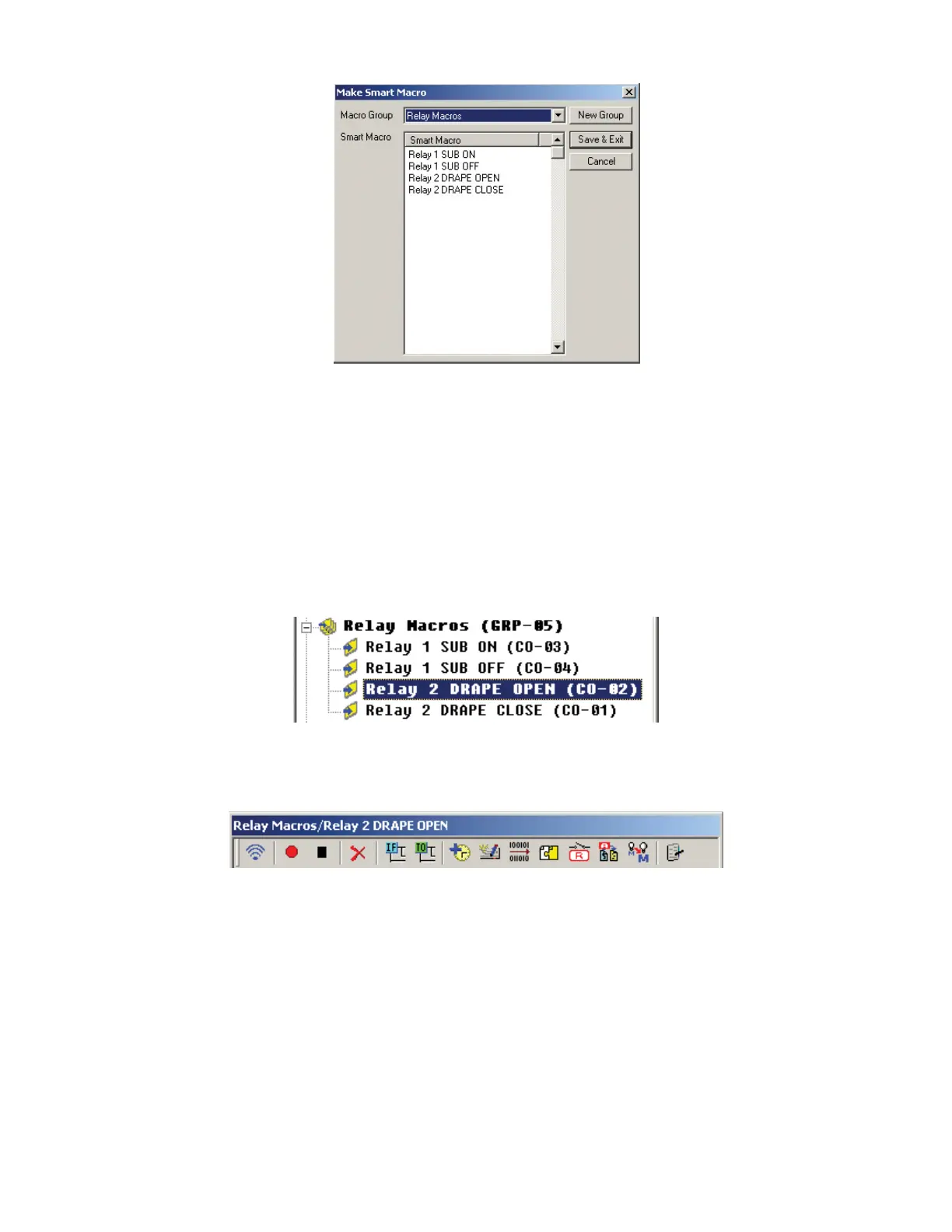
2. Click the NEW GROUP BUTTON. The PROPERTY WINDOW will appear.
3. In the PROPERTY WINDOW, type the NAME of the NEW GROUP. (Relay Macros) Click OK. In the
MAKE SMART MACRO WINDOW, RELAY MACROS will appear in the MACRO GROUP BOX.
4. In the SMART MACRO BOX, double click in the box directly under SMART MACRO. The TEXT
TOOL will activate. Type the name of the RELAY SMART MACRO. (Enter something meaningful like
Relay 2 Drape Open, etc.)
5. Press ENTER on the PC KEYBOARD and type the name of the next SMART MACRO. (Relay 2
Drape Close)
6. Click SAVE & EXIT.
7. The new MACRO GROUP will appear at the BOTTOM of MSC EDITOR TREE VIEW.
8. Click the ‘+’ next to RELAY MACROS to expand the group.
9. Click the RELAY 2 DRAPE OPEN SMART MACRO so it appears in the SMART MACRO WINDOW
TITLE BAR.
10. Click the RELAY BUTTON. The RELAY SETTING WINDOW will appear. Relay Setting Window
2
4-5
6
7-8
9
9
10
3



 To Next Page