MSC-400 Reference Manual
Rev 4
63
1c
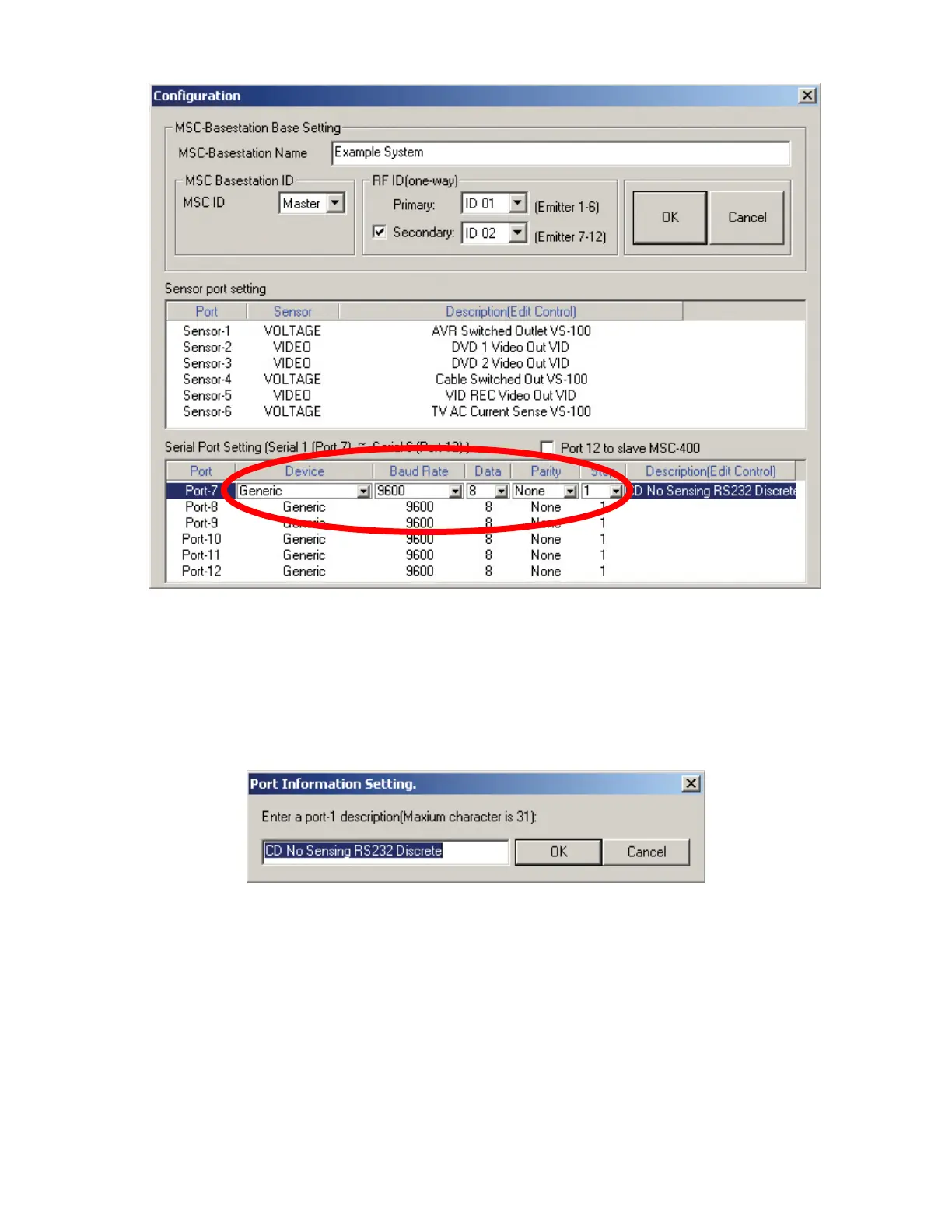
Configuration Window Serial Port Setting
2. Under SERIAL PORT SETTING, click the PORT to which the DEVICE BEING COND is
CONNECTED. (Port 7)
3. Per the device manufacturer’s specifications, set the BAUD RATE, DATA BITS, PARITY and STOP
BITS, using the respective pull-downs.
4. Double click directly under DESCRIPTION (ex. Edit Control).
a) The PORT INFORMATION SETTING WINDOW will appear. Port Information Setting Window.
9. Enter the TYPE of device, (ex. CD) and any other specific useful information, up to 31 characters in
the TEXT BOX.
10. In the PORT INFORMATION SETTING WINDOW, click OK to SAVE.
11. Repeat STEPS 2-4 for any additional SERIAL DEVICES connected to PORTS 8-12.
12. Click OK. The window will close and the Port Configuration(s) will be saved.
2
3
4
8
5
6



 To Next Page