MSC-400 Reference Manual
Rev 4
64
Serial Database
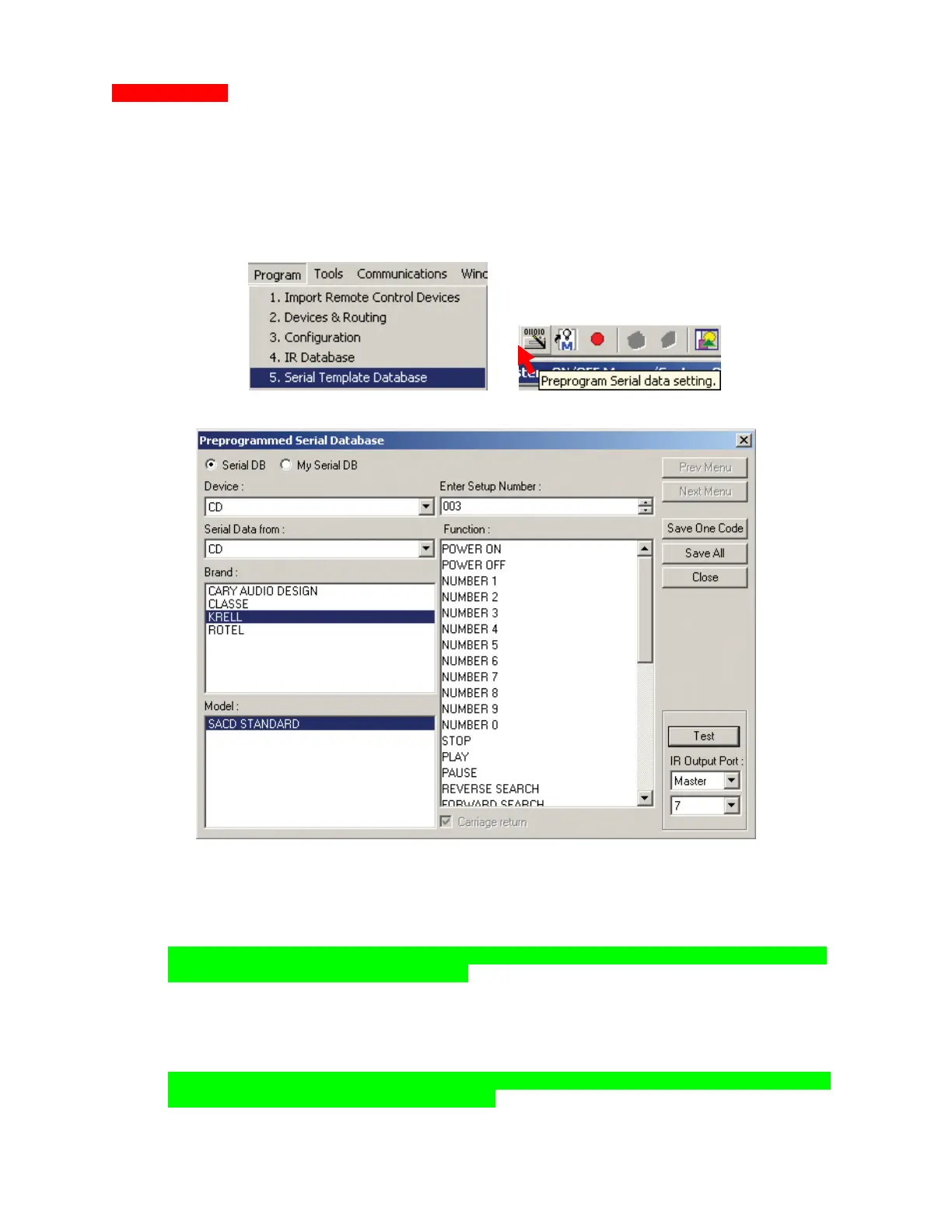
When a RS232 controlled device is added as a Connected Device, the first thing to do is look in the
PREPROGRAMMED SERIAL DATABASE to see if the commands are already available.
1. To look up Serial Command Sets:
a) In the MSC EDITOR MENU BAR, click PROGRAM then click SERIAL TEMPLATE DATABASE.
b) In the MSC EDITOR TOOL BAR, click the PREPROGRAMMED SERIAL DATA SETTING ICON.
The PREPROGRAMMED SERIAL DATABASE WINDOW will appear.
1a
1b
MSC-400 Preprogrammed Serial Database Window
2. To find RS232 Commands in the Serial Database:
a) If not selected, select SERIAL DB.
b) Select DEVICE using the pull-down. (ex. CD)
NOTE - Only Serial Devices that are Connected Devices in the system being programmed
will be available in the Device pull-down.
c) Select SERIAL DATA FROM (ex. CD, DVD, etc.) using the pull-down. (ex. CD)
d) Select the BRAND from the list.
e) Select the MODEL from the list.
f) Scroll the FUNCTION list to review commands.
g) To TEST a command:
NOTE - Serial Port Settings must be downloaded to the MSC-400 before attempting to test
RS232 Commands from the Serial Database.
I. Connect the DEVICE to the appropriate MSC-400 SERIAL PORT (7-12).
2a
2b
2c
2d
2e
2f
2g
2h



 To Next Page