MSC-400 Reference Manual
Rev 4
81
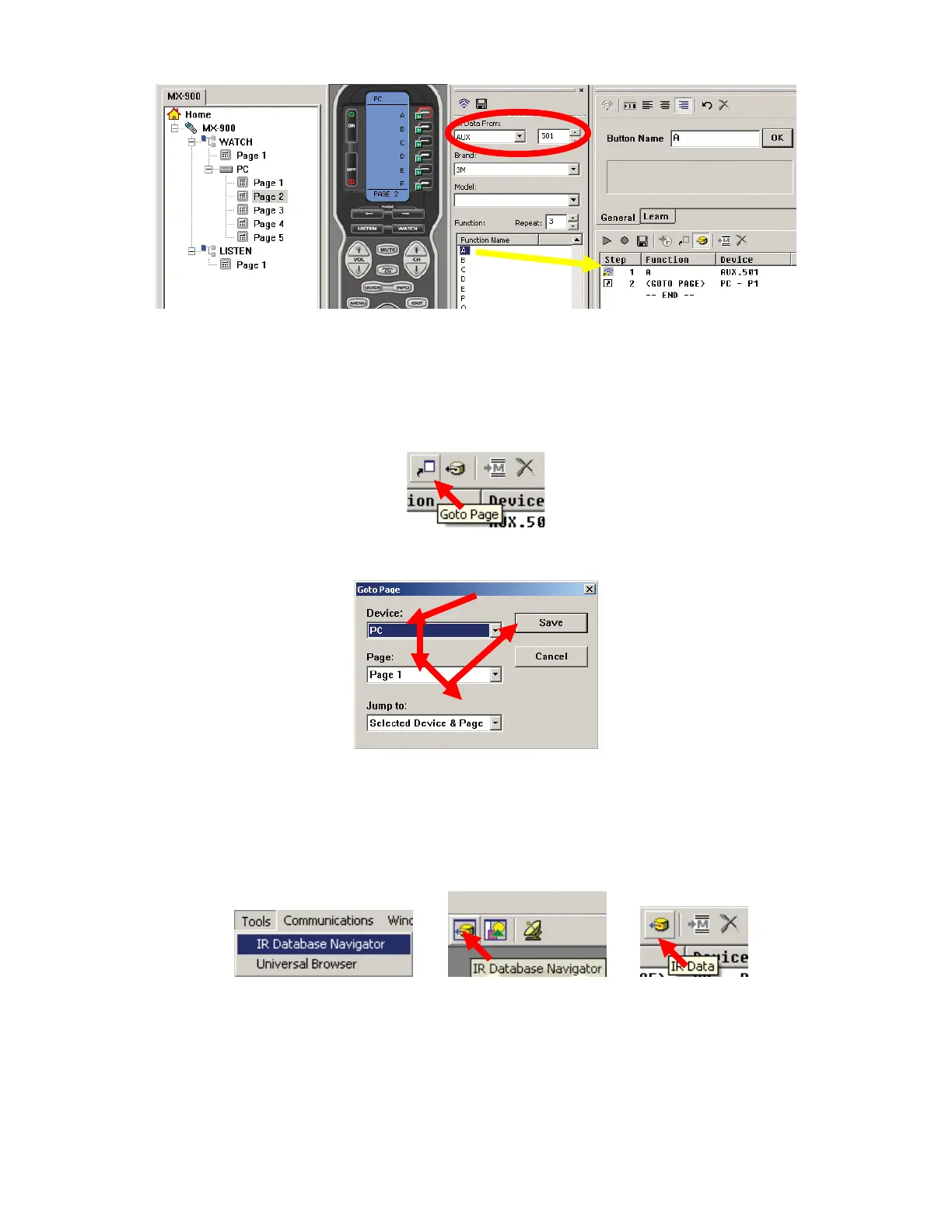
PC Keyboard Emulator Page 2
9. Using the BUTTON EDITOR, add the letters A-F to the individual buttons as shown in PC Keyboard
Emulator Page 2 and click SAVE.
10. Highlight the ’A’ BUTTON on page 2 of the PC device.
11. Click the GOTO PAGE BUTTON.
a) The GOTO PAGE WINDOW will appear.
12. In the GOTO PAGE WINDOW, for DEVICE select PC, for PAGE select PAGE 1 and for JUMP TO
select SELECTED DEVICE & PAGE for the settings using the PULL-DOWNS. Click SAVE.
13. Open the IR Database Navigator. To open the IR Database Navigator do any one of:
a) In the MX/TX EDITOR MENU BAR, click TOOLS, then click IR DATABASE NAVIGATOR.
b) In the MX/TX EDITOR TOOL BAR click the IR DATABASE NAVIGATOR ICON.
c) In the MX/TX EDITOR MACRO WINDOW TOOL BAR click the IR DATA ICON.
13a
13b 13c
The IR DATABASE NAVIGATOR WINDOW will appear.
14. In the DATABASE WINDOW, in IR DATA FROM select AUX. In the box directly to the right, enter the
SETUP NUMBER: 501 for letters or 502 for any special characters that may be desirable for a
particular user requirement. DO NOT make any changes to: BRAND, MODEL OR REPEAT.
15. With the ’A’ BUTTON still selected, drag the ‘A’ from the DATABASE WINDOW to the top of the
MACRO FUNCTION LIST. Now, any time the ‘A’ BUTTON is pressed, the ‘A’ will be issued and the
8
9
10
11
12
14
15



 To Next Page