© UPLIFT Desk • 800-349-3839 • 512-614-3152 • info@upliftdesk.com • upliftdesk.com
14
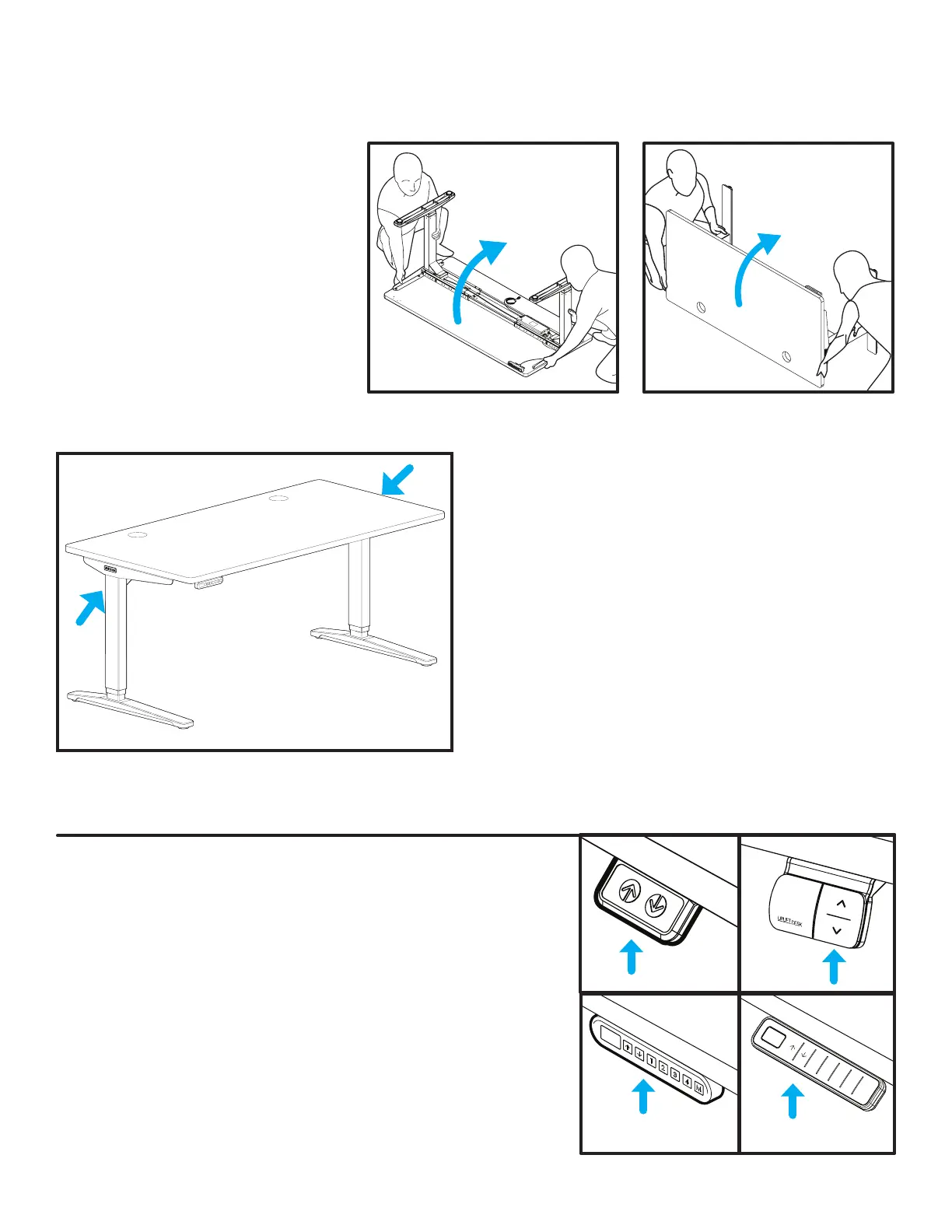
A. With one person located at each
end of the desk, support the desk
frame and the desktop equally
and begin to tilt it slowly towards
the back of the desk so that the
Keypad is facing up and the back
of the Feet are touching the oor.
B. Readjust your grip and continue
to rotate the desk until it is
rightside up with both Feet
completely on the oor.
1 2 3 4 M
Step 13 -Desk Placement
When preparing to ip the desk, be aware of loose cables and attached accessories, especially an accessory
that might move on a track like a Keyboard Tray or CPU Holder.
Step 14 - Desk Reset Procedure
IMPORTANT: Before using your desk, perform the Initial Desk
Reset Procedure below.
Initial Desk Reset Procedure
A.
Press and hold the DOWN button for approximately 10
seconds, then release the button. If you have a Keypad with a
display, it will read “RST”.
B.
Press and hold the DOWN button again, the desk will lower a
little, then rise a little, and then stop.
C.
Release the button. Your desk is now ready for use! If you are
using an Advanced Keypad, see additional Keypad instructions
for further information on how to use your Keypad.
• If your desk has Casters: Moving is easy! If your
Casters include locks, make sure they are unlocked
and roll the desk to the desired location. Be sure to
relock the Casters to keep the desk stationary.
• If your desk does not have Casters: Using two
people, lift your desk (do not drag it) by holding
onto the Side Brackets where indicated by arrows.
D. Adjust the Leveling Glides or Casters as needed to
level the desk.
E. Check your desk’s surroundings to make sure there
will be no obstacles within the desk’s path while it is
being raised or lowered. Do not place any objects
underneath the desk that are taller than 21” and
be aware of any accessories mounted underneath
your desk.
C. Position your desk where you would like it to be. Never lift the desk by just the desktop, doing so will
put undue stress on the attachment screws. Be sure to support the frame Side Brackets when lifting.
F. Ensure that the Power Cord and all accessory cords are long enough to accommodate the raising and
lowering of your desk.
G. Plug your desk into a grounded, 120V power outlet.


 To Next Page