S.6 Supplement
Brake Maintenance
Replacing the Friction Discs
1. Disconnect and lock out the power
supply. Remove the housing.
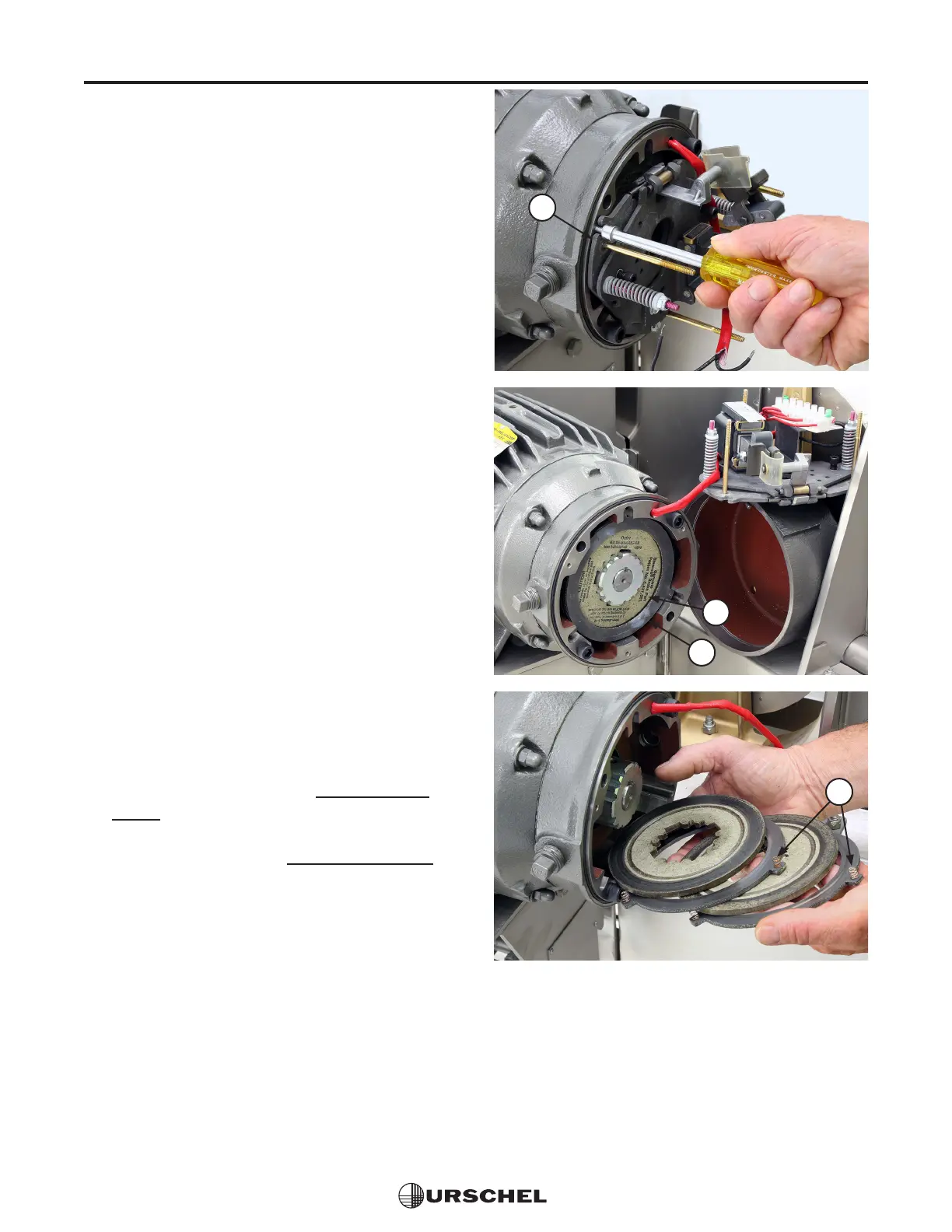
2. Remove the support plate assembly
(1). Three screws hold the assembly in
place. The wires to the solenoid coil can
remain attached. Support the assembly
so that wires are not damaged; see the
middle photo to the right.
3. Remove the stationary discs (2) and
friction discs (3). The 10 pound-foot
brake has two friction discs and two
stationary discs. Replace friction discs
when they are worn to one half the
original thickness or .093" (2.4 mm), or
3/32". Discard worn discs.
4. Install the stationary discs and new
friction discs. The springs (4) on the
stationary discs face inward. Alternate
discs beginning with a friction disc as
shown.
5. Install the support plate assembly on
the end plate and tighten screws to 55-58
inch-pounds. (6.2-6.6 newton meters).
6. Check the air gap. See Adjusting the
Brake on page S.4.
7. Test the brake. See Testing the Brake
on page S.3.
1
3
2
4


 To Next Page