3. KEYBOARD LAYOUT AND DESCRIPTION
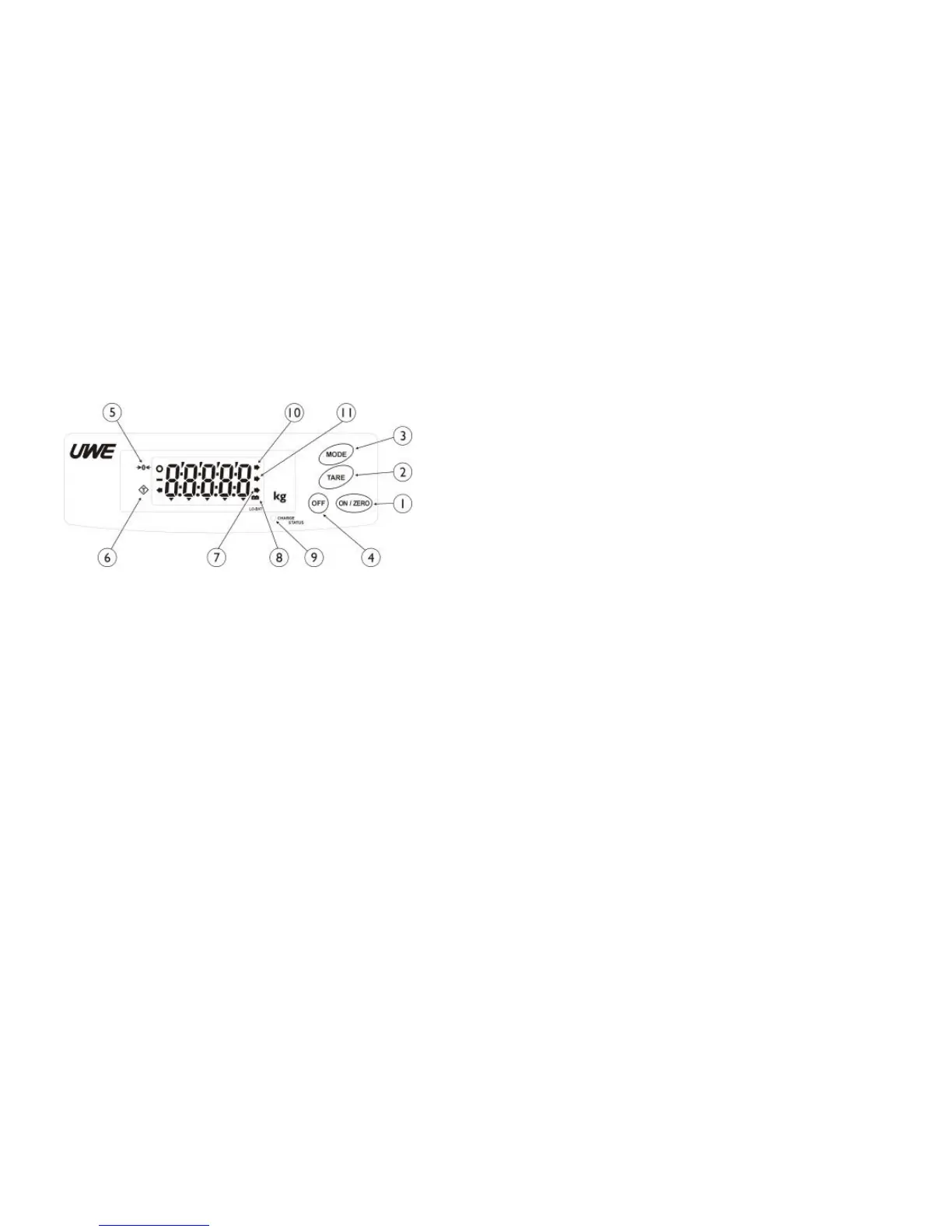
1. ON/ZERO KEY
Press this key to: (a) turn scale on or reset
display value to zero during normal
operation, (b) return to normal operation
during function setup
2. TARE KEY
Press this key to tare off the weight of
a container during normal operation.
3. MODE KEY
Press this key to shift among different
weight units and display parameters.
4. OFF KEY
Press this key to turn scale off.
5. ZERO INDICATOR
This indicator appears to indicate a zero
weight status.
6. TARE INDICATOR
This indicator appears to indicate the tare
function is in operation and weight
displayed is net weight.
7. WEIGHT UNIT INDICATOR
This indicator appears to indicate the
weighing unit being selected is at metric.
8. LO-BAT INDICATOR
When this indicator appears, recharge the
scale immediately. Failure to do so may
cause unrecoverable damage to the
rechargeable battery inside scale.
9. IN-CHARGE INDICATOR
Red color: Recharging battery
Green color: Charging completed


 To Next Page