-9-
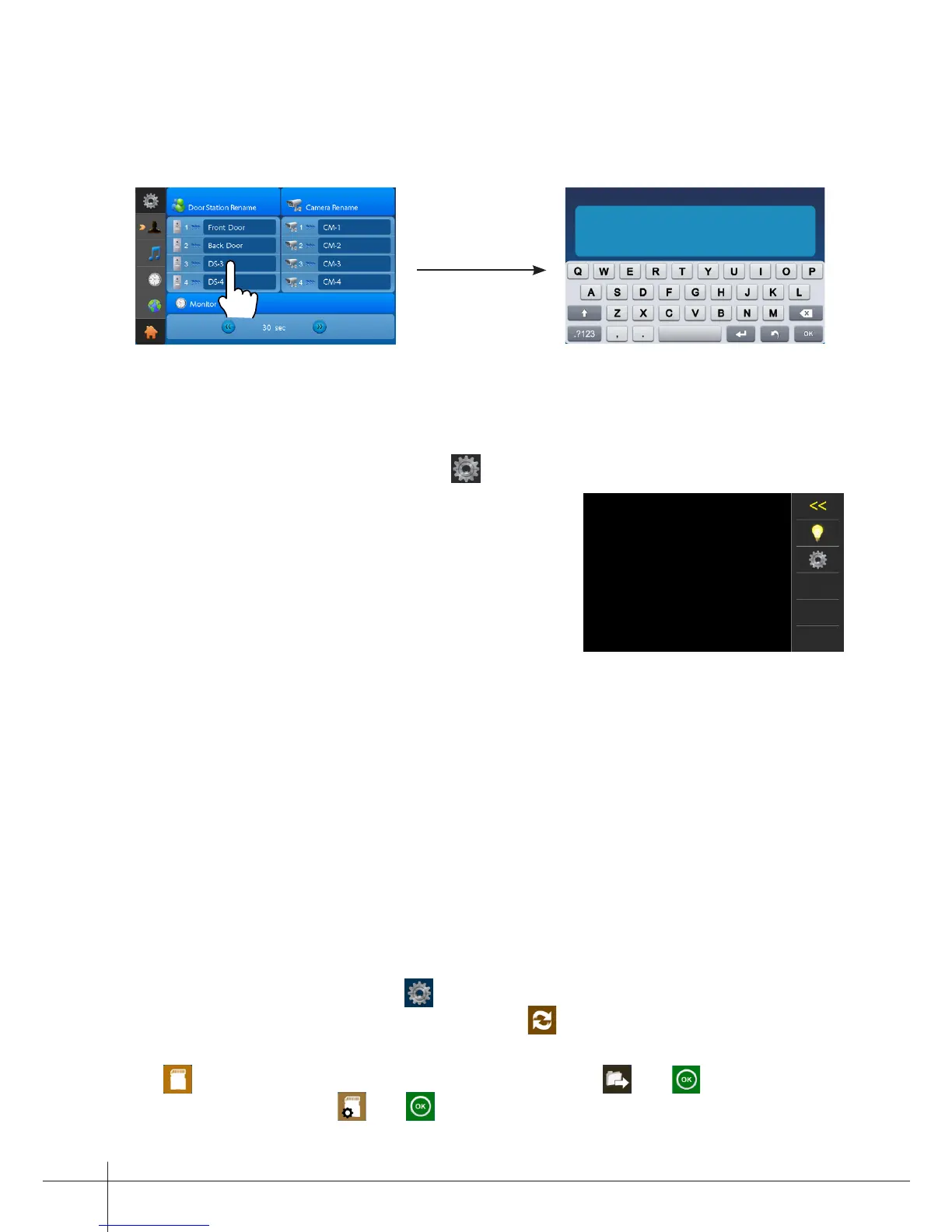
Note: If you want to rename, please touch the place of name, then it will turn keypad
page ,you can input your new name in this page.
DOOR3 RENAME
abc
DS-3_
During monitoring or talking state, touch icon,the Adjust page will be displayed.
1. The Scene mode selection: Total 4 screen
modes can be selected in sequence:
Normal,
Brightly, Soft
and
User.
Whenever you modify
Brightness
or
colour, Scene
item will be set to
User
mode automatically.
2. Note that all the modications will be performed immediately after the operation.
Touch the window of image to exit the adjust page.
Screen and Volume Adjustment
The restore to default function allows the user to recover the settings to factory setting.
Note that the restore to default operation will not change the setting and datas.
Enter main menu page,and touch icon, then select "About" item (or touch logo
position) to enter the about settings page, touch icon, the default settings will be
loaded.
touch icon to enter the Memo Information page, touch and icon to copy the
pictures to SD card. Touch and icon to format SD card and restart.
12. Restore to Default



 To Next Page