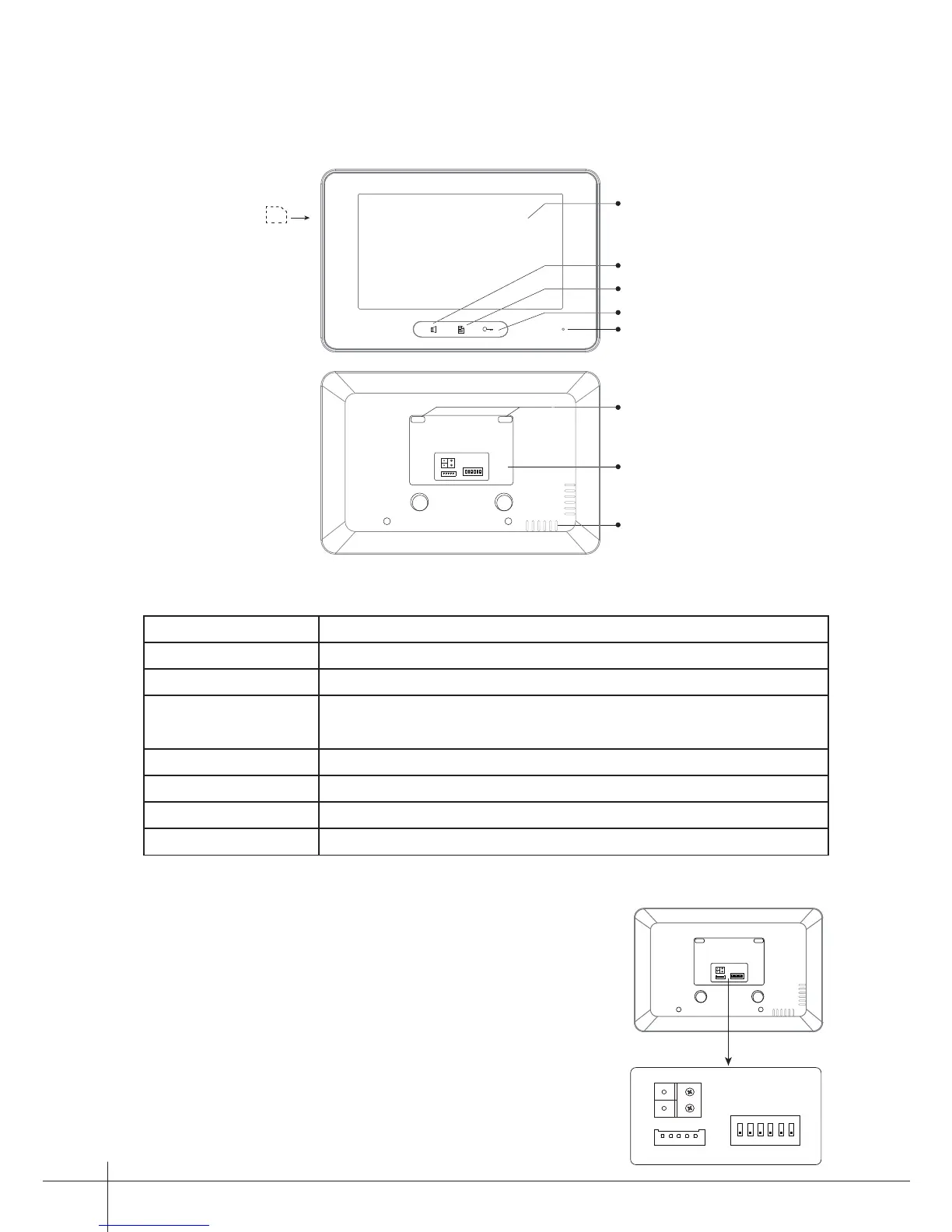
Connection Port
Speaker
Mounting Hook
Unlock Button
Microphone
Talk/MON Button
Menu Button
L1
L2
SD card
1 2 3
ON DIP
4 5 6
Key functions
Terminal Description
-1-
LCD screen Display the visitors' image
Unlock button Press to release the door
Menu button Press to open the menu shortcuts
Talk/Mon button Press to communicate hands free with visitor
Press to view the outdoor condition in standby mode
Microphone Receive voice from the user
Mounting hook Use to hang up the monitor
Connection port Bus terminal
Speaker Send out vioce from the visitor
L1
L2
1 2 3
ON DIP
4 5 6
L1
L2
1 2 3
ON DIP
4 5 6
SW+
SW-
Ring
GND
NC
L1,L2: Bus terminal.
SW+,SW-: Door bell call button connection port.
Ring,GND: Extra buzzer connection port.
NC: Reserved.
DIP switches: Total 6 bits can be congured.
Bit1~Bit5:
Used to User Code setting.
Bit6:
Set to ON if the monitor is at the end of the line;
Otherwise, set to OFF.



 To Next Page