-7-
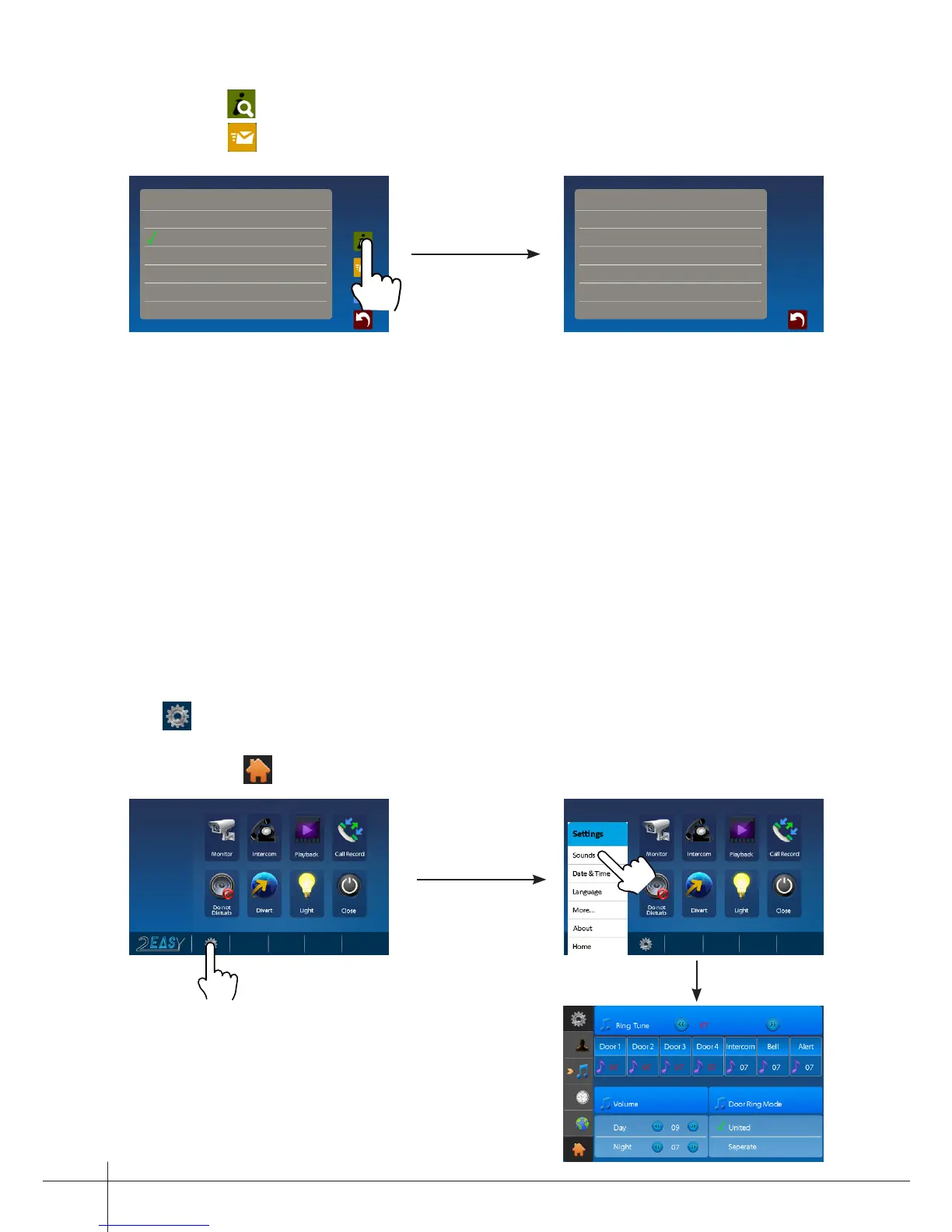
Note:1.Touch icon to detect the transfer device info.
2.Touch icon to send message.
10. Staircase Light
Note: the staircase light function will be activated only when the system connect light
via SC6V module, otherwise, this function is unvalid in normal. For more information,
please refer to SC6V user instruction in detail.
On main menu page or in monitoring,touch Light icon to open the staircase light, the
staircase light will be turned off automatically.
11. Basic Setup Instructions
Sounds Settings
Touch icon on main menu page(or on door camera switching mode page), then select
"Sounds" item to enter the sounds settings page.You can set a variety of ring tones on
this page.(touch icon to exit the setting and return main menu page.
Transfer Options
Don't Transfer
If No Answer
Simutaneously
1)
2)
3)
Transfer Device Info
Device -
SIM -
Network -
Signal Level -
Note: Door Ring have 2 mode:United
and Seperate.If select "United",it means
Door1/2/3/4 as a whole to adjust the ring
tones.



 To Next Page