-12-
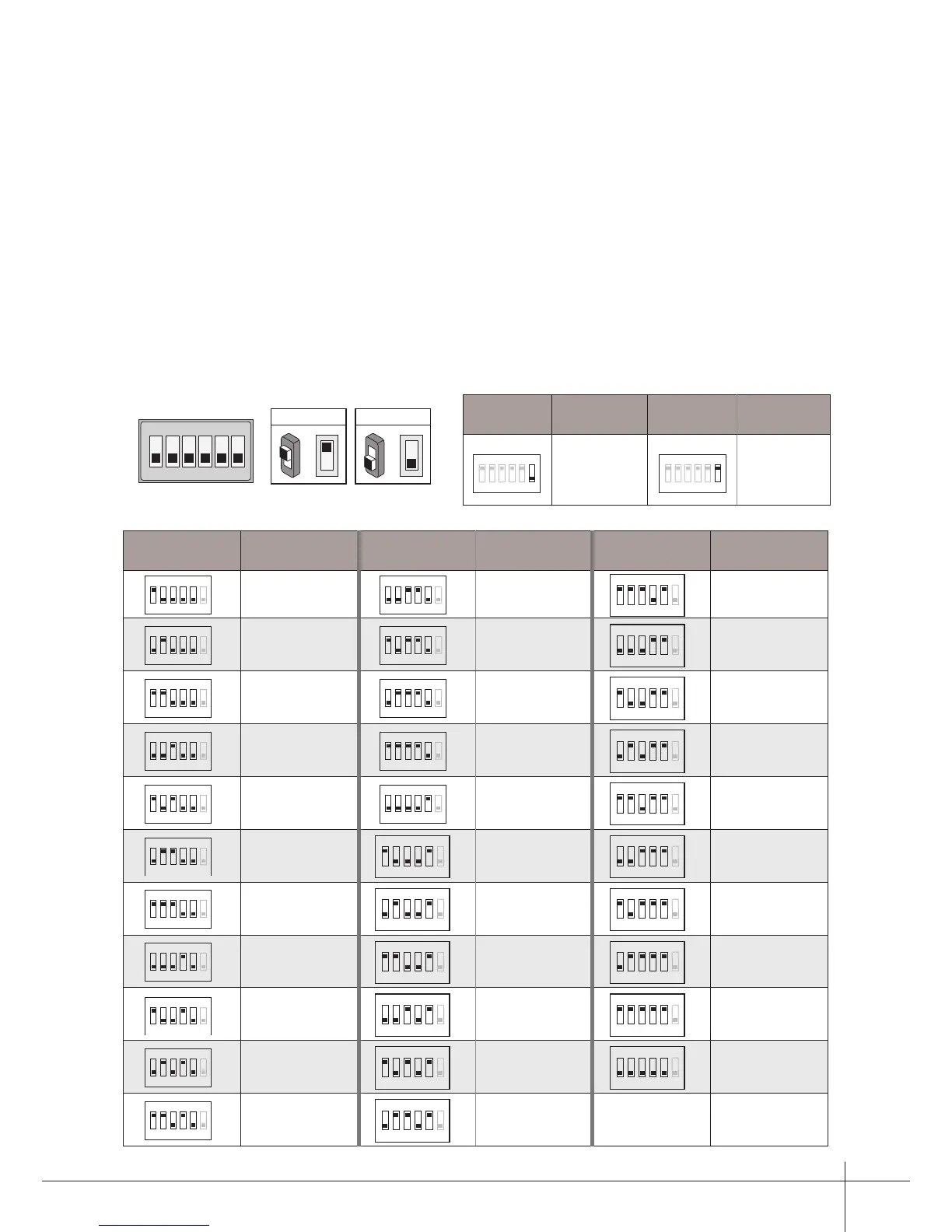
How to set the user code for the monitor
•
• When multi Monitors are installed in one apartment, these Monitors have to use the same
User Code setting, and the Master/Slave mode should be set on the Monitor.
•
ON(1)
=
OFF(0)
=
ON
ON
ON
Bit state User Code Bit state User Code Bit state User Code
1 2 3 4 5 6
ON
Code=1
1 2 3 4 5 6
ON
Code=12
1 2 3 4 5 6
ON
Code=23
1 2 3 4 5 6
ON
Code=2
1 2 3 4 5 6
ON
Code=13
ON
Code=32
1 2 3 4 5 6
ON
Code=11
1 2 3 4 5 6
ON
Code=22
Bit-6 line terminal setting:
Bit state Setting Bit state Setting
1 2 3 4 5 6
ON
Monitor not at
the end of the
line.
1 2 3 4 5 6
ON
Monitor at
the end of
the line.
In the DT system,every apartment must have a unique identification called User Code.
The DIP swiches are used to configure the User Code for each Monitor.
Bit-1 to Bit-5 are used to User Code setting. The value is from 1 to 32, which have 32
different codes for 32 apartments.
Bit-6 is line terminal switch, which have to be set to ON if the Monitor is in the end of the
line(bus), otherwise set to OFF. The end of the line is terminal that no other section will
start from it.
1 2 3 4 5 6



 To Next Page