2 EASY
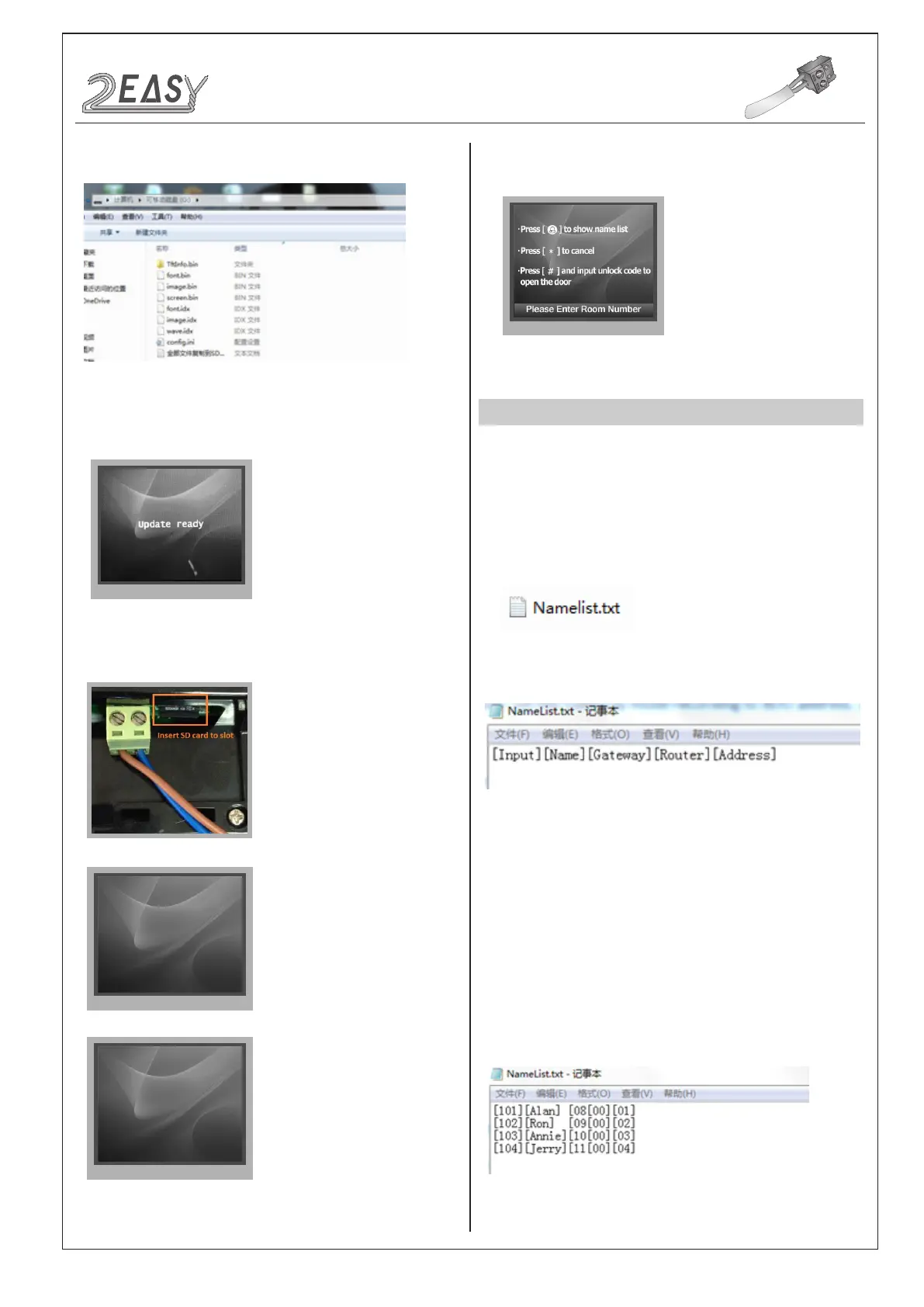
3. Copy the Update UI le to SD card by computer.
CONFIGURATION
System Update
5. Insert SD card to slot, after that, the update progress will be
showed
font.bin :12%
font.bin :100%
image.idx :100%
image.bin :6%
4. Select 3 to enter UI update,the information of “update ready” will
be showed
6. When update is nished, it will return to Standby Mode interface.
And show the new UI.
NAMELIST UPDATE
1) Namelist update by SD card
1. Format SD card
2. Namelist.txt le setting
• Create a TXT le, and named NameList.
• Open the NameList.txt file, and input 5 [ ] symbols. Each [ ]
symbol has its meaning, see the following picture.
Descriptions:
Input: The number to call the monitor
Name: It would be displayed on a screen
Gateway: Set the gateway mode according to BDU
address. [08~15] means BDU address 01~08
Router: Set the Router mode according to BDU address.
[01~08] means BDU address 01~08
Address: Set the monitor address you want to call
• Edit NameList.txt le, for example, as the following picture shows:
101 will call the monitor with User Code 1 connected to BDU 1
DMR18S Technical Manual-12-


 To Next Page
 Loading...