ENGLISH
44
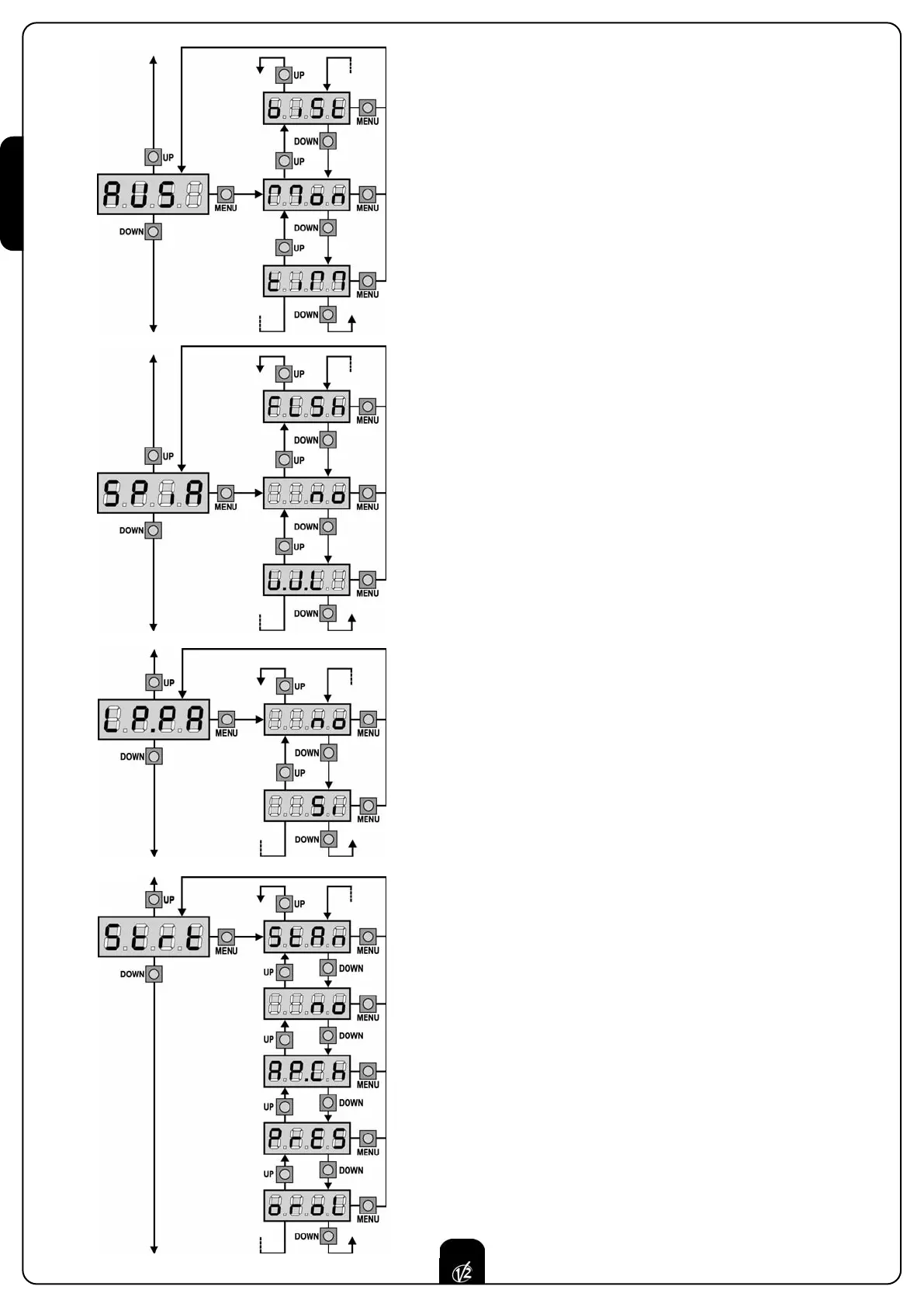
Auxiliary channel
This menu allows setting the operating of the relay of the lighting of the
courtesy lights by means of a remote control stored on the channel 4 of
the receiver.
tiM the relay is activated receiving the transmission of the
remote control; it is disabled after the time set for the
parameter t.LUC inside the menu LUCi
Mon the relay is activated for all the length of the
transmission of the remote control. Releasing the key of
the remote control the relay is deactivated
biSt the status of the relay changes at each transmission of
the remote control
Low Voltage Output Setup
This menu allows you to set the operation of the low voltage output.
no Not used
FLSh Flasher operation (fixed frequency)
WL Indicator light operation: Indicates the status of the gate in
real-time. The type of blinking indicates the four possible
conditions:
- GATE STOPPED: Light off
- GATE IN PAUSE: the light is on, fixed
- GATE OPENING: the light blinks slowly (2 Hz)
- GATE CLOSING: the light blinks quickly (4 Hz)
Blinker during pause time
Blinker usually operates during the gate motion only; however, if this
function is enabled, blinker will be on during the pause time too.
The flasher may be either in the device connected to the LUCI output
(setting the CiCL parameter in the LUCi menu) or the device connected
to the low voltage output (setting the FLSh parameter in the SPiA
menu).
Start input function
This menu allows selecting input operation modes (see paragraph
“Activation inputs”):
StAn Start and Pedestrian Start input standard operation,
according to menu setups.
no Start inputs from terminal board are disabled. Radio inputs
operate in StAn mode.
AP.CH Start impulse always controls the opening phase, Pedestrian
Start always controls the closing phase.
PrES Manned operation; the gate will open as long as the Start
input stays closed and it will close as long as Pedestrian
Start stays closed.
oroL Timer-operation; the gate stays open while the Start input or
Pedestrian Start input is closed; as soon as the contact
opens, the pause count down will start.



 To Next Page