AV Bridge MATRIX PRO
AV Bridge Matrix Pro Manual - Document Number 342-0915 Rev C Page 22 of 68
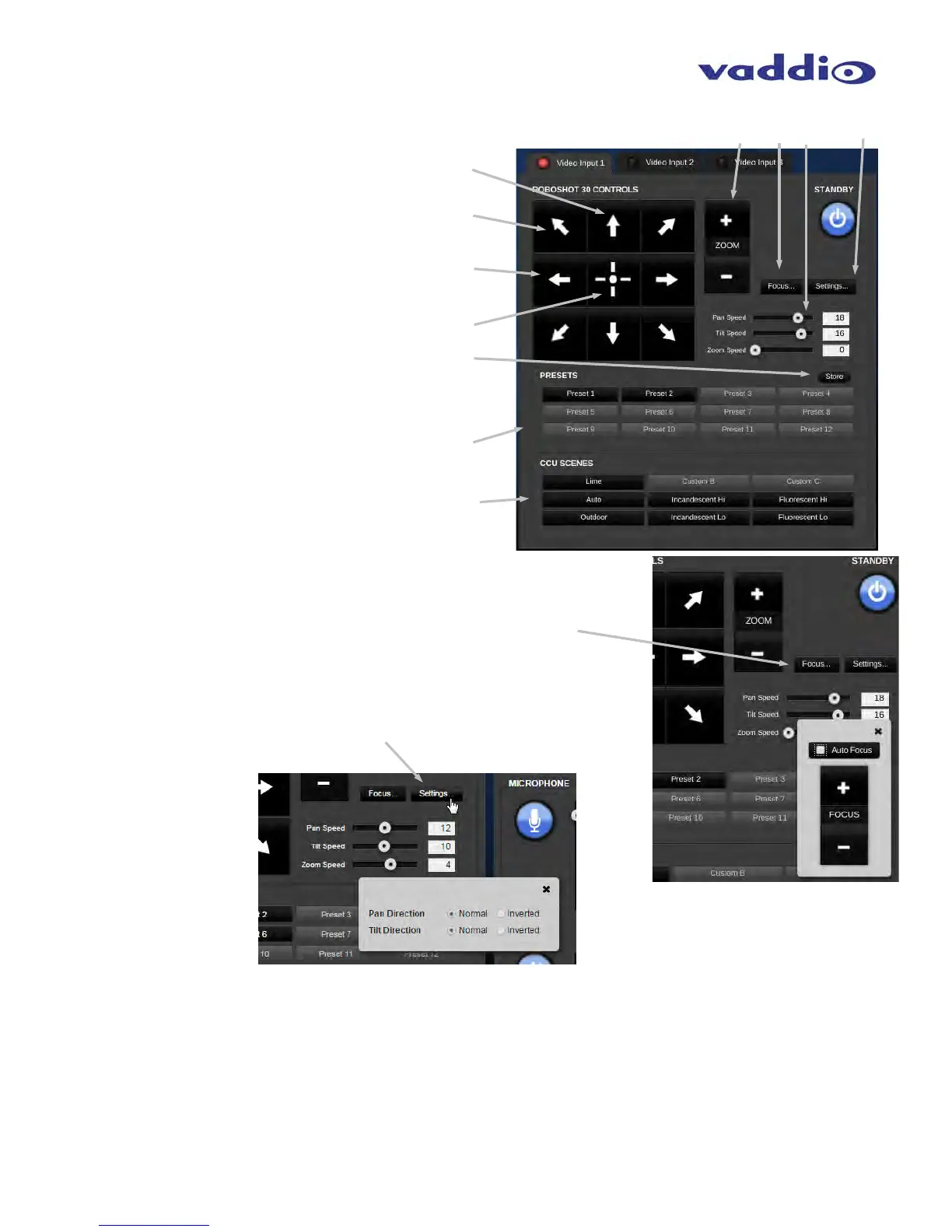
• PTZ Camera
PTZ Camera Up / Down controls
PTZ Camera Diagonal controls
PTZ Camera Left / Right controls
PTZ Camera Home Button
Camera location Preset Store Button
Camera Location Preset Recall buttons
CCU Factory suggested Scene recall buttons
allow for choice among (3) Custom Scenes or
(6) suggested factory Scenes designed for different
specific lighting-type environments.
PTZ/POV Camera Zoom control.
Focus Button brings up a window for manual
or Automatic Focus control
Speed control sliders for Pan, Tilt and Zoom
Settings button brings up a dialog to set pan and tilt for normal
or inverted operation.
⑪



 To Next Page