AV Bridge MATRIX PRO
AV Bridge Matrix Pro Manual - Document Number 342-0915 Rev C Page 23 of 68
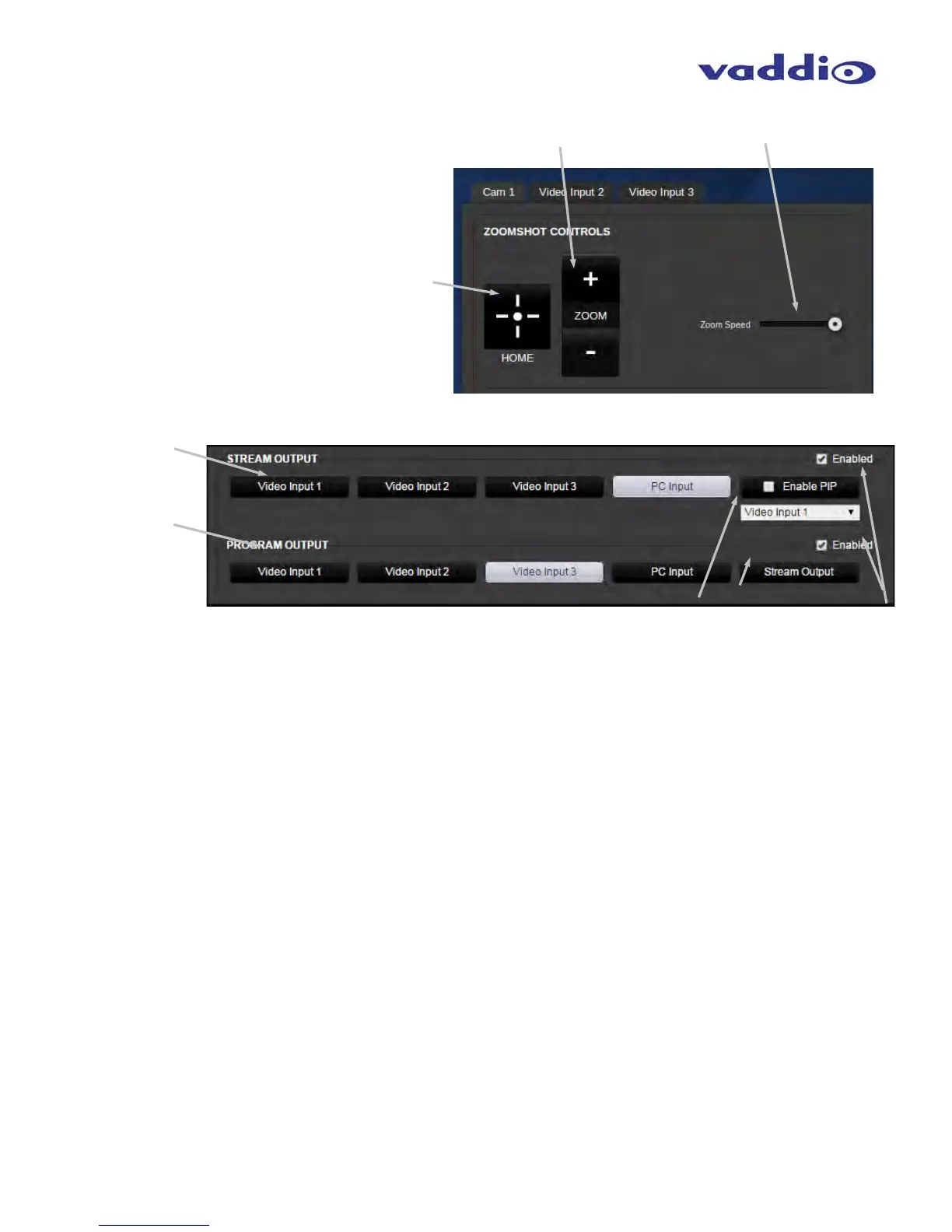
• POV Camera:
Home button to recall Zoom Home position
Zoom button + Zoom in, - Zoom out
Zoom speed control slider
• Video Source Selection:
Stream Output selection: Use the Video Input 1, 2, 3 or PC Input to select source for the Streaming Outputs.
This selection will apply to both the USB and IP streamed outputs.
Program Output selection: Use the Video Input 1, 2, 3 or PC Input to select source for the Program Outputs.
This selection will apply to both the local back plane HDMI and Vaddio HSDS outputs.
Enable PIP: Check box to enable PIP. The pull down will allow selection of the video to appear in the PIP.
Selection of PIP type and location is in the video/switching setting page.
Stream Output button: Since there is only one PIP engine, and it’s located in the Streaming buss, this button
acts as a source select for the local Program Outputs to “Track” the Streaming outputs.
Stream Output and Program Output enable check boxes allow the user to change sources when checked. If
not checked, changing of source selection on that buss is disabled.



 To Next Page