AV Bridge MATRIX PRO
AV Bridge Matrix Pro Manual - Document Number 342-0915 Rev C Page 34 of 68
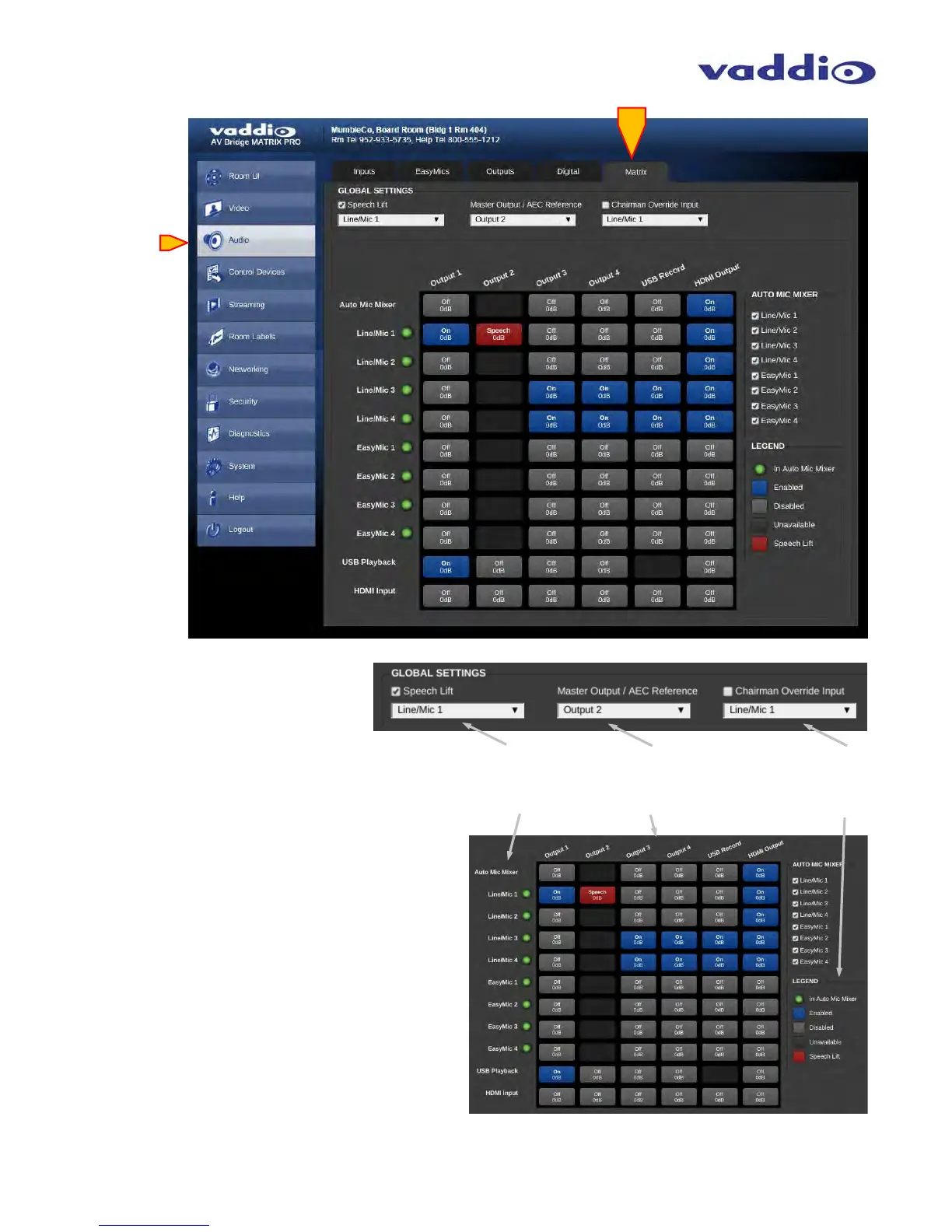
• Matrix:
Global Setting: Speech Lift: check to
enable. Select input desired for speech
lift to increase the gain through the
Master audio outputs. Only one channel
of Mic/Line source is available for
this
feature.
Global Setting: Master Output: selects which output
will be the Speaker output. Speaker Output is the AEC
reference for Acoustic Echo Cancelation.
Global Setting: Chairman Override Input: check box to
enable, select desired input with the pull down arrow.
Chairman override will afford a higher level in Automix
mode for audio priority when multiple sources are
amplified simultaneously. This override is only available
for the Mic/Line inputs.
Audio Matrix Mixer: Inputs shown vertically
Audio Matrix Mixer: Outputs shown horizontally
Audio Matrix Mixer: Legend showing function colors
for what is configured at each cross-point location:
Red = Speech Lift is enabled
Blue/White = Cross-point is enabled (ON)
Grey/White = Cross-point Off
Black = Cross-point disabled



 To Next Page