AV Bridge MATRIX PRO
AV Bridge Matrix Pro Manual - Document Number 342-0915 Rev C Page 38 of 68
• Macros Cont’d:
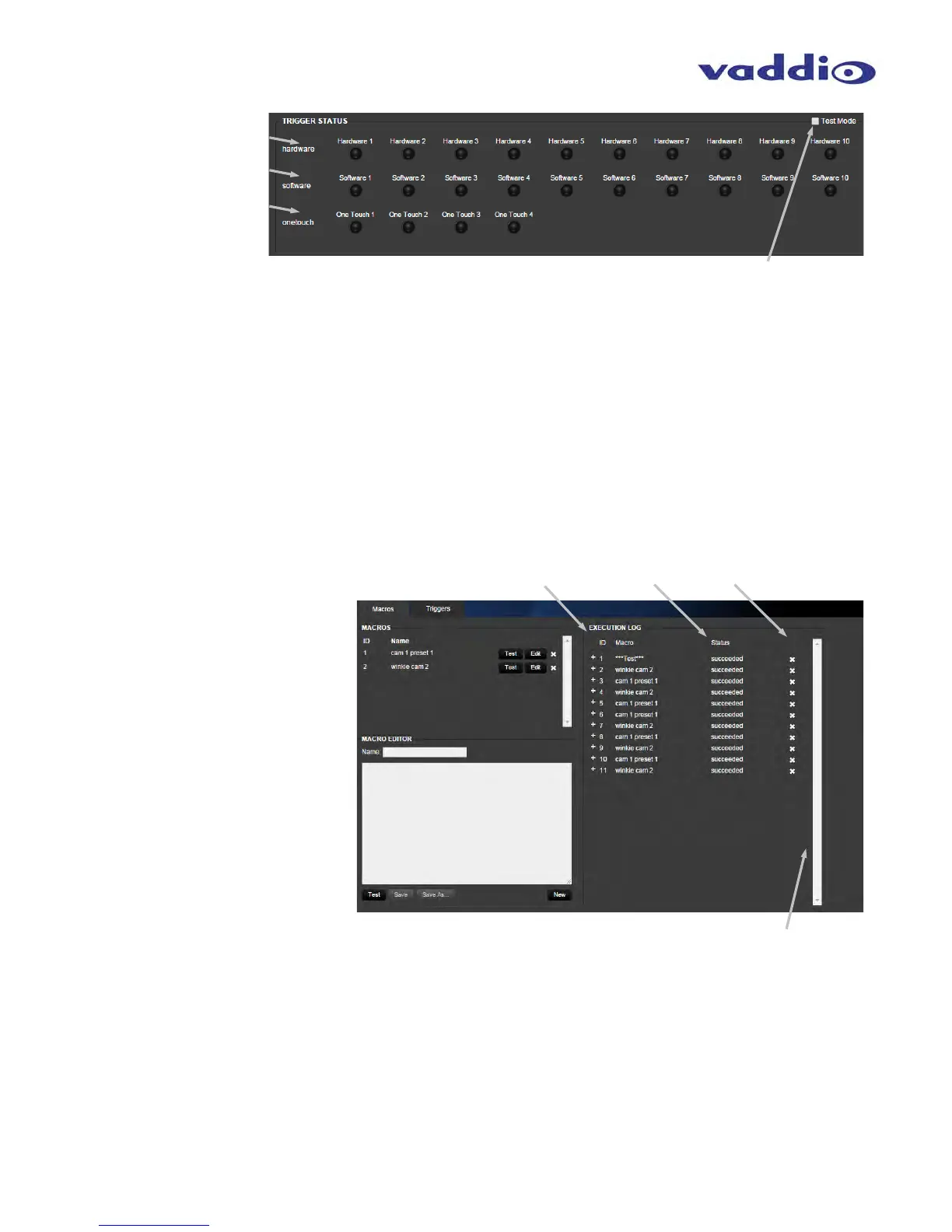
TRIGGER STATUS Hardware: Trigger status lights indicate real time hardware trigger status,
corresponding to rear panel trigger connections. Red lamp lit indicates hardware contact closure active.
TRIGGER STATUS Software: Trigger status lights indicate real time Software trigger status from external
control system, either Telnet or RS-232. Red lamp lit indicates software contact closure active.
TRIGGER STATUS OneTouch: Trigger status lights indicate real time OneTouch triggers status from Vaddio
EasyMIC MicPODs.
TRIGGER STATUS Test Mode: Test Mode check box will allow the programmer to enable the trigger status lights
to act as test buttons to test Macro functionality. Clicking on a light will act as an external hardware, software or
OneTouch trigger event, and will affect the unit in real time. So instead of asking a lackey to run to the other end of
the room to stand on a pressure step mat or stand under an IR detector, just hit the button in Test mode to check the
Macros you’ve written. Clicking on a triggers status button once will light the red light and act as a trigger event starting,
a second time will extinguish the red light and act as a trigger event ending. These will allow for testing the On Enter
trigger Macro, and the On Exit trigger Macros assigned to a given trigger. Un-check Test Mode box after testing.
Execution Log Macro: Lists the
name of the Macros which have
been executed in the order of their
occurrence. First shown is the
Macro ID, then Macro name.
Execution Log Status: Displays
the status of the requested Macro
event, and if the commands were
successfully completed or not.
Execution Log Delete: Click the
“x” to delete any commands from
the executed commands list.
Execution Log scroll bar: The scroll bar
on the right allows viewing of
various groups of executed Macros
if the list gets too long to view in one pane.



 To Next Page