AV Bridge MATRIX PRO
AV Bridge Matrix Pro Manual - Document Number 342-0915 Rev C Page 39 of 68
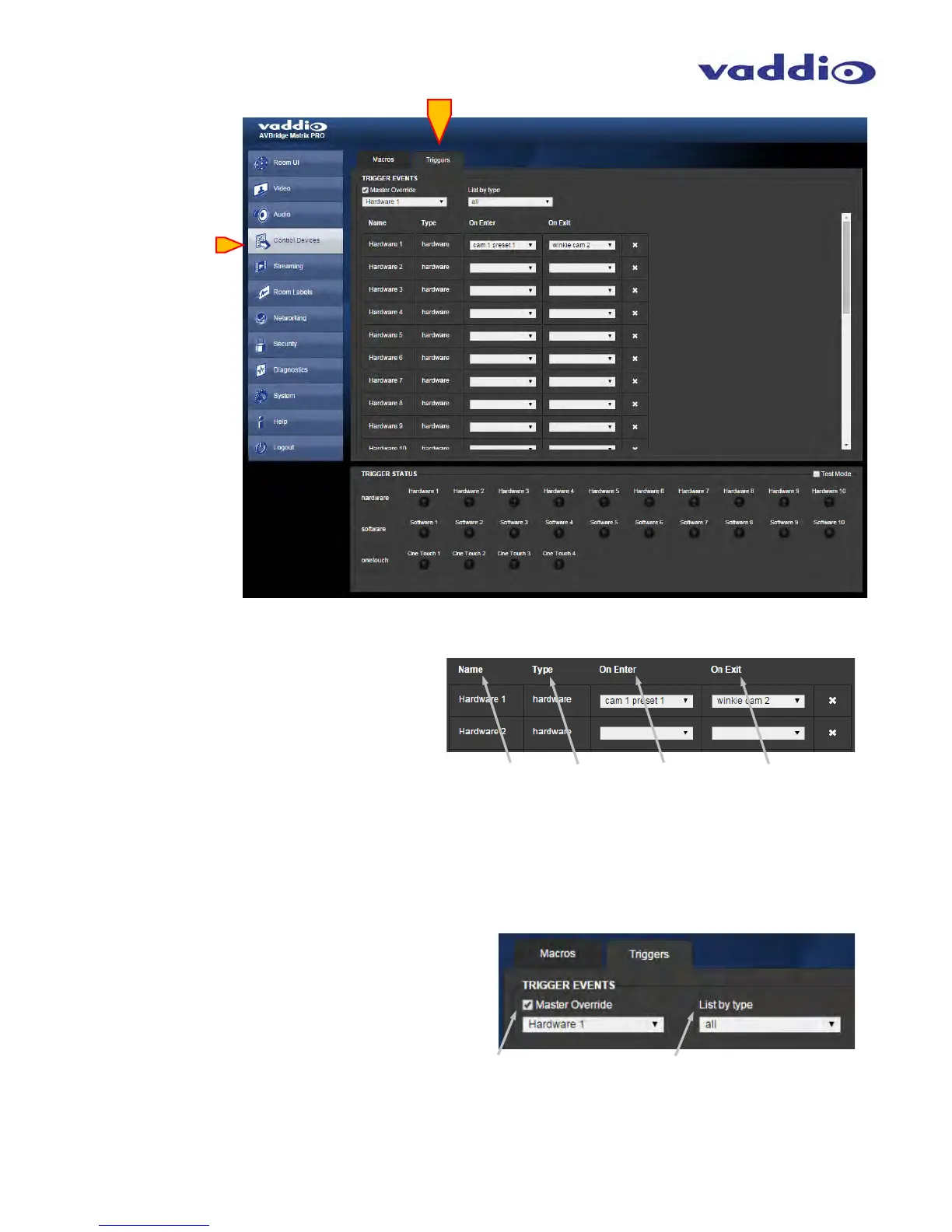
• Triggers:
Name: Name of the Trigger Event, assignable
when building the Trigger Event in the Macro
Editor section.
Type: Type of Trigger Event, these can be
hardware, software or One-Touch (MicPOD)
events.
On Enter: The Macro desired to be initiated at
the start of the trigger event, immediately upon
triggering. Select the desired Macro from any
already built, using the pull down arrow.
On Exit: The Macro desired to be at the end of a
Trigger Event, when the trigger is no longer happening.
This is typically configured as whatever the user requires
to be the “default” condition. Select the desired Macro from
any already built, using the pull down arrow.
Master Override: Check Master Override box to enable
a single trigger to be prioritized above the rest. Use the
pull down to select which of the 24 triggers should be
the prioritized one.
List by type: Allows filtering of the Trigger event list
so those trigger types used most often appear first
in the displayed list.



 To Next Page