EasyTalk USB Tools
Vaddio EasyTalk USB Solution - Document Number 342-0449 Rev A Page 23 of 48
PC-based USB Conferencing with Analog Recording or Streaming:
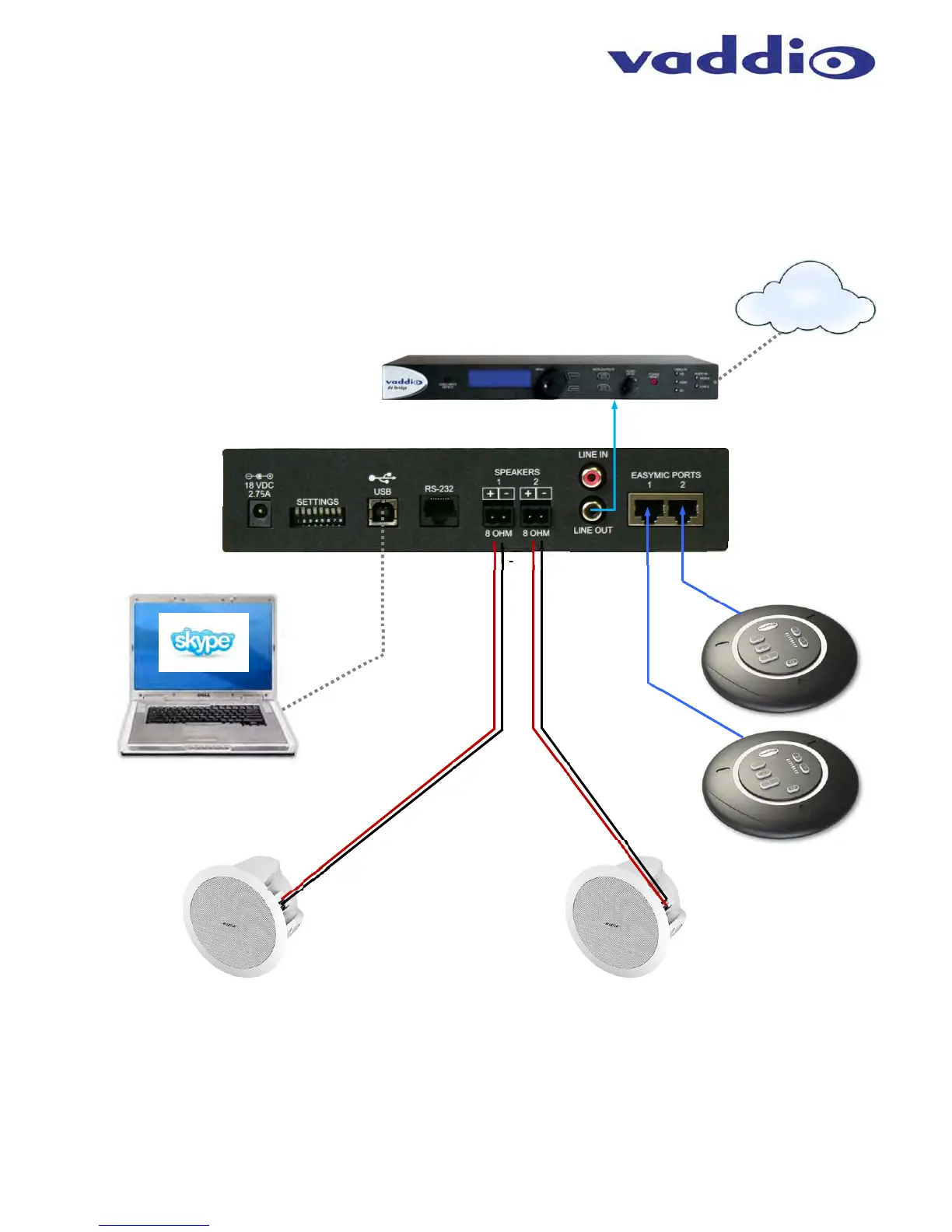
The EasyUSB Mixer/Amp includes an audio mixing mode for creating recordings or streaming the audio content
of both the local and far-end participants. The recording mixing mode is selectable from the back panel dip
switch. The diagram below depicts a connection scheme with the Vaddio AV Bridge in an IP Streaming
application.
Diagram: Recording or Streaming Application
PC with UC Client Software
+
+
_
_
+
_
+
_
Bose EasyTalk
Ceiling Speakers
Plenum Rated
Speaker wire
Not Included
Supplied
CAT-5e
Cables
Two (2) 25’
(7.62m)
Cables
EasyUSB
Mixer/Amp
Rear Panel
Two (2) EasyMic
MicPOD Table Mics
or EasyMic Ceiling
MicPODs
Uses UAC
(Universal
Audio
Class)
Drivers
USB 2.0
Cable
Recorder or Streaming Endpoint
Ethernet
Network


 To Next Page