EasyTalk USB Tools
Vaddio EasyTalk USB Solution - Document Number 342-0449 Rev A Page 28 of 48
EasyTalk Ceiling Speaker Installation:
A complete set of installation instructions are provided with the Bose DS16F ceiling speakers packaging.
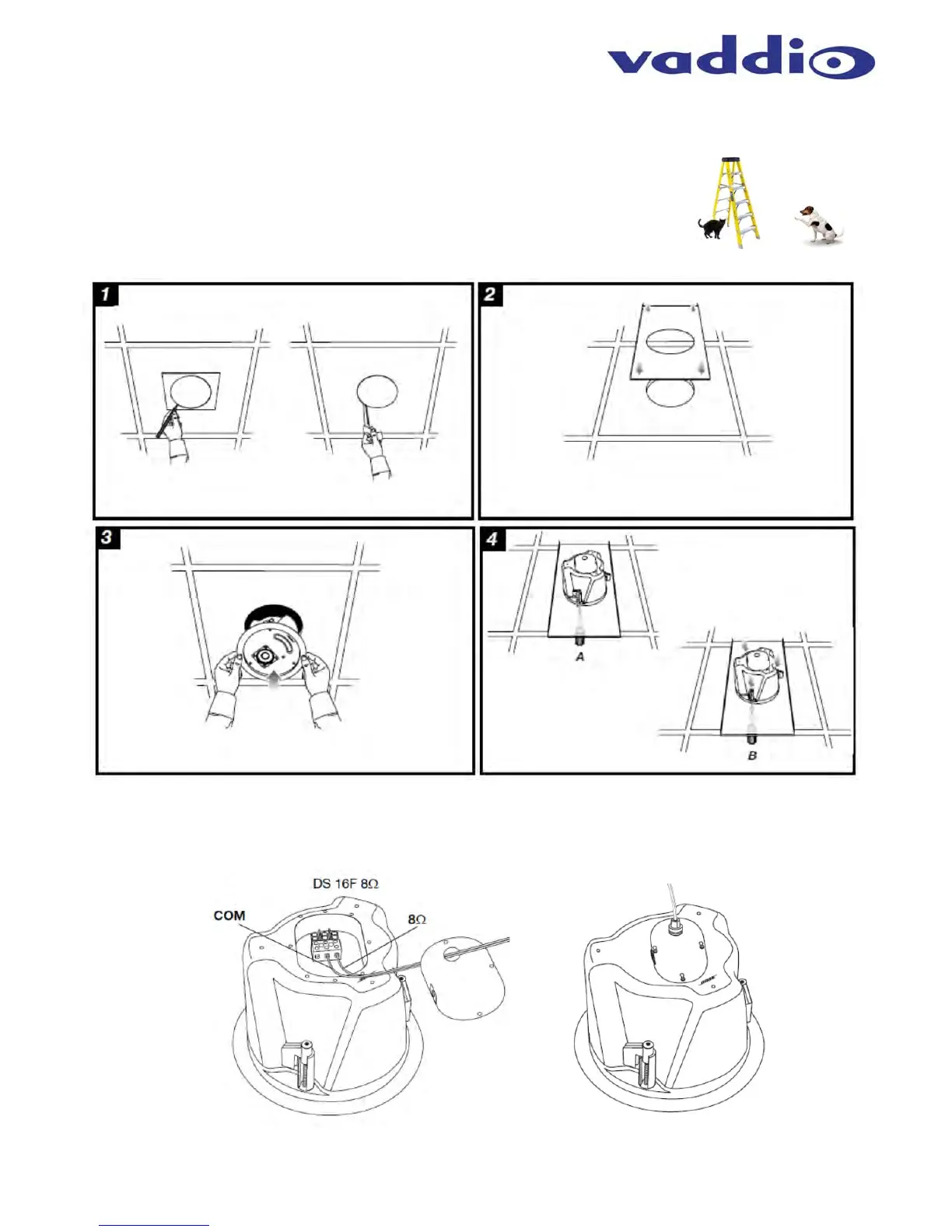
Diagram: Installing Ceiling Speakers in Ceiling Tile
STEP 1: Identify desired location of the ceiling tile for the speaker to be
installed in. Use included template to cut hole in tile. Again safety comes first.
STEP 2: Place Tile Support Brace in ceiling over the top of the open hole.
STEP 3: Insert ceiling speaker in the hole extending through the Tile Brace.
STEP 4: Tighten hanging tabs with screws located on the face of speaker to adhere to Tile Support Brace.
Step 5: Connecting Speaker to EasyUSB Mixer/Amp
After the ceiling speaker is installed, the speaker must be attached to the speaker terminals of the EasyUSB
Mixer/Amp. Remove the connector cover on top of ceiling speaker. Connect speaker wire to the terminal block
using the 8-ohm and common terminals. Replace the cover. Put the plenum back cans on when finished.


 To Next Page