10 Operating Manual auroMATIC 560
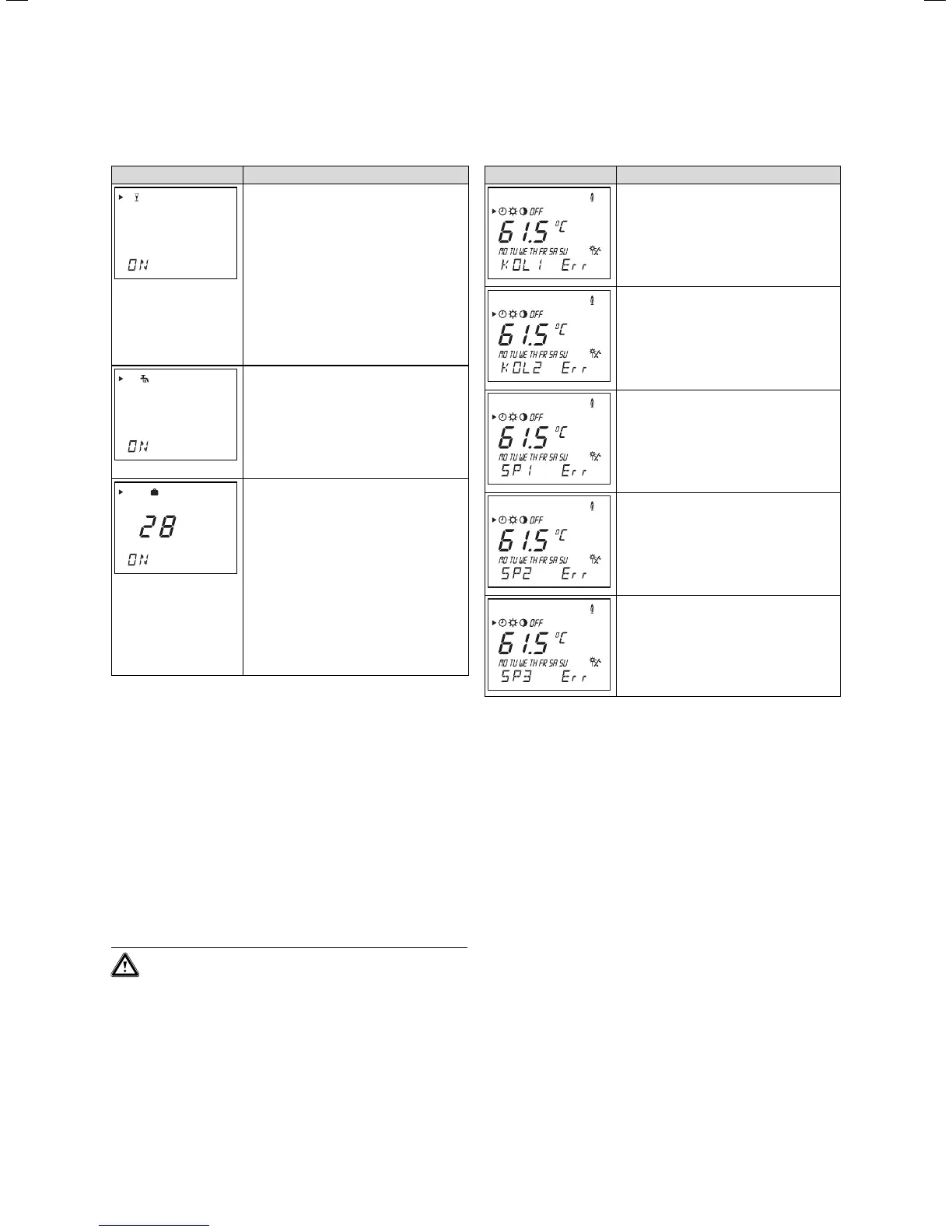
5.6 Activating the special functions
Display Required steps
Party function
Press the special function button once-
the party symbol flashes for approx. ten
seconds in the display, then the function
is activated.
The function is deactivated automatically
when the next reheating window begins.
If you want to deactivate the function
before, simply reselect the function.
The function can only be activated in the
reheating operation mode.
One-time reheating
Press the special function button twice -
The one-time reheating symbol flashes in
the display for approx. ten seconds, then
the function is activated.
If you want to deactivate the function
before, simply reselect the function.
Holiday function
Press the special function buttonthree
times - the holiday function symbol
flashes in the display for approx. ten sec-
onds, and you can use the dial to set the
number of holidays.
Finally, the function is activated for the
set time.
If you want to deactivate the function
before, simply reselect the function.
If the anti-Legionnaire’s disease function
is activated, the protection will be carried
out on the last holiday.
Table 5.6 Activating the special functions
6 Error messages
The auroMATIC 560 solar controller shows error mes-
sages in the main operating level if there is a problem
with the temperature sensor.
The sensor configuration will always be displayed when
the controller is switched on for the first time, or if the
power has been switched off and on again. Depending
on the set hydraulic plan, the controller recognises
whether there is a problem, or if the sensor is not neces-
sary for operation.
Caution!
Never try to repair or carry out maintenance
work on the controller yourself. Call in an
approved technician. We recommend concluding
a maintenance contract for your solar system
with a recognised handicraft business.
The following table explains the error messages.
Display Message/Description
Error collector sensor 1
This error occurs if the there is a prob-
lem with the sensor, or if it is not con-
nected.
Error collector sensor 2
This error occurs if a sensor is connected
for hydraulic plan 1, or for hydraulic plan
2 or 3 if there is a problem with the con-
nected sensor or it is not connected.
Error cylinder sensor 1
This error occurs if the there is a prob-
lem with the connected sensor.
Error cylinder sensor 2
This error occurs if the there is a prob-
lem with the sensor, or if it is not con-
nected.
Error cylinder sensor 3
This error occurs if the there is a prob-
lem with the connected sensor.
Table 6.1: Error messages
5 Operation
6 Error messages







 To Next Page