6 Operating Manual auroMATIC 560
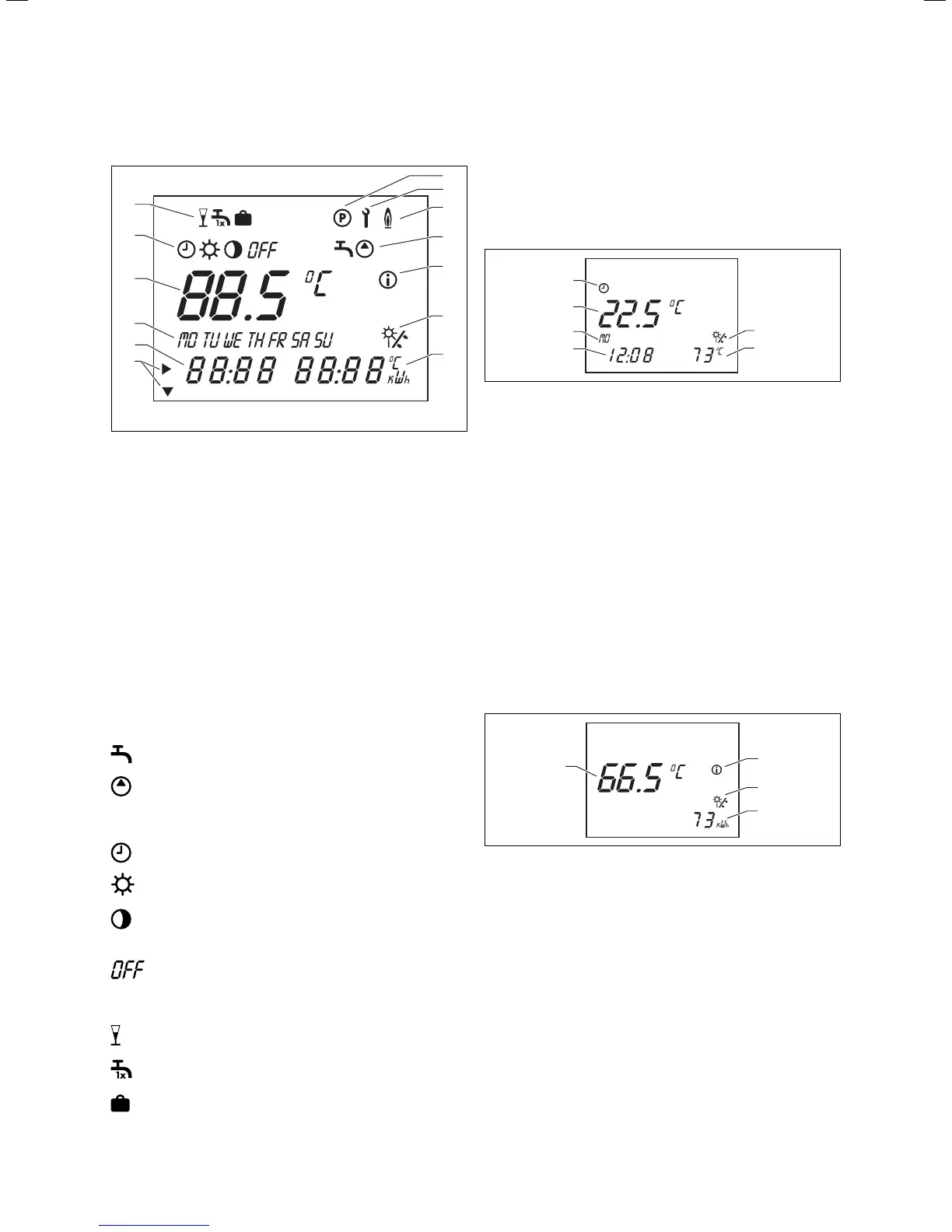
5.3 Display overview
4
1
2
3
5
6
7
8
9
10
11
12
13
Fig. 5.2 Controls
Key
1 Programming level
2 Service/diagnostic level
3 Reheating
4 Timer programs
5 Info level
6 Solar yield (blinks if solar yield is available)
7 Units
8 Cursor
9 Multifunction display
10 Days of the week
11 Target/actual value
12 Operating modes
13 Special functions
Display symbols
Timer programs:
Timer program for reheating
Timer program for connected circulation pump
Operating modes
Reheating function with timer program
Reheating function in constant standby mode
No reheating
Solar pump(s) not activated
No reheating
Special functions:
Party
One-time reheating
Holiday function
5.4 Display modes
5.4.1 Main operating level
The main operating level appears when the appliance is
switched on. Please refer to Sec. 5.5.2 for information
on how to set and change the values.
1
2
4
5
6
3
Fig. 5.3 Main operating level
Key
1 Indicates that solar yield is available (collector pump is running)
2 Actual collector temperature
3 Current time, or LEG for anti-Legionnaire’s disease function
(if active)
4 Current day of the week
5 Actual cylinder temperature (the target temperature can be
called up and adjusted by turning the dial)
6 Current operating mode
5.4.2 Info level
You can access the info level by pressing the info button.
The display initially appears as seen in the diagram
below. You can call up additional information by pressing
the info button again (see Sec. 5.5.1). The information
called up appears on the display for approx. five sec-
onds, then the display returns to the main operating
level.
1
2
4
3
Fig. 5.4 Info level
Key
1 Info level
2 Solar yield indicator (collector pump is running)
3 Solar yield in kWh
4 Target cylinder temperature
5 Operation






 To Next Page