8 Operating Manual auroMATIC 560
5.5 Settings
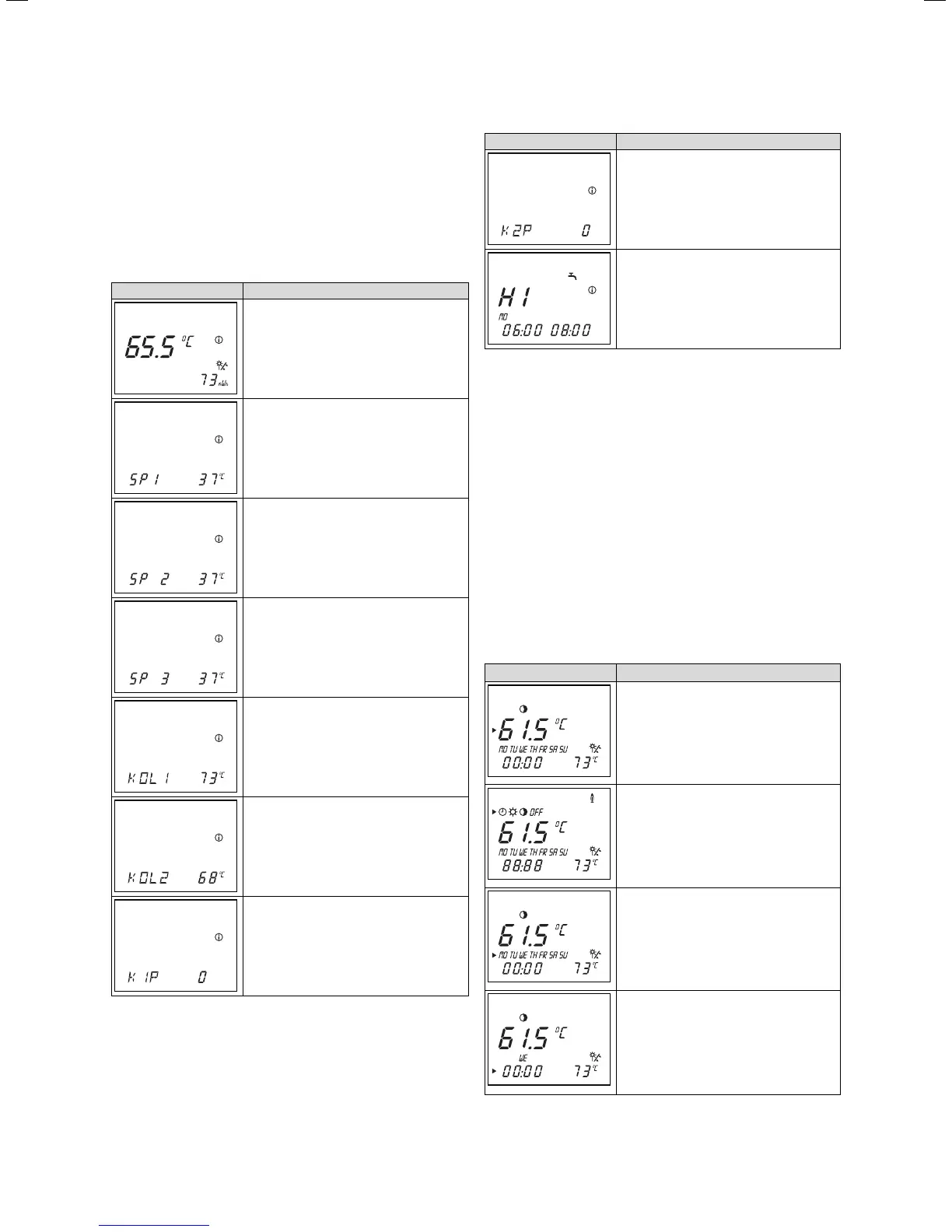
5.5.1 Calling up values for settings
You can call up values for the settings successively by
repeatedly pressing the info button.
The information called up appears on the display for
approx. five seconds, then the display returns to the
main operating level.
Display Settings
Cylinder temperature target value
yield
Cylinder sensor 1 temperature
Cylinder sensor 2 temperature
Cylinder sensor 3 temperature
(if connected)
Collector sensor 1 temperature
Collector sensor 2 temperature
(if connected)
Operating hours for collector pump 1
Table 5.1 Values for settings
Display Settings
Operating hours for collector pump 2
Timer program for heating window
Table 5.1 Values for settings (continued)
Any additional timer programs you have set will also be
displayed here (see Sec. 5.5.3 and 5.5.4).
5.5.2 Settings in the main operating level
You can adjust the following settings in the main operat-
ing level:
– Cylinder temperature target value
– Operating mode
– Current day of the week
– Current time
When you call up a setting, it can be viewed and/or
changed for approx. five seconds, then the display auto-
matically returns to the main operating level. Click the
dial within the five second period to display the next set-
ting.
Display Required steps
Turn the dial, after 3 seconds the cursor
marks the temperature display, which will
be flashing.
Turn the dial to adjust the target value
for the cylinder temperature.
Click the dial - The cursor will mark the
operating modes. The selected operating
mode flashes.
Select an operating mode by turning the
dial.
Click the dial - The cursor will mark the
day of the week. The selected day of the
week flashes.
Turn the dial to select the current day of
the week.
Click the dial - The cursor will mark the
hours and/or the minutes.
Turn the dial to adjust the current time.
Table 5.2: Settings in the main operating level
5 Operation






 To Next Page