7Operating Manual auroMATIC 560
5.4.3 Programming level
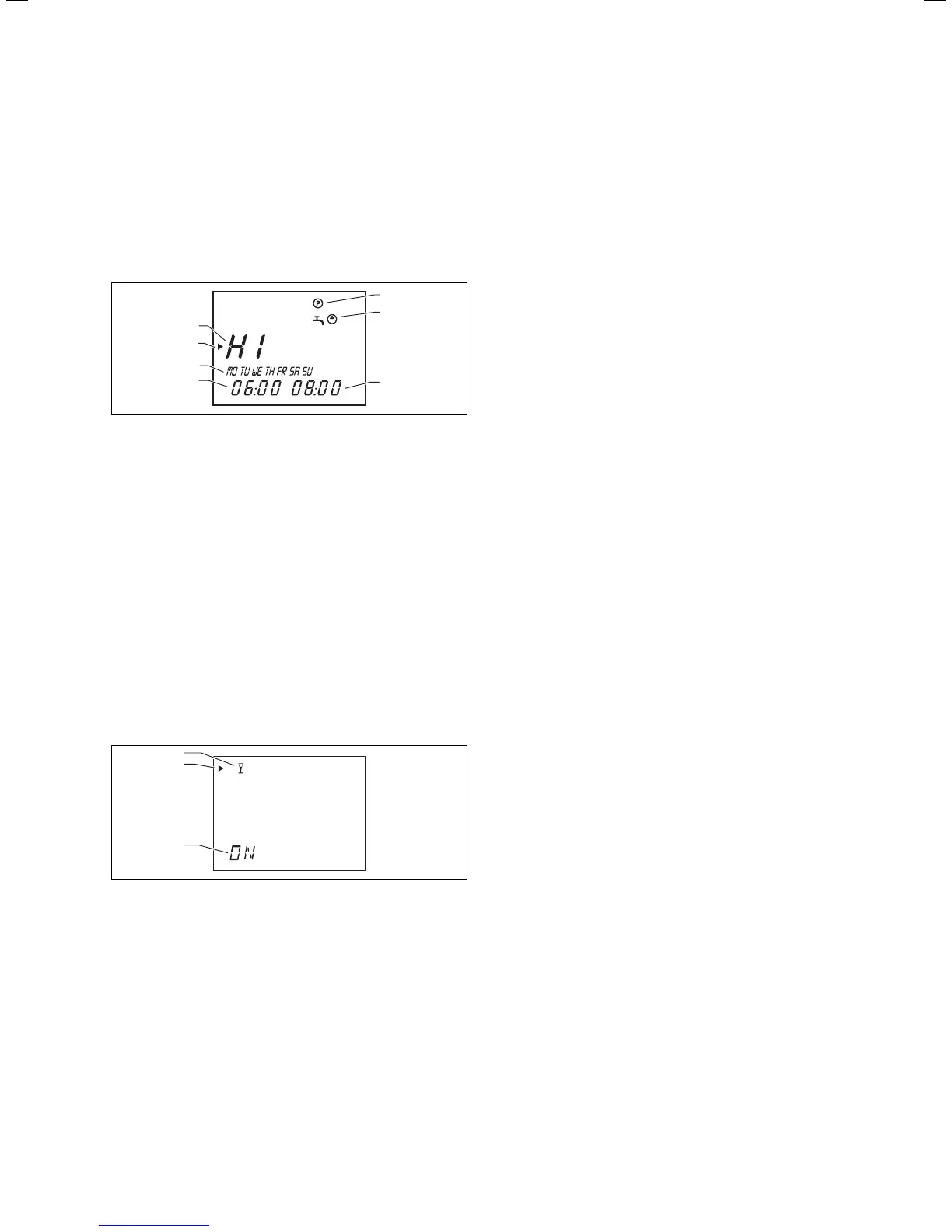
You can access the level for programming the control-
ler‘s operating times by pressing the “P” programming
button. You can set timer programs here for reheating
the solar cylinder and for the connected circulation
pump (see Sec. 6.3 and 6.4).
The display returns to the main operating level if you
press the programming button.
1
2
4
5
6
3
7
Fig. 5.5 Programming level
Key
1 Programming level
2 Timer program for reheating the solar cylinder (tap symbol)
or for the circulation pump (pump symobol)
3 End time
4 Start time
5 Day of the week or block of days
6 Cursor (marks the value to be changed)
7 Time window
5.4.4 Special functions
By pressing the “F” button, you can access the special
functions: party, one-time reheating, and holiday func-
tion. After approx. ten seconds, the selected function is
activated and the display returns to the main operating
level.
Please refer to Sec. 5.7 for information on how to acti-
vate the individual special functions.
1
2
3
Fig. 5.6 Special functions
Key
1 Special function activated
2 Cursor (marks the special function selected)
3 Symbol for the special function selected
5.4.5 Service/diagnostic level
You can access the service/diagnostic level by simultane-
ously pressing the programming button “P” and the dial
for approx. 3 seconds. All actuators and sensors can be
controlled and checked in this level (see Sec. 7 in the
installation manual).
The display returns to the main operating level if you
press the programming button. The actuators and sen-
sors should be checked by the heating engineer.
5.4.6 Installer level
You can access the installer level by pressing the pro-
gramming button “P” for approx. 3 seconds.
Press the programming button once to return to the
main display level.
These parameters should only be adjusted by the heat-
ing engineer.
Operation 5






 To Next Page