0020288151_04 Operating and installation instructions 59
Appendix
A Troubleshooting, maintenance message
A.1 Troubleshooting
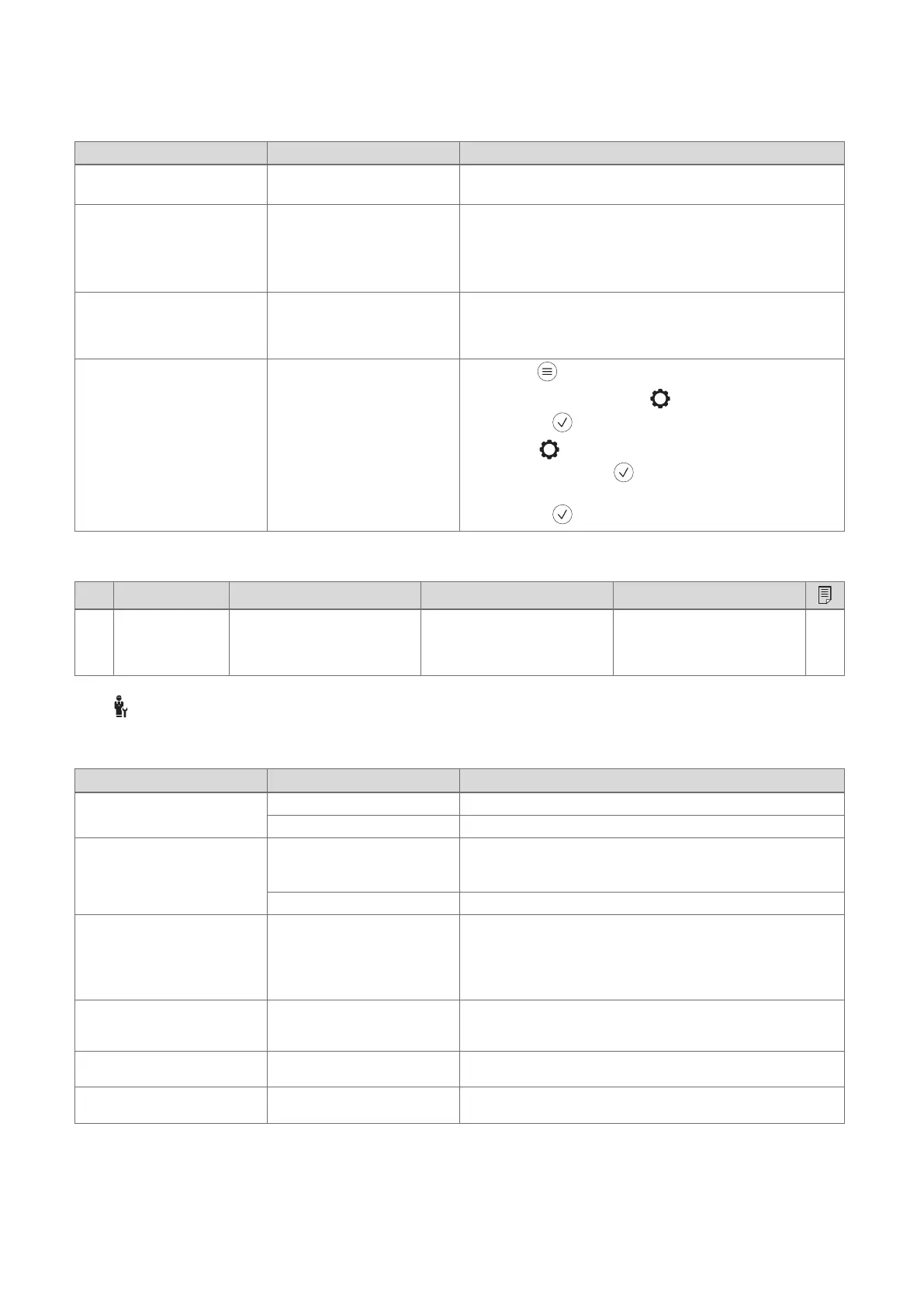
Symptom Possible cause Measure
Display remains dark The batteries are flat 1. Change all the batteries. (→ Section 6.5)
2. If the fault persists, inform the competent person.
Display: Mode: Back-up heater
if fault occurs Heat pump (call
the comp. person), insufficient
heating-up of the heating and
the domestic hot water
Heat pump does not work 1. Inform the competent person.
2. Select the setting for limp home mode until the competent
person arrives.
3. You can find more detailed explanations under Faults, fault
messages and maintenance messages (→ Section 6).
Display: F. Boiler fault, the
specific fault code (e.g. F.33)
with the specific boiler is shown
in the display
Boiler fault 1. Reset the boiler by first selecting Reset and then Yes.
2. If the fault message persists, inform the competent person.
Display: You do not understand
the set language
Incorrect language set 1.
Press twice.
2.
Select the last menu item ( SETTINGS) and confirm by
pressing .
3.
Under SETTINGS, select the second menu item and
confirm by pressing .
4. Select the language that you understand and confirm by
pressing .
A.2 Maintenance messages
# Code/meaning Description Maintenance work Interval
1 Water defi-
ciency: Follow
the instructions
in the heat gen.
The water pressure is too low in
the heating installation.
Refer to the operating instruc-
tions for the relevant heat gen-
erator for information on filling
with water
See the operating instructions
for the heat generator
B -- Troubleshooting, maintenance message
B.1 Troubleshooting
Symptom Possible cause Measure
Display remains dark The batteries are flat ▶ Change all the batteries. (→ Section 6.5)
The product is defective ▶ Replace the product.
No changes in the display can
be made via the control ele-
ments
Software error 1. Take all the batteries out.
2. Insert the batteries in the battery compartment, making sure
that the poles are the right way round.
The product is defective ▶ Replace the product.
Heat generator continues to
heat once the room temperature
has been reached
Incorrect value in the Room
temp. mod.: or Zone assign-
ment: function
1. In the Room temp. mod.: function, set the value Active or
Expanded.
2. In the zone in which the system control is installed, assign
the system control's address in the Zone assignment: func-
tion.
The heating installation remains
in domestic hot water mode
Heat generator cannot reach
the max. target flow temperat-
ure
▶ Reduce the set value in the Max. target flow temperature:°C
function.
Only one of several heating
circuits is displayed
Heating circuits inactive ▶ In the Circuit type: function, define the required function for
the heating circuit.
It is not possible to switch to the
installer level
You do not know the code for
the installer level
▶ Reset the system control to the factory setting. All set values
will be lost.





 To Next Page