DataLog x2 and Terminal x2 Installation and User Guide
MANUAL-1899207337-17
5.2 Calibrate a 740 Tide Gauge
There are two routes to calibrate a 740 tide gauge in DataLog X2, it will appear as part of the
configuration wizard while configuring a model 740, or can be directly accessed via the Instrument
Tools Toolbar. To access via the Instrument Tools section, a connection will first have to be
established with the Model 740.
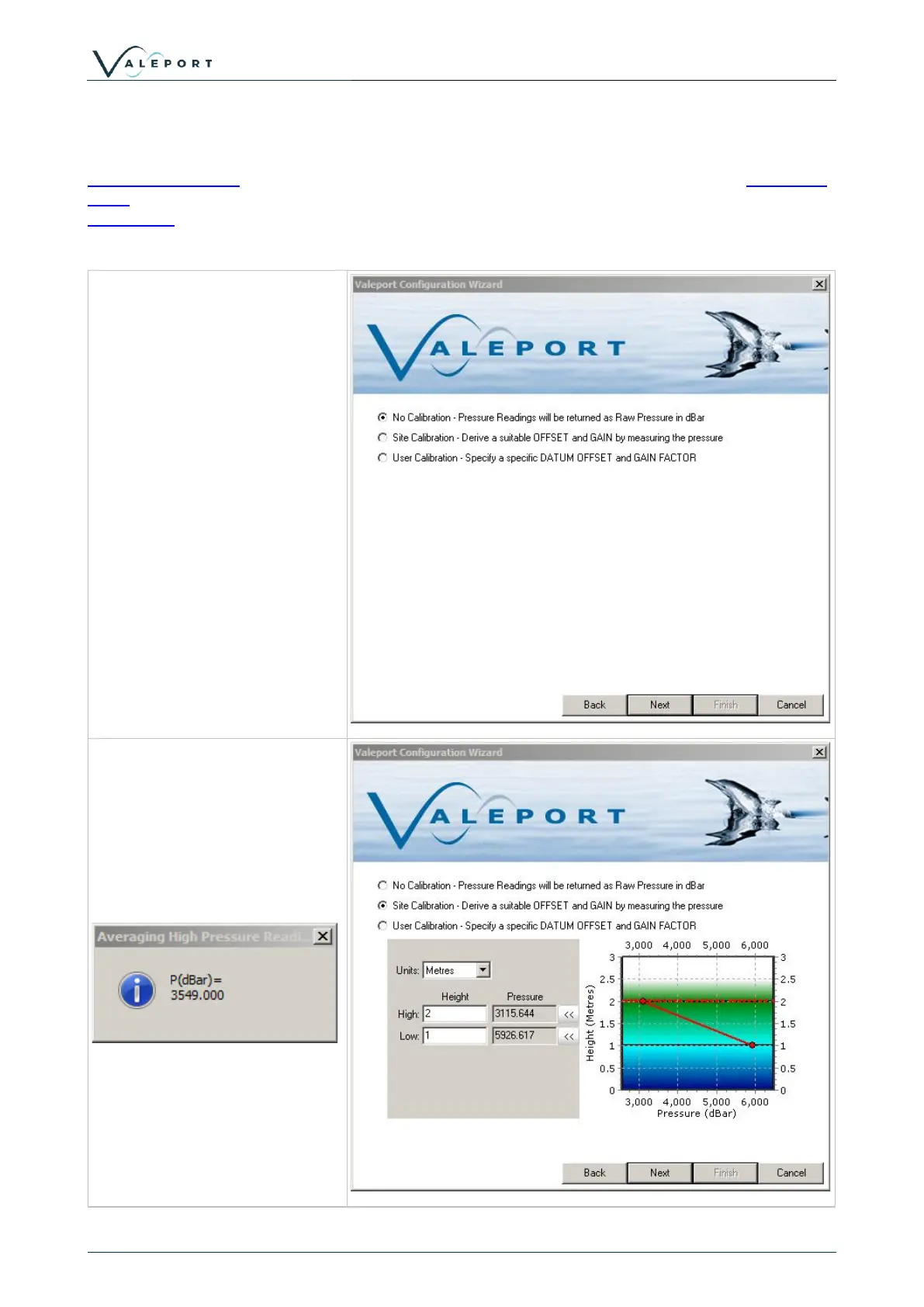
There are three options for the
calibration of a Model 740.
1: No calibration
2: Site Calibration - A site
specific calibration is calculated
by measured the pressure at
known high and low tide heights.
See Model 740 manual or
TideMaster manual for more
detail on the operation procedure
used to carry this out. Height can
be output in metres or feet.
3: User Calibration - a datum
offset and gain factor is manually
applied.
Selecting the Site Calibration
method activates the window
shown.
Select the required units, enter
the known tide heights and click
the << button to measure the
pressure at that height. 60s of
pressure data will be averaged.



 To Next Page