70 Rainger Linear
OPERATION
Swing Around
Pivot Procedure
To pivot the span, correctly position the machine and
follow the guidelines on the previous page. Then do
the following:
1. Press
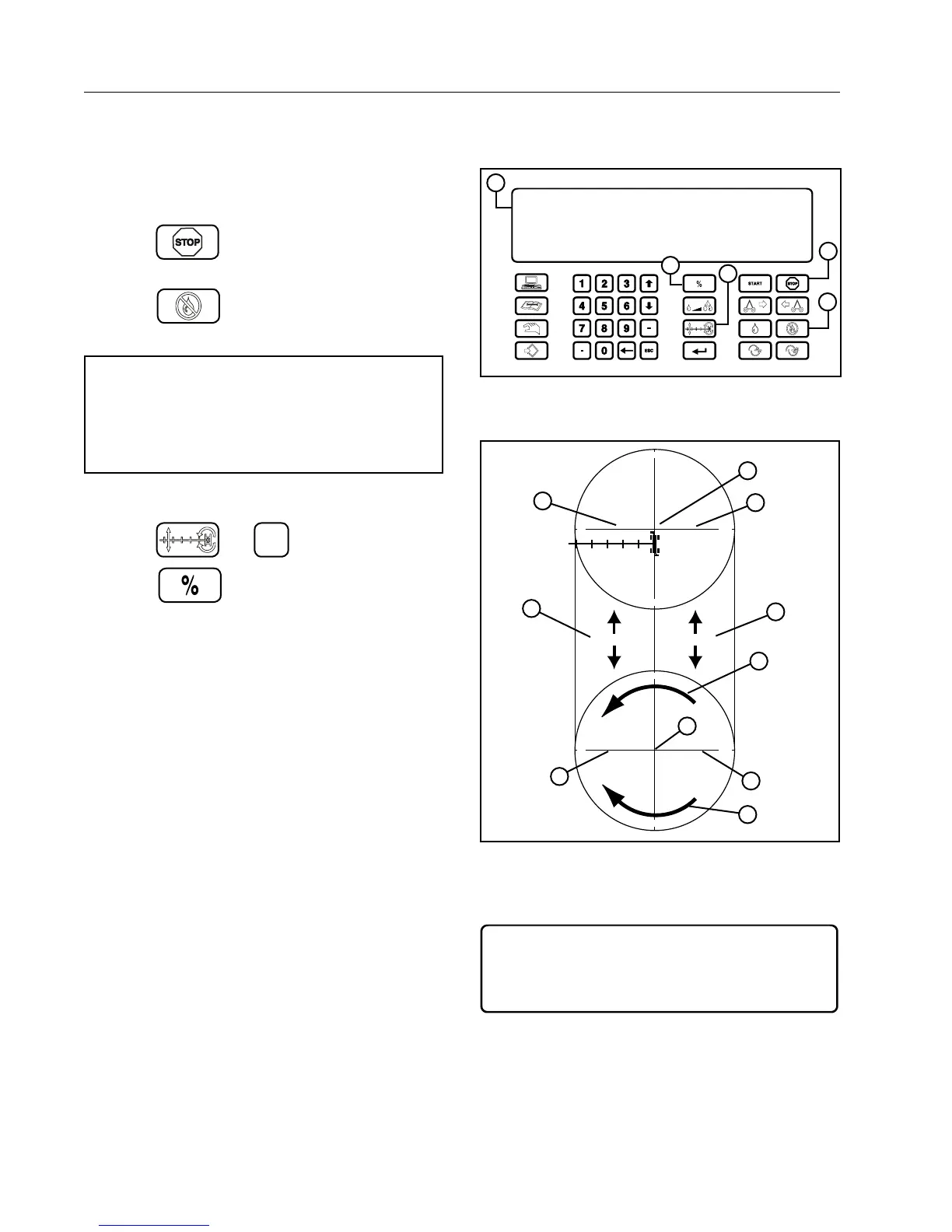
to Stop the machine. See Figure
70-1.
2. Press
to turn the Water OFF. See Fig-
ure 70-1.
NOTE
• The Rainger Linear Swing Around should
always be ran dry (without water) when pivot-
ing or swinging the span around. See Figure
70-2.
3. Set the control panel to pivot mode. See Figure
70-1.
Press
and
2
.
4. Press
to set the percent timer to the
desired percentage. See Figure 70-1.
5. There are typically 2 pivot zones. See Figure
70-2.
6. Press the correct number key to select the pivot
zone that the machine will be operating within.
See Figure 70-3.
Select a Zone 1=A, 2=B, 3=C 4=D. See Figure
70-3.
MANUAL
LINEAR A
477 VOLTS
48.0 HR
ENTER 1.AUTO 2.PIVOT 3.LINEAR (3) >
821 FT
0. .PSI
100 %
0.25 IN
STOPPED
FORWARD
WATER OFF
SIS. 500
2
1
3
4
5
Figure 70-1 1. Control Panel Display
2. Stop Key
3. Water OFF Key
4. Percent Timer Key
5. Pivot/Linear Key
270°
90°
0°
180°
270°
90°
0°
180°
0ft (0M) 0ft (0M)
1000ft (304.8M)1000ft (304.8M)
1
2
3
3
4
4
5
6
7
8
Figure 70-2 1. Pivot Zone A
2. Pivot Zone B
3. Linear Start
4. Linear End
5. Linear Zone A
6. Linear Zone B
7. Forward
8. Reverse
MANUAL
LINEAR A
477 VOLTS
48.0 HR
ENTER ZONE 1. . A 2. . B 3. . C 4. . D >
821 FT
0. .PSI
100 %
0.25 IN
STOPPED
FORWARD
WATER OFF
SIS. 500
Figure 70-3



 To Next Page