10
Fir settings
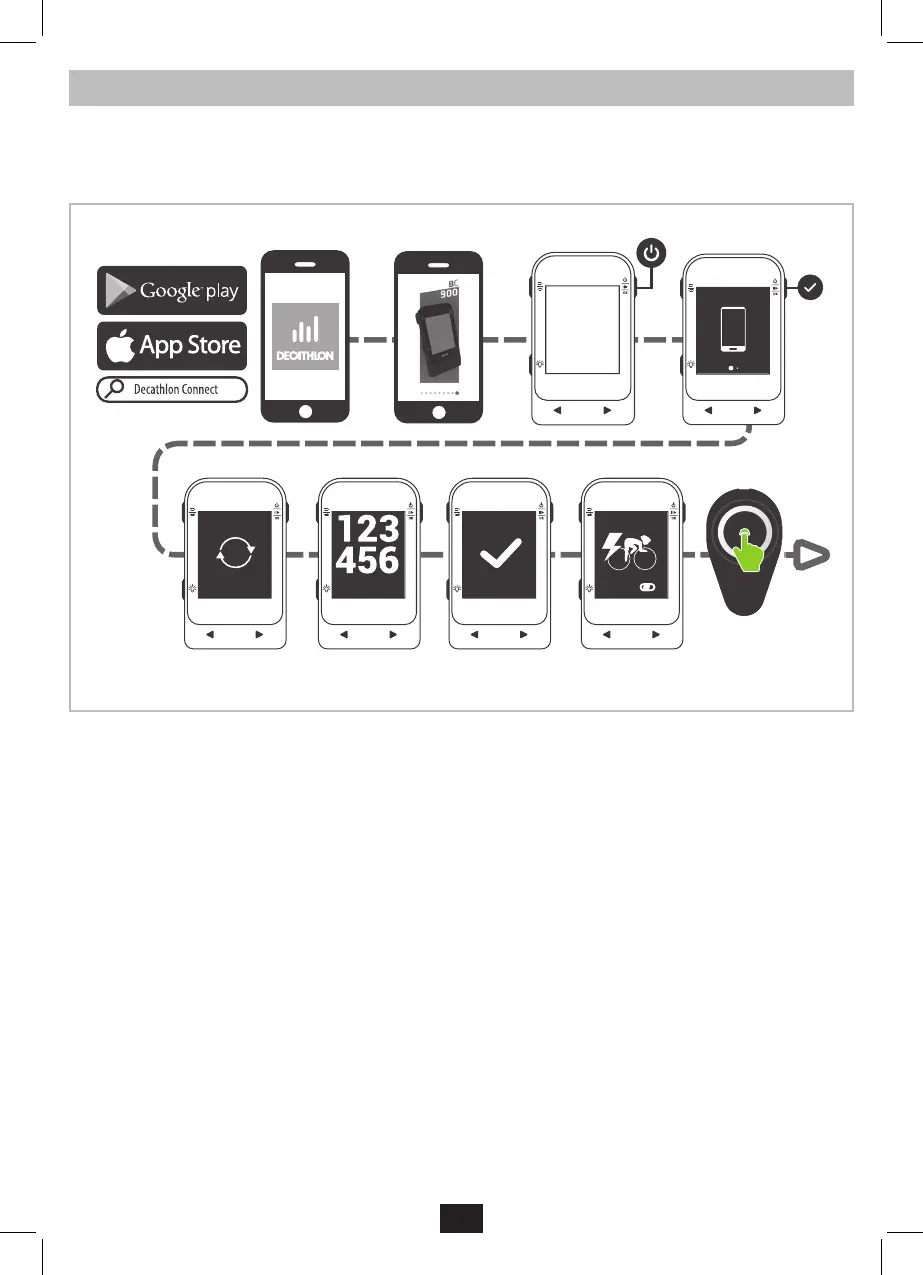
IMPORTANT! When you power on your BC900 display for the r time, you will need to go through the r settings and pair the bike computer to
your ebike syem. Please follow the next eps.
Download the “Decathlon Connect” app on your smartphone, open it and follow the inructions on the screen.
Switch on the BC900 bike computer, by pressing the power button for 2 seconds. When the “connect” screen appears, press once again on the OK
button to conrm and launch the connection process with your smartphone.
Settings
Records
Sessions
Start
Settings
General
Targets
Sensors
E-bike
Off Off
Sensor A
Sensor B
Done
Password
Done
Done
turn on
e-bike
pairing...
2’’
ON
Once these r settings are done, the bike computer will art the pairing process with your e-bike.
Please make sure the e-bike is switched on during this process. If the pairing was not successful, the pairing process will be relaunched at every
activity art.


 To Next Page
 Loading...