11
Utilizzo del ciclocomputer BC900
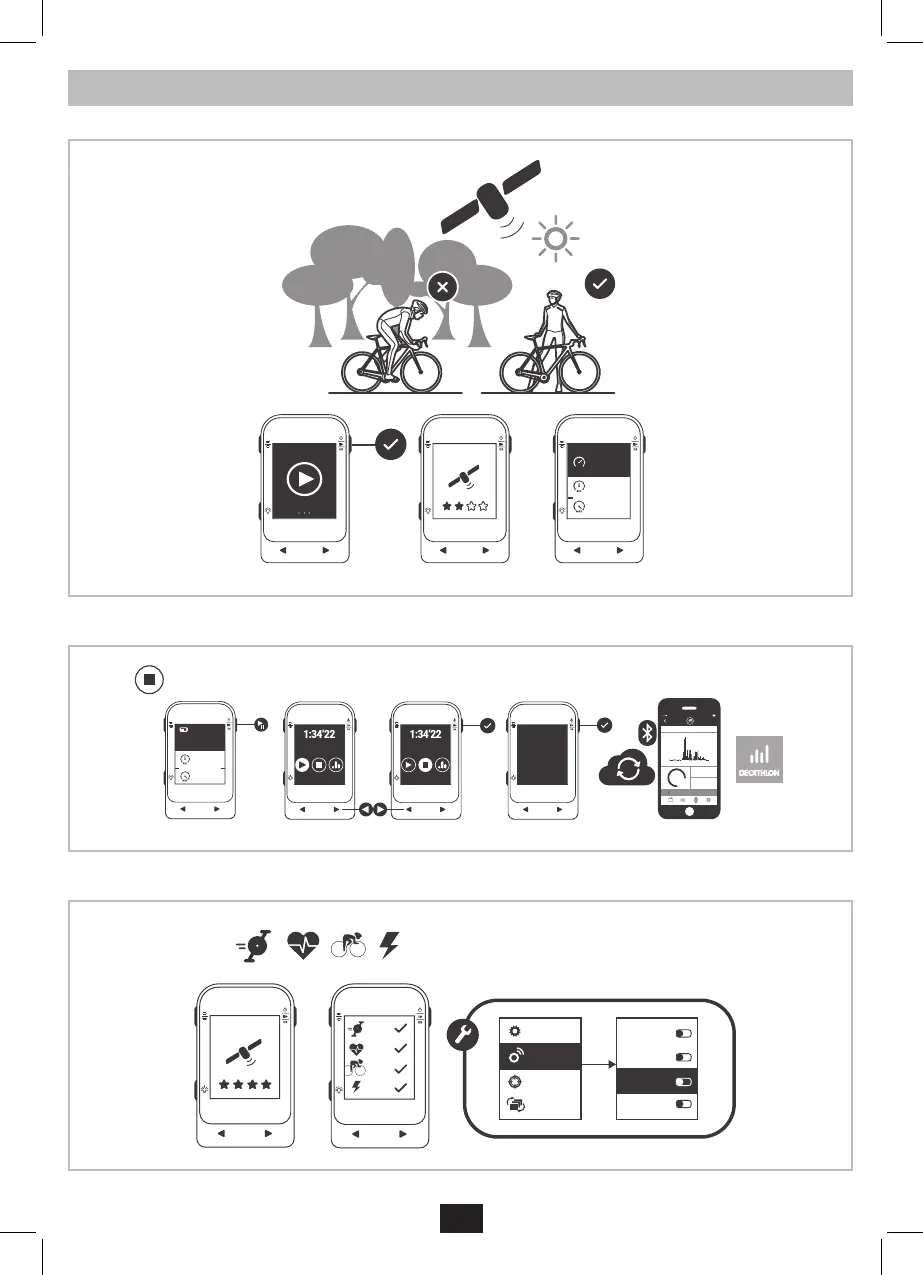
Avviare una corsa premendo il pulsante OK.
0
.
0
Km/h
20
.2
31
.4
Avg Km/h
Max Km/h
26
.
9
Km/h
20
.2
31
.4
Km/h
Km/h
Quit & save?
YES
YEAR MONTH WEEK DAY
TODAY MONDAY JUNE 23RD
00:00 00:0006:00 18:0012:00
124
KM
12.9
KM/H
AVG SPEED
468
KCAL
CALORIES
9:41 AM
Cadence
Speed
Cardio
Power
General
Sensors
Targets
Screens
Cardio
Cadence
Power
Speed
Mettere in pausa o interrompere una corsa premendo il pulsante OK. È possibile vedere la traccia GPS e le informazioni sulla corsa tramite l’app
Decathlon Connect. Lasciare il ciclocomputer acceso e vicino allo smartphone durante la sincronizzazione.
0
.
0
Km/h
20
.2
31
.4
Avg Km/h
Max Km/h
26
.
9
Km/h
20
.2
31
.4
Km/h
Km/h
Quit & save?
YES
YEAR MONTH WEEK DAY
TODAY MONDAY JUNE 23RD
00:00 00:0006:00 18:0012:00
124
KM
12.9
KM/H
AVG SPEED
468
KCAL
CALORIES
9:41 AM
Cadence
Speed
Cardio
Power
General
Sensors
Targets
Screens
Cardio
Cadence
Power
Speed
È possibile associare sensori eerni come cardiofrequenzimetri, sensori di cadenza o sensori di potenza nel menu impoazioni > sensori.
Tutti i sensori ANT+ o Bluetooth Smart sono compatibili, indipendentemente dalla marca.
0
.
0
Km/h
20
.2
31
.4
Avg Km/h
Max Km/h
26
.
9
Km/h
20
.2
31
.4
Km/h
Km/h
Quit & save?
YES
YEAR MONTH WEEK DAY
TODAY MONDAY JUNE 23RD
00:00 00:0006:00 18:0012:00
124
KM
12.9
KM/H
AVG SPEED
468
KCAL
CALORIES
9:41 AM
Cadence
Speed
Cardio
Power
General
Sensors
Targets
Screens
Cardio
Cadence
Power
Speed


 To Next Page
 Loading...