11
Using your BC900 bike computer
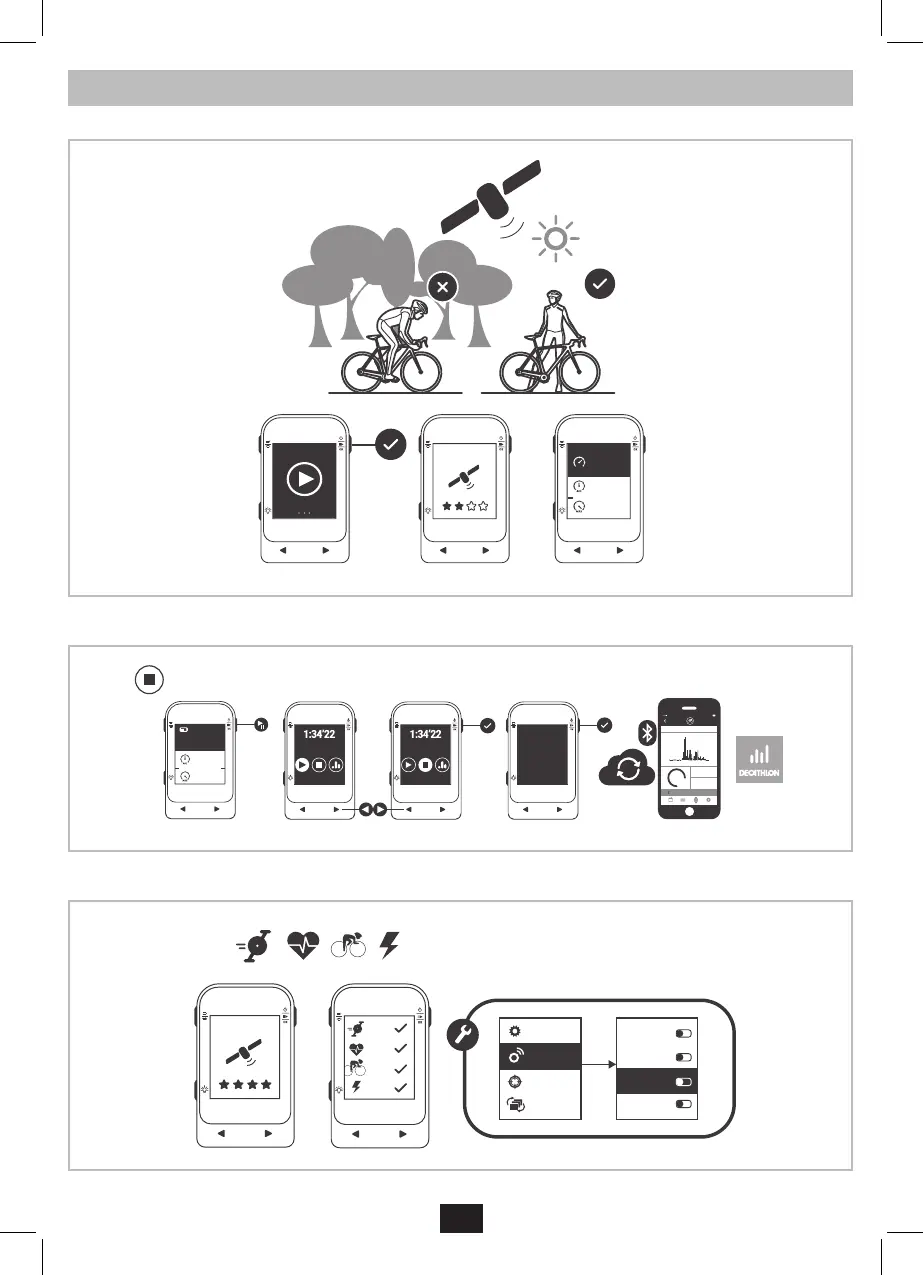
Start a ride by pressing the OK button.
0
.
0
Km/h
20
.2
31
.4
Avg Km/h
Max Km/h
26
.
9
Km/h
20
.2
31
.4
Km/h
Km/h
Quit & save?
YES
YEAR MONTH WEEK DAY
TODAY MONDAY JUNE 23RD
00:00 00:0006:00 18:0012:00
124
KM
12.9
KM/H
AVG SPEED
468
KCAL
CALORIES
9:41 AM
Cadence
Speed
Cardio
Power
General
Sensors
Targets
Screens
Cardio
Cadence
Power
Speed
Pause or op a ride by pressing the OK button. You can see your GPS trace and the details of your ride on the Decathlon Connect app. Leave
your bike computer powered on and next to your smartphone during synchronization.
0
.
0
Km/h
20
.2
31
.4
Avg Km/h
Max Km/h
26
.
9
Km/h
20
.2
31
.4
Km/h
Km/h
Quit & save?
YES
YEAR MONTH WEEK DAY
TODAY MONDAY JUNE 23RD
00:00 00:0006:00 18:0012:00
124
KM
12.9
KM/H
AVG SPEED
468
KCAL
CALORIES
9:41 AM
Cadence
Speed
Cardio
Power
General
Sensors
Targets
Screens
Cardio
Cadence
Power
Speed
You can pair external sensors such as heart rate monitors, cadence sensors or power sensors in the settings menu > sensors.
All ANT+ or Bluetooth Smart sensors are compatible, independent of the brand of the sensor.
0
.
0
Km/h
20
.2
31
.4
Avg Km/h
Max Km/h
26
.
9
Km/h
20
.2
31
.4
Km/h
Km/h
Quit & save?
YES
YEAR MONTH WEEK DAY
TODAY MONDAY JUNE 23RD
00:00 00:0006:00 18:0012:00
124
KM
12.9
KM/H
AVG SPEED
468
KCAL
CALORIES
9:41 AM
Cadence
Speed
Cardio
Power
General
Sensors
Targets
Screens
Cardio
Cadence
Power
Speed


 To Next Page
 Loading...