www.vanatoo.com 10
REMOTE CONTROL
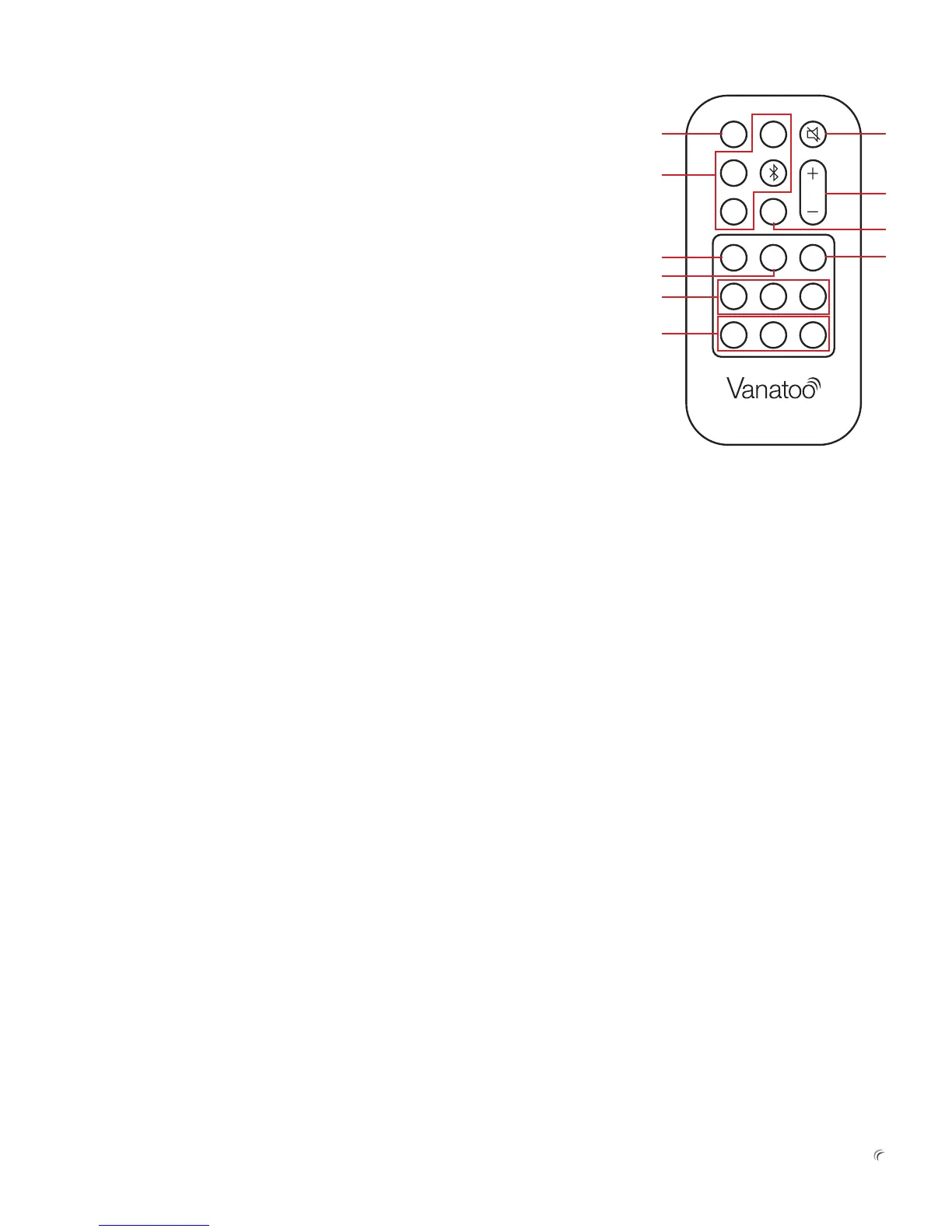
TheT0comeswitharemotecontrol.Youcanusethisremotetocontrolvariousfunctionsofthe
T0.Inaddition,someuniversalremotessupporttheVanatooremotecontrolcommands.Check
youruniversalremote’sdevicecompatibilitylisttoseeiftheVanatooproductsareincluded.
1) Auto Command—WhentheAutoCommandissenttheT0amplierenablestheAuto
InputSwitchingalgorithmandautomaticallyselectstheinputtoplayaccordingtothe
AutoInputSwitchingrules.
2) Analog, USB, Bluetooth, Optical Commands—WheneithertheAnalog,USB,Bluetooth,
orOpticalinputselectioncommandsaresent,theT0amplierwilldisabletheAutoInput
Switchingalgorithmandswitchtheinputtotheinputthatwasselected.Thisprovidesa
meansfortheusertoselectaninputregardlessofthehierarchyoftheAutoInputSwitch
algorithm.Howeveritcanresultinauserselectinganinputthatisnotreceivingmusicwhich
willresultinthespeakersbeingsilent.IfforexamplemusicisbeingreceivedbytheBluetooth
receiverandnomusicisbeingreceivedbytheopticalinput,theniftheuserselects“Optical”
fromtheremotecontroltheresultwillbethatnomusicwillbeheardfromthespeakers.
3)Coax Command—WhentheCoaxcommandissenttotheT0thecommandwillbe
ignoredandnoactionwillbetakenastheT0doesnothaveaCoaxinput.
4)Mute Command—WhentheMutecommandissenttotheT0theoutputwillbemuted.If
theamplierisalreadymutedthenitwillbeunmuted.
5)Vol+ and Vol- Commands—WhentheVol+orVol-commandsaresenttheT0amplierwill
eitherincreaseordecreasetheoutputvolumedependingonwhichkeyisdepressed.Ifone
ofthekeysishelddowntherateatwhichthevolumeischangedwillacceleratethelonger
thekeyisheld.Iftheamplierismutedwhenoneofthevolumecommandsissentthe
amplierwillbeunmuted.
6)Enable Command—WhentheEnablecommandissenttheT0amplierwillstartan“Enable
Key”15secondcountdowntimer.Duringthat15secondstheamplierwillrespondtothe
BTPaircommands,Treblecommands,andBasscommands.Anycommandsreceivedfrom
theBTPair,Treblecommands,orBasscommandsduringthe15secondswillcausethe15
secondcountdowntimertoberesetto15secondsandrestartthecountdownaswellas
executingtherequestedactionasdescribedbelow.
7)BT Pair Command—Ifthe15secondenabletimerisgreaterthanzero,theBTPair
commandwillforcetheBluetoothreceivertothepairingmode.DepressingtheBTPair
buttonontheremotealsowillresettheEnablecountdowntimerto15secondsandrestart
thecountdown.
8)Treb+, Treb Mid, Treb- Commands—Ifthe15secondenabletimerisgreaterthanzero,
theTreb+orTreb-commandwillincreaseordecreasethetrebletonecontrolby1dB.
HoldingtheTreb+orTreb-remotecontrolkeydownwillnotcontinuetoincreaseor
decreasethetreblesettingbymorethan1dB.Tomovethetreblesettingmorethan1dB
theremotecontrolkeymustbereleasedanddepressedagain.Forexample,iftheuser
wantstoincreasethetreblesettingby3dBhemustpressandreleasetheTreb+remote
button3consecutivetimes.Ifthe15secondenabletimerisgreaterthanzero,theTrebMid
commandwillsetthetrebletonecontrolto0dB.DepressinganyoftheTrebbuttonsonthe
remotewillalsoresettheEnablecountdowntimerto15secondsandrestartthecountdown.
9)Bass+, Bass Mid, Bass- Commands—Ifthe15secondenabletimerisgreaterthan
zero,theBass+orBass-commandwillincreaseordecreasethebasstonecontrolby
1dB.HoldingtheBass+orBass-remotecontrolkeydownwillnotcontinuetoincrease
ordecreasetheBasssettingbymorethan1dB.Tomovethebasssettingmorethan
1dBtheremotecontrolkeymustbereleasedanddepressedagain.Forexample,ifthe
userwantstoincreasethebasssettingby3dBhemustpressandreleasetheBass+
remotebutton3consecutivetimes.Ifthe15secondenabletimerisgreaterthanzero,
theBassMidcommandwillsetthebasstonecontrolto0dB.Depressinganyofthe
BassbuttonsontheremotewillalsoresettheEnablecountdowntimerto15seconds
andrestartthecountdown.
10)Fn1 Command—WhentheFn1commandisreceivedbytheT0receiverthecommand
willbeignoredandnoactionwillbetaken.Thiscommandisreservedforfutureuse.
Auto
Coax
Fn1
Treb
–
Bass
–
Bass
+
Treb
+
Treb
Mid
Bass
Mid
Enable
BT
Pair
Vol
Analog
Optical
USB
1
2
6
8
9
7
3
5
4
10


 To Next Page