www.vanatoo.com 5
SETTING UP YOUR SYSTEM
Youmayhavenoticedtheabsenceofaregistrationcard.Youarenotrequiredtoregister
yourspeakers.However,ifyouwantustosendyouupdatesorinformationonfuture
products,you’llwanttoregisterasaVanatoocustomeratourwebsiteatwww.vanatoo.com.
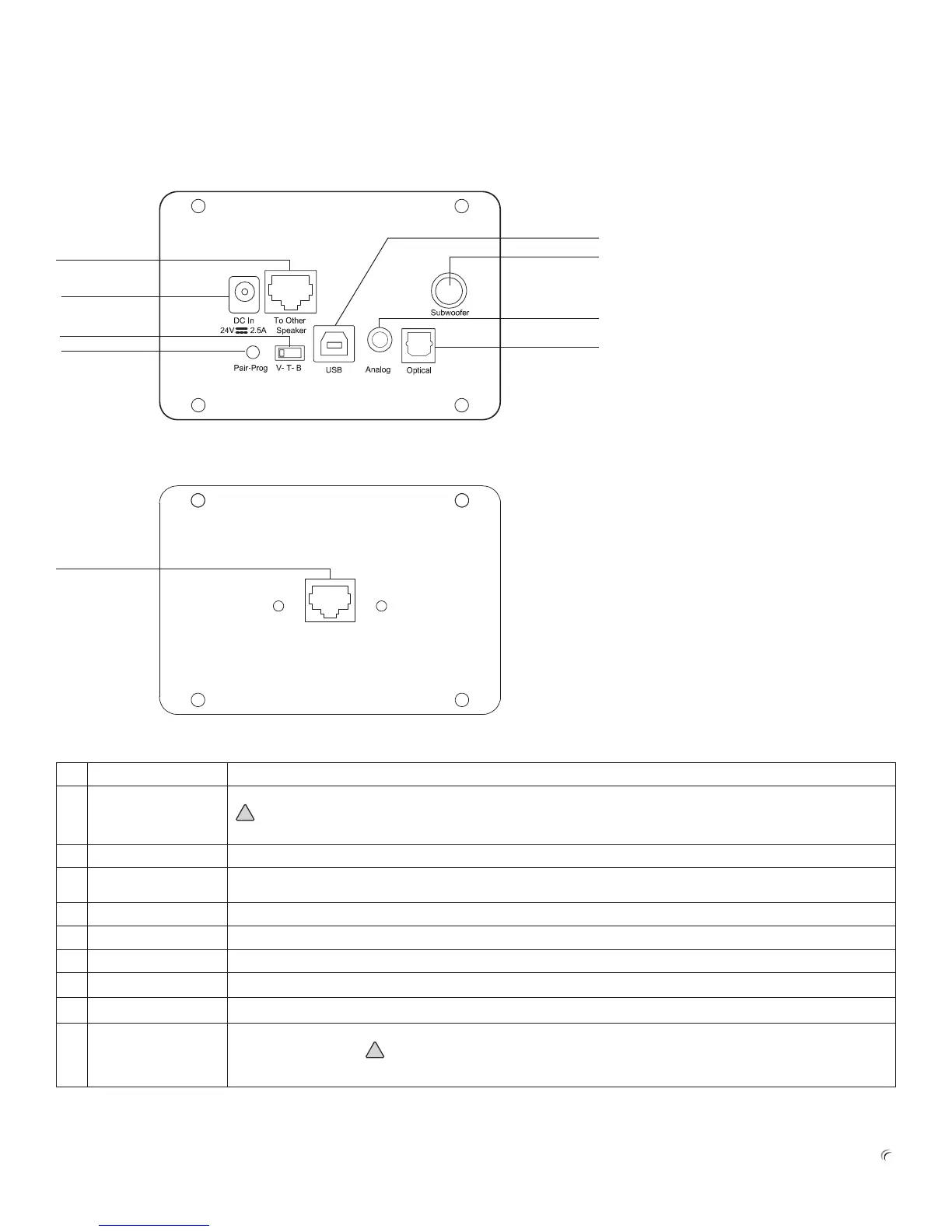
Passive Speaker Back Plate Overview
# Feature Description
1 TOOTHERSPEAKER AmplierOUTPUTconnectortoconnecttheactivespeaker’sinternalampliertothepassivespeaker
DONOTconnectthisoutputtoanythingotherthanthepassivespeaker.THISSHOULDNEVERBE
CONNECTEDTOANYETHERNETEQUIPMENTORDAMAGEMAYRESULT.
2 POWERINPUT PowerinputforDCpowercablefromtheexternalpowersupply
3 VOL/TREB/BASS
SWITCH
Denesthefunctionofthepotentiometerlocatednexttothepassiveradiator.Alsousedtoselectspeakersetup
congurations.
4 PAIR/PROG PlacestheBluetoothreceiverinpairmode.Alsousedtoprogramspeakersetupcongurations.
5 USBIN DigitalAudioUSBinputforastandardUSBtypeBplug
6 SUBOUT Lineleveloutputforanoptionalpoweredsubwoofer
7 ANALOGIN Analoginputfora3.5mm(sometimescalledan1/8inch)stereoplug
8 OPTICALIN DigitalS/PDIFinputforaTOSLINKberopticplug
9 SPEAKERINPUT
CONNECTOR
PassivespeakerINPUTconnector.ConnecttotheamplierOUTPUTconnector(1)ontheactivespeakersusingthe
speakerwireprovided.
DONOTconnectthisinputtoanythingotherthantheactivespeaker.THISSHOULD
NEVERBECONNECTEDTOANYETHERNETEQUIPMENTORDAMAGEMAYRESULT.
Active Speaker Back Plate Overview
2
3
1
9
4
5
6
7
8
(continued next page)


 To Next Page