- Disconnect the cable from the bypass.
- Remove the by-pass module from the unit.
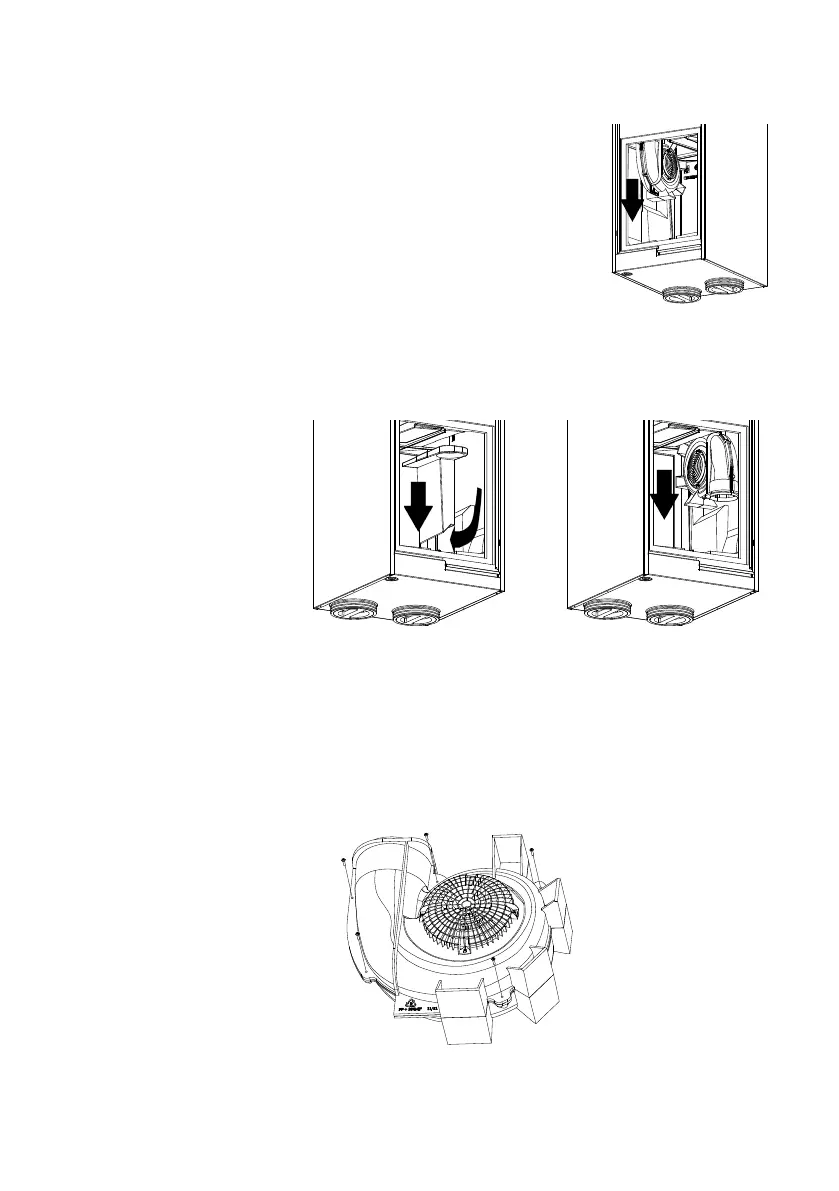
- Slide the snail shell down.
- Disconnect the following connectors:
• Power cable fan
• Signal cable fan
• Temperature sensor
- Remove the snail shell including fan from the unit.
For the supply fan:
- Remove the EPP insert from - Slide the snail shell
the device downwards
- Disconnect the following connectors:
• Power cable fan
• Signal cable fan
• Temperature sensor
- Remove the snail shell including fan from the unit.
• Loosen the 5 screws on the outer edge of the snail shell housing.
INSPECTION/ CLEANING FANS 27
1.
2.
TOE - EPP inzetstuk verwijderen.pdf 1 20/08/2018 17:33
AFV - Slakkenhuis verwijderen.pdf 1 20/08/2018 17:32
TOE - Slakkenhuis verwijderen.pdf 1 20/08/2018 17:34
Slakkenhuis demontage.pdf 1 20/08/2018 17:34



 To Next Page