252 Driving and operating
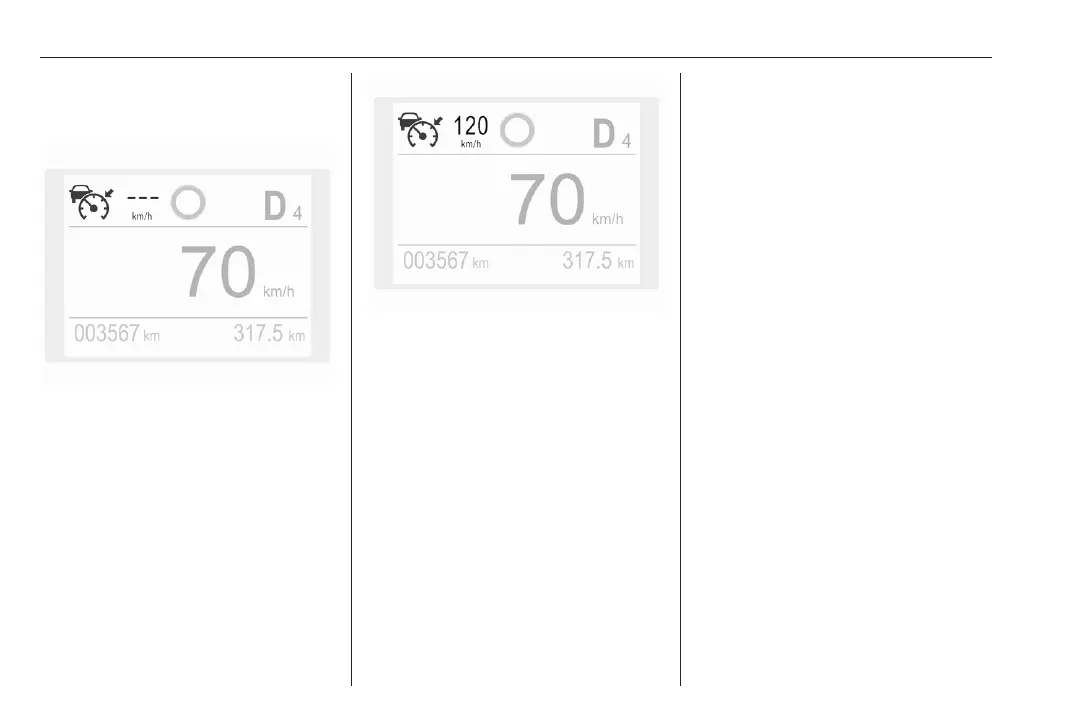
Press C, the symbolC is indicated in
the Driver Information Centre. The
system is still not active.
Activation of the functionality by
setting the speed
The adaptive cruise control has to be
switched on manually at a speed
between 19 mph and 112 mph.
For vehicles with automatic
transmission, the automatic selector
lever must be in position D or M.
Accelerate to the desired speed and
move the thumb wheel to SET/-. The
current speed is stored and
maintained.
The speed value is indicated in the
Driver Information Centre.
When the adaptive cruise control is
operating, the stop-start system is
automatically deactivated.
Adopting the speed limit from the
traffic sign assistant
The intelligent speed adaptation
informs the driver when a speed limit
is detected by the traffic sign
assistant. The detected speed limit
can be taken over as new set speed
for the adaptive cruise control.
Using the camera at the top of the
windscreen, this system detects and
reads speed limit and end of speed
limit signs. The system also takes into
account the information on speed
limits from the navigation map data.
If the adaptive cruise control is active,
the recognised speed limit will be
displayed in the Driver Information
Centre and MEM illuminates.
Press MEM on the steering wheel to
request saving of the suggested
speed.
Press MEM on the steering wheel
once more to confirm and save the
new speed setting.
This speed limit is now the new set
speed of the adaptive cruise control.
The function can be activated or
deactivated in the personalisation
menu 3 107.
Traffic sign assistant 3 278
Overriding set speed
It is always possible to drive faster
than the selected set speed by
depressing the accelerator pedal.
When the accelerator pedal is













 To Next Page