Driving and operating 275
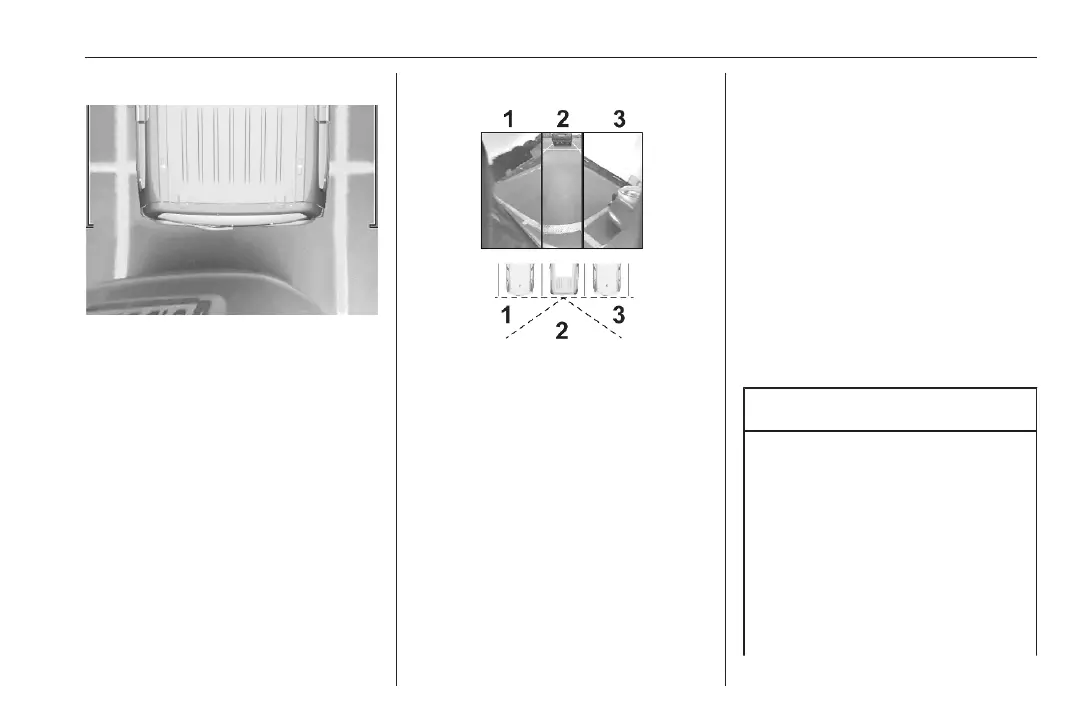
Rear zoom view / Zoom view
The camera records the vehicle's
surroundings during the manoeuvre
in order to reconstruct a view from
above the rear of the vehicle in its
near surroundings, allowing the
vehicle to be manoeuvred around
obstacles nearby. This view is
available with AUTO Mode or in the
view selection menu.
Rear side view / 180° view
The 180° view facilitates reversing
out of a parking bay, making it
possible to see the approach of
vehicles, pedestrians and cyclists.
This view is not recommended for
carrying out a complete manoeuvre.
It is made up of three areas: left 1,
centre 2 and right 3. This view is
available from the view selection
menu only.
Deactivation
Panoramic view system is
deactivated when:
● driving faster than 6 mph
● seven seconds after disengaging
reverse gear
● by pressing the icon Ù in the left
upper corner of the touch screen
and then &
● opening the tailgate
● attaching a trailer or a bike carrier
System limitations
Caution
For optimal operation of the
system, it is important to keep the
lenses of all cameras always
clean. For the rear view camera,
there is a washer nozzle which will
be activated when the rear window
washer is operating.
If manually cleaning the lenses of
the cameras, rinse the lenses with
water and wipe with a soft cloth.













 To Next Page