DLKPro Inspection Key • Operating Instructions – Edition 03/2012 33
8 “DownloadTools” PC programme / Configuration module
Download configuration
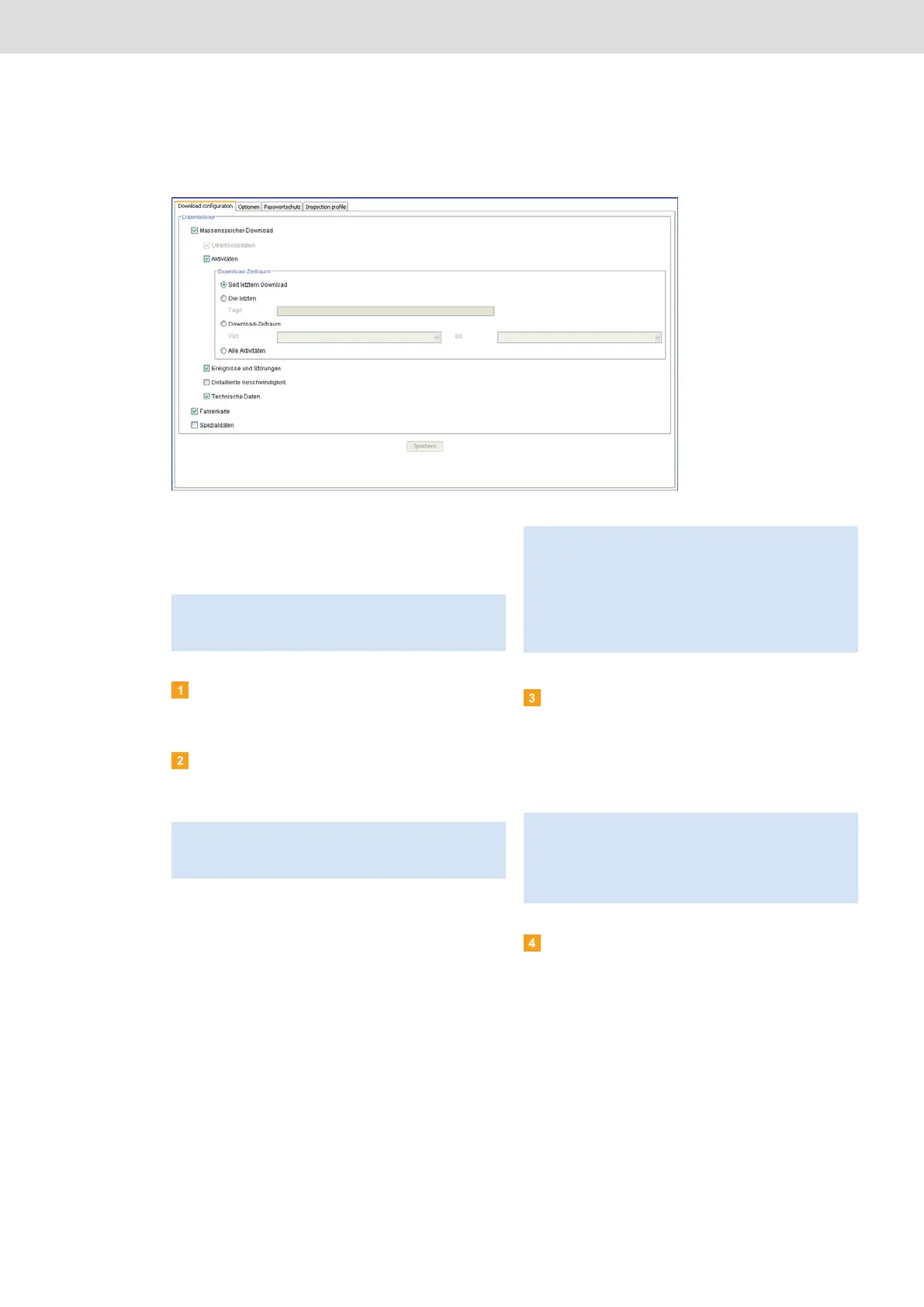
In the Configuration module on the Download
configuration tab, specify the data you want to
download from the digital tachograph.
Choose the Configuration module and then the
Download configuration tab if you want to modify
the download settings.
Specify the data to be downloaded in the future.
All data with a check mark will be included when
downloading.
Set the period for which data should be
downloaded:
• Since last download
• Last x days
• Download period From – to
• All activities
Click on [Save] to apply the changes.
Note: When delivered, the DLKPro is configured to
download all legally required data since the last
download.
Note: Please observe the regulations in force in your
country for archiving mass memory and driver card files
(M and C files).
Tip: You can limit the amount of data (and consequently
the duration of the download) for the Activities and
Special Data blocks by entering a download period or
clearing the Detailed Speed check box.
Users of TIS-Web
®
or TIS-Office
®
must ensure that the
DLKPro download settings match the settings specified
in TIS-Web
®
or TIS-Office
®
.
Note: If you set a specific date range for the data
download, that range will apply to all future download
procedures using this DLKPro.
When the download is complete, please remember to
change the settings for the next download procedures.


 To Next Page