DLKPro Inspection Key • Operating Instructions – Edition 03/2012 38
8 “DownloadTools” PC programme / Support module
Collecting support files
The DLKPro lets you to collect all the service-relevant
files in a ZIP file in the support folder. These files also
include a log file.
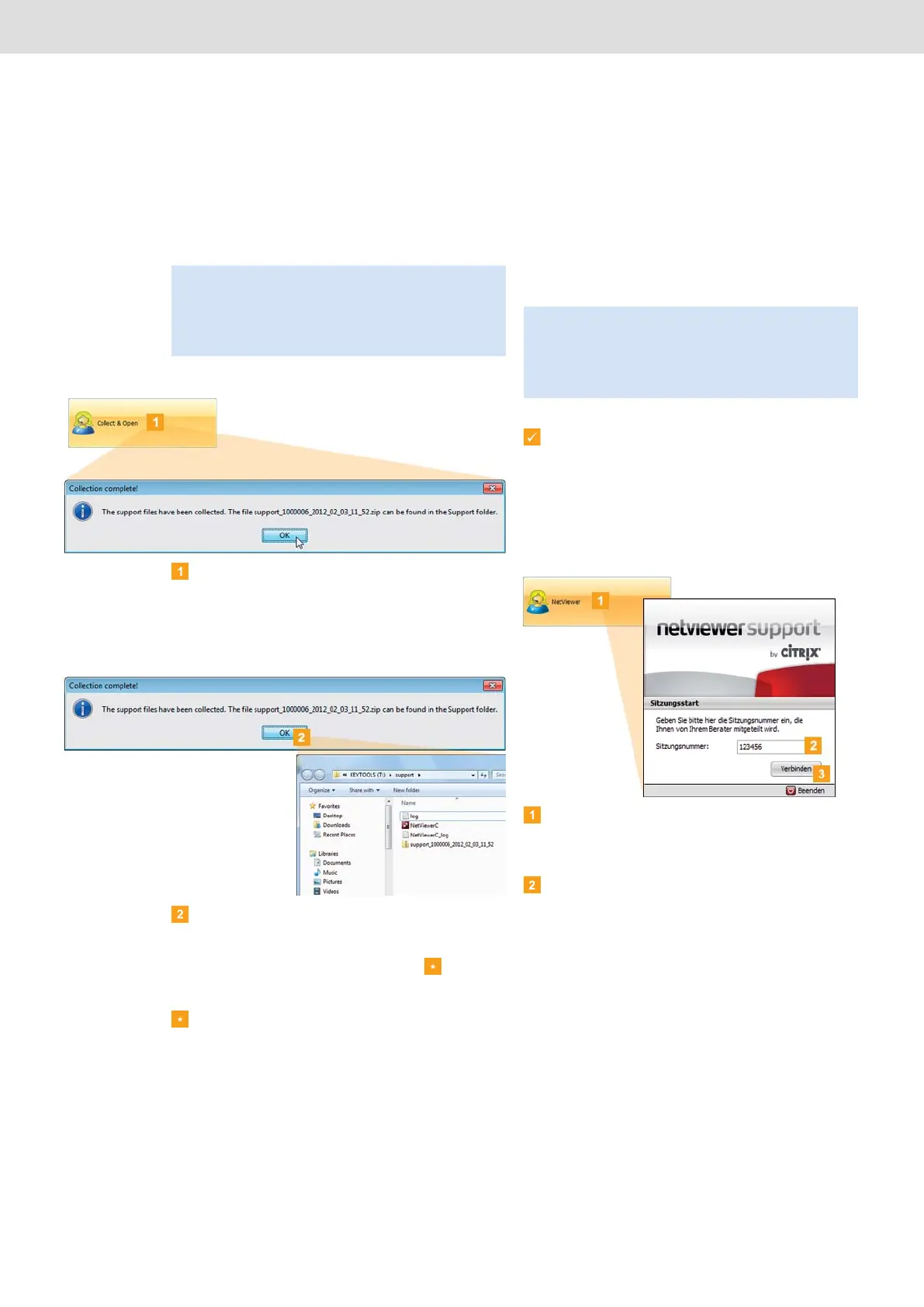
Click on [Collect & Open] to collect the service-
related files (log file and configuration files) in a ZIP
file.
When the ZIP file has been created, the Collection
complete! dialogue box is displayed.
Click on [OK] to close the Collection complete!
dialogue box.
Windows
®
Explorer automatically opens the
directory in which the ZIP file is stored .
You can now send the data to your service partner.
If the directory does not open, start Windows
®
Explorer and switch to the KEYTOOLS:\Support
directory.
Tip: The log file indicates any errors and/or problems
when downloading data.
Use this function if you notice repeated irregularities
during downloading. Then e-mail the ZIP file to your
service partner to ascertain the cause behind the errors.
Starting Netviewer
If you agree, your service partner can also solve a
support problem directly on your computer:
The DLKPro includes the Netviewer software which, with
your permission, gives your service partner access to
your computer.
Requirements:
• You have already discussed it with your service
partner, he has dictated a session number to you
and now wishes to access your computer using
Netviewer.
• The DLKPro must be connected to a computer
which in turn is connected to the Internet.
Click on [Netviewer] to grant your service partner
access to your computer.
Netviewer is launched.
Enter the session number given to you by your
service partner.
Note: A session number is required each time a
connection is established. This number is uniquely
generated for each individual Netviewer session. When
the connection is ended, your service partner can no
longer access your system.


 To Next Page