DLKPro Inspection Key • Operating Instructions – Edition 03/2012 39
8 “DownloadTools” PC programme / Support module
Click on [Connect].
The connection is established.
Click on Close to exit the Netviewer session.
Carrying out a software update
When the PC programme is started, a version check is
performed.
If the version being used is different from the
manufacturer’s current version, a dialogue box opens.
Click on [OK] to carry out the update.
If you cancelled an update procedure, you can initiate a
new update later via the Support module.
Prerequisite:
The DLKPro must be connected to a computer
which in turn is connected to the Internet.
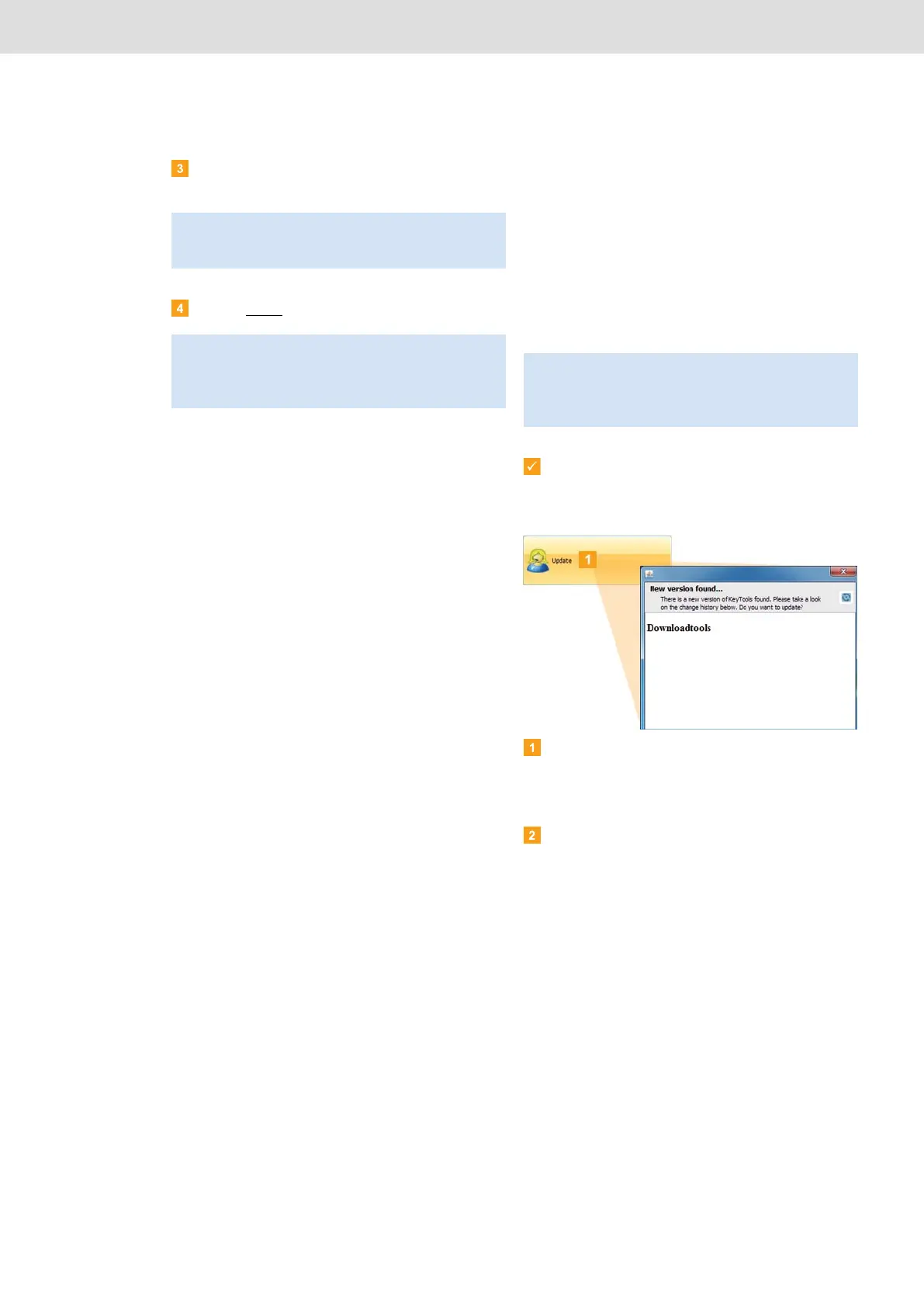
Click on [Update] if you wish to check whether or
not a more up-to-date software version is available.
If a more up-to-date software version is available, a
message to that effect is displayed.
Click on [Install Update] to install the software.
Note: In Netviewer, you must grant your service partner
the necessary rights, e. g. to display your screen or to
move your mouse pointer.
Note: The Netviewer session can be ended by you or
your service partner at any time. If your service partner
ends the session, the following message is displayed:
“The session has been ended”.
Note: If you have cancelled the update and you do not
carry it out via the PC programme, a dialogue box will
again be displayed the next time you start the
PC programme.


 To Next Page