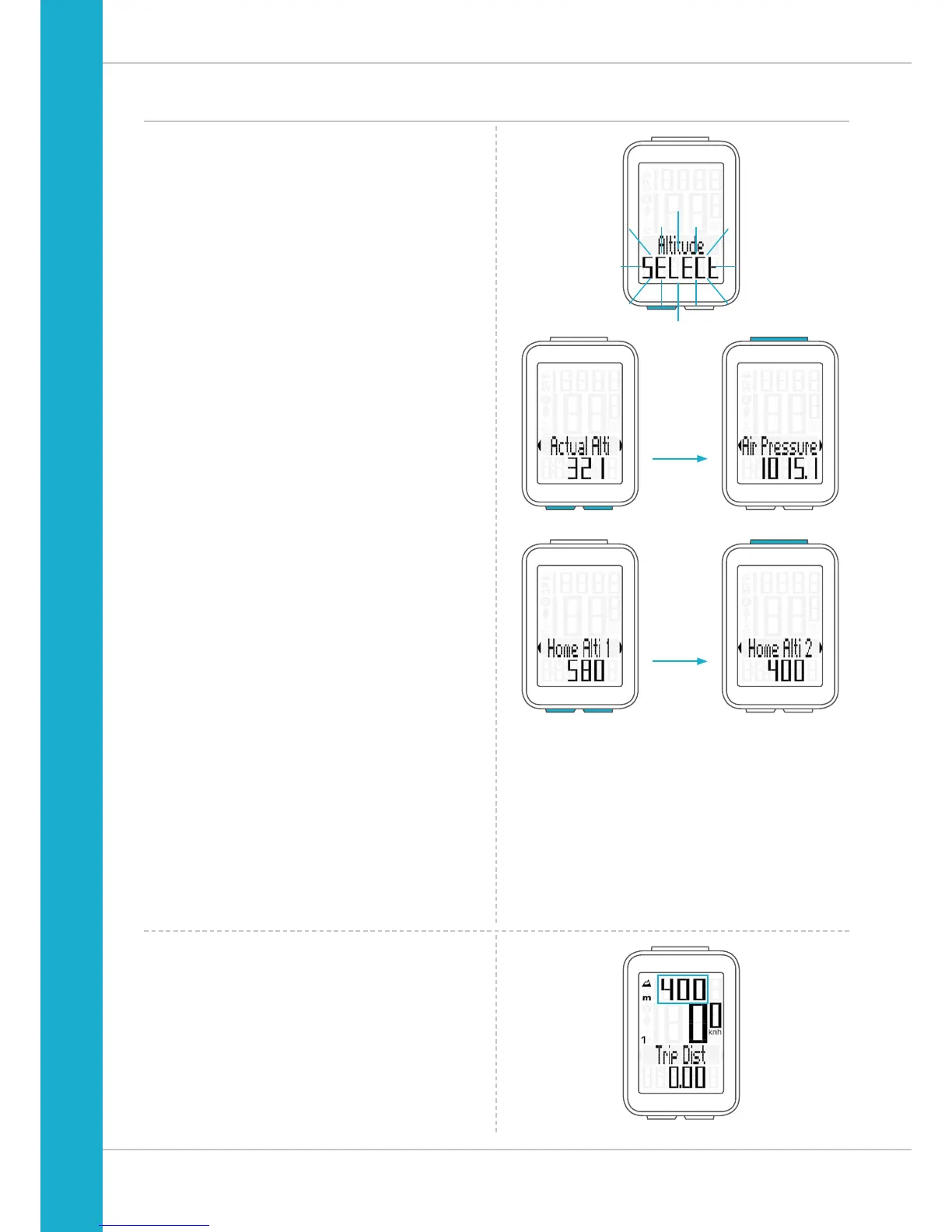
Recalibrating the altitude before starting
Why is it necessary to recalibrate the M4 WL?
The M4 WL measures the current air pressure and converts
it into an altitude measurement. The air pressure changes
daily depending on the weather. This leads to a constantly
changing current altitude measurement
HOWEVER: your home start altitude has not changed.
During recalibration, the currently measured air pressure is
recalculated on the basis of a reference value – the preset
start altitude for your home.
Following recalibration, the M4 WL again correctly displays
the start altitude as the current altitude.
To calibrate the cycle computer, press and hold the
ALTI button until the menu opens.
“Altitude SELECT” flashes on the display.
You can now choose whether you want to:
– set the current altitude to the correct value
– set the current sea level pressure to the correct value
– use the start altitude 1 as the reference value for the
recalibration
– use the start altitude 2 as the reference value for the
recalibration
Press the BIKE or ALTI button to scroll to Home Alti 1 or
Home Alti 2 depending on where you are setting off from.
Press the SET button to confirm the desired start altitude.
The M4 WL now stores the preset values and displays the
start altitude as the current altitude at your present location.



 To Next Page