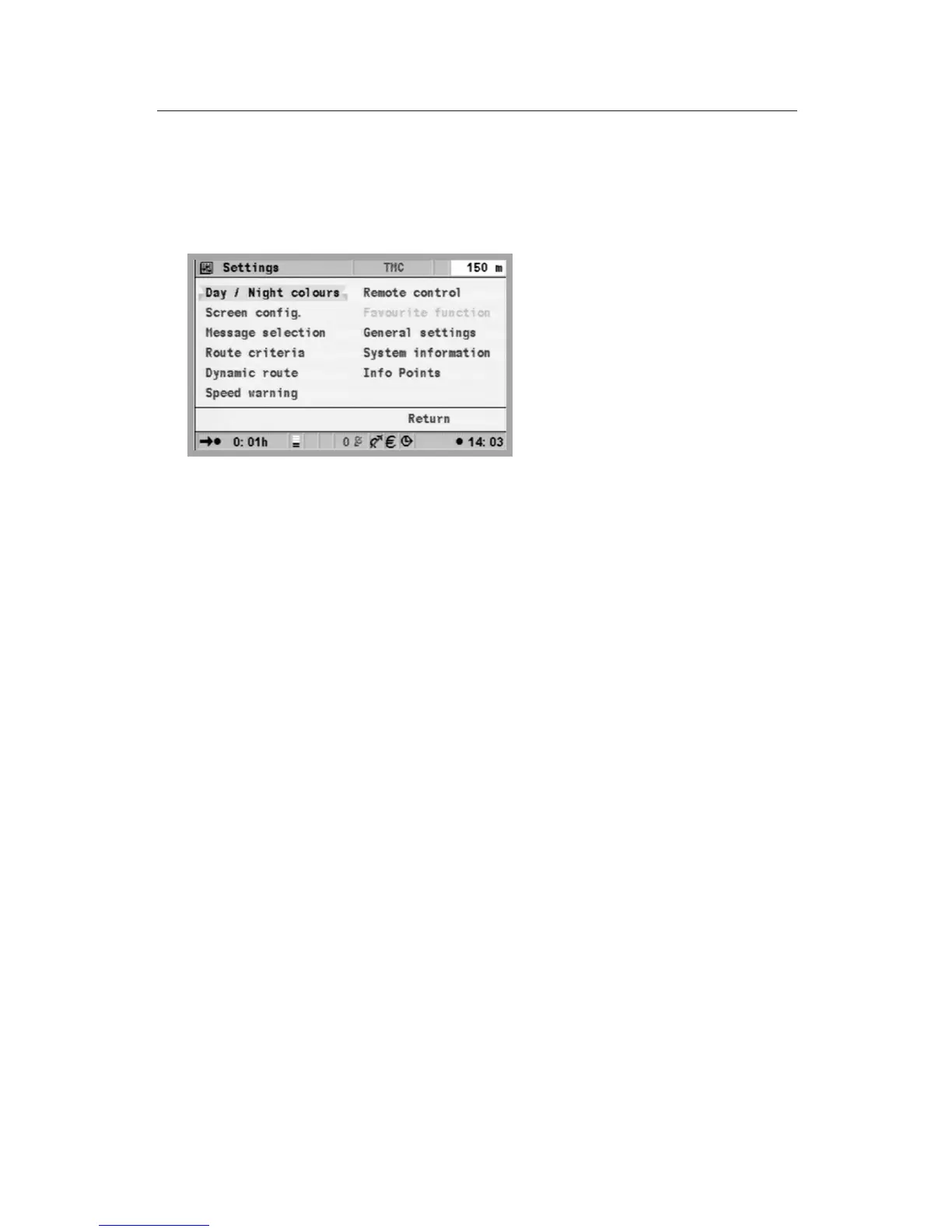
Settings – adjusting the navigation system
You can change several settings to adapt the navigation system to meet
your personal requirements. The following functions are available in the
“Settings” menu and can be selected from the Start menu:
•
Day / night colours
•
Screen config.
•
Message selection
•
Route criteria
•
Dynamic route
• Speed warning
•
Remote control
•
Favourite function
•
General settings
•
System config.
•
Info Points
Day / night colours
Selection of options:
•
Automatic switching of day and night colours, whereby the night
colour is selected whenever the headlights of the vehicle are switched
to low beam.
•
Always day colour
•
Always night colour
u
Select “Day / night colours” in the “Settings” menu, and press the
OK key.
u
Select one of the three options and press the OK key.
The brightness of the screen can be adjusted on the monitor.
17
GENERAL INFORMATION


 To Next Page