On the guidance display
Ê
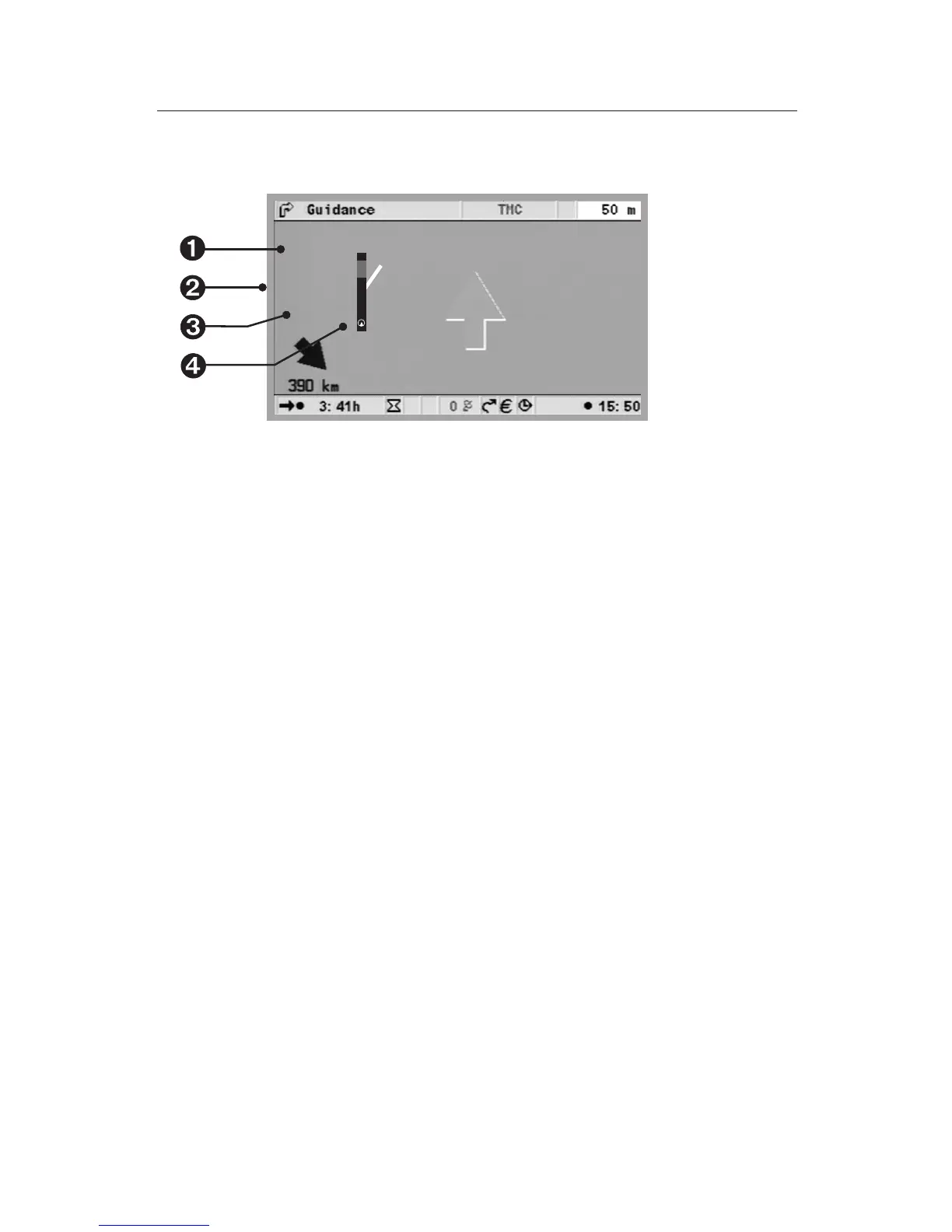
TMC symbol: Indicates the type of road obstruction. If a number of
obstructions exist, this is indicated by means of a second TMC symbol
which is partially obscured by the first.
Ë
d + Unit of measure (red): Length of the road obstruction, or distance
to the end of the section affected by stationary traffic.
Ì
Unit of measure: Distance to the beginning of the section affected by
stationary traffic.
Í Simplified presentation of the route (black bar) and location of the
road obstruction (red segment). Vehicle position is shown as a circle
with an arrow inside.
For urgent traffic information, a special note is displayed on the screen
(can be deleted by confirming with the OK button). In addition, this
information is provided as an audible message. Please not that
route-specific traffic information can only be displayed if guidance is
active.
TMC detail information
You can choose to have detailed information about specific road
obstructions displayed at any time.
Map display
u
Press the OK button to open the function list.
u
Select “Traffic view”, and press the OK button. The map display
shows a square cursor field.
u
Using the remote control cursor buttons move the cursor field to
the icon for the TMC that you wish to consult. Press the OK
button. The screen displays a window containing the requested
traffic report.
43
NAVIGATION
Gambacher Kreuz
A 45, Linden
J
d
34 km
14 km


 To Next Page