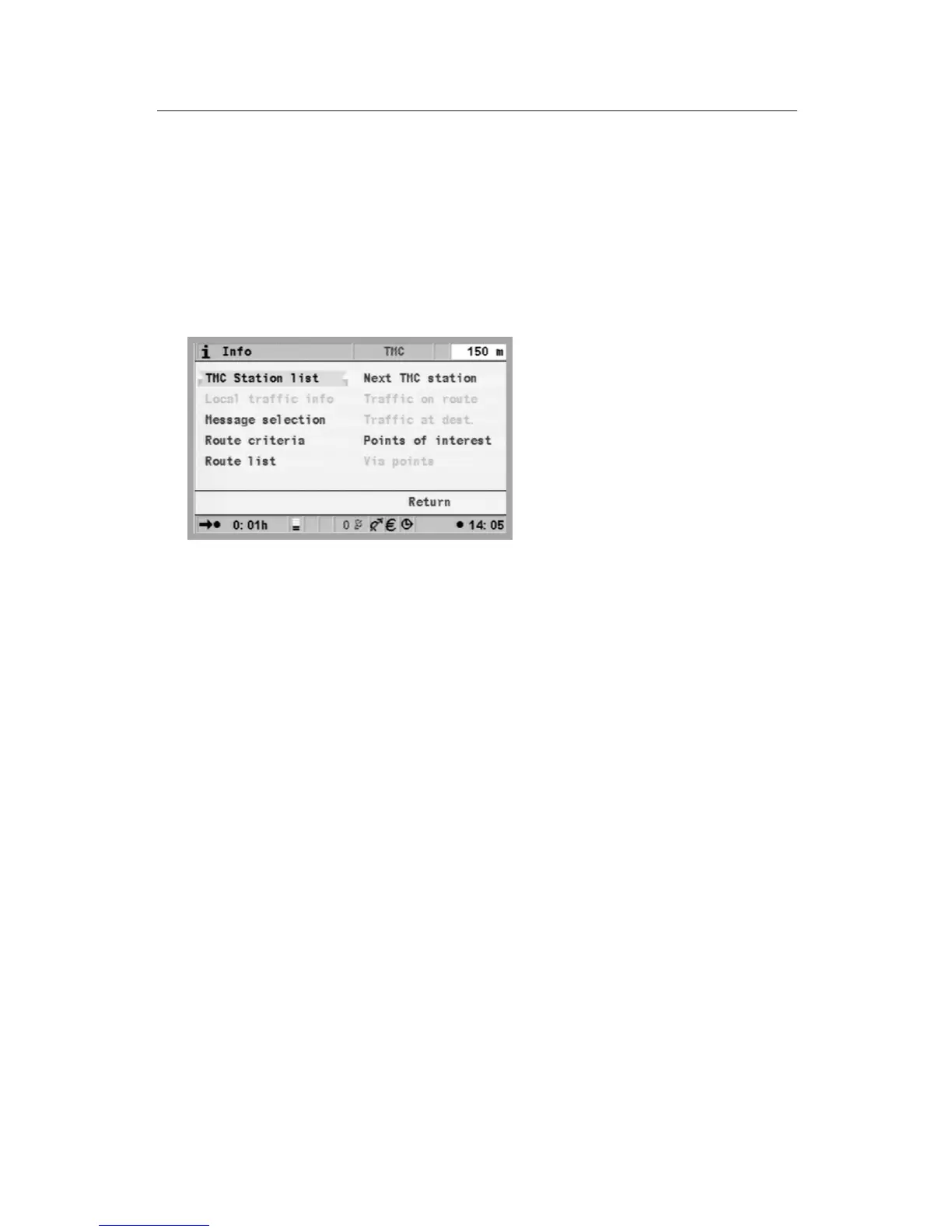
“Info” menu
The Info menu can be selected from the Start menu and from all guidance
screens. From a guidance screen:
u
Press the OK button from one of the navigation screens.
u
Select ”Info”, press the OK button.
u
From the Start menu, select ”Info”, and press the OK button
The following options are available:
•
Message selection: Selection list for TMC messages, to be displayed on
the screen and output acoustically.
•
Traffic on route*: List of road obstructions on the planned route
•
Local traffic info*: List of road obstructions in a circumference of 400km
from the current vehicle position if they are provided by the TMC
supplier.
•
Traffic at dest.*: List of road obstructions in a circumference of 400km
from the next via point/destination if they are provided by the TMC
supplier.
•
Route criteria: see chapter Settings.
•
Route list: List of the roads on the planned route.
•
Next TMC station*: Start scan for the next TMC station.
•
Points of interest: Display of a list of points of interest in the vicinity of
the vehicle’s position, see “Travel info” and “Special Destination” in the
Start menu.
•
Via points: Display of the next via point in the via point list.
*Only for system expansion starting from MT 5010.
47
NAVIGATION


 To Next Page