¹
TMC symbol for the next road obstruction on the planned route (only
with TMC source connected and TMC traffic information available).
º
Menu name
»
Distance to the next change of direction.
¼
Name of the street to turn into (next change of direction).
Ñ
Directional arrow for next crossing or junction.
Ò
Current location of the vehicle: Street name, town name and district, if
available on the map DVD/CD.
Ó
Status line (see also chapter Settings)
Map display
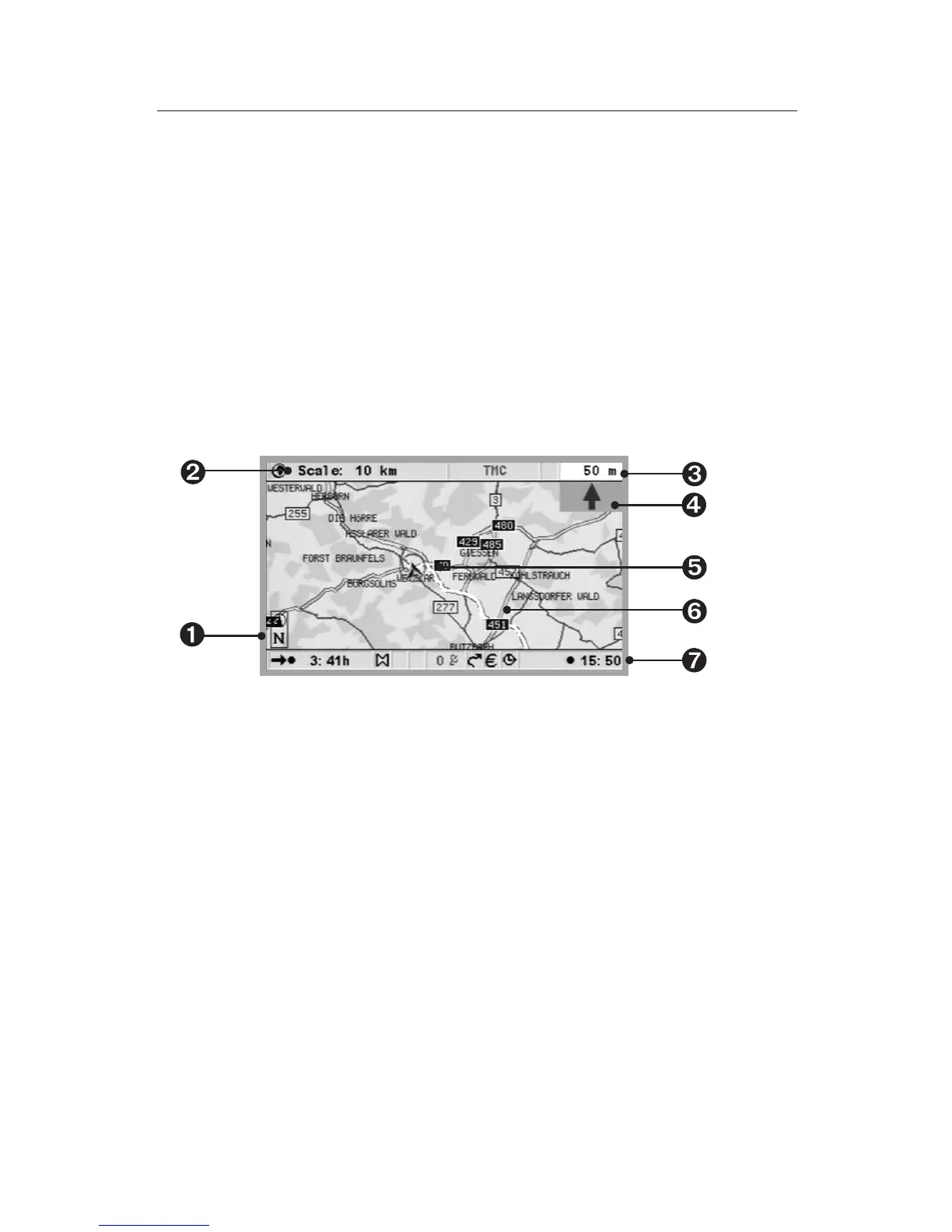
The map display can be selected when guidance is active, by pressing the
MAP or Navigation button, or by selecting ”Map” in the “Start menu”.
Ê
Compass: The arrow in the circle points north.
Ë
Selected scale
Ì
Distance to the next change of direction.
Í
Simplified graphical presentation of the direction of travel, the next
crossing or junction.
Î
Vehicle position, arrow indicates current direction of travel.
Ï
TMC symbol for the next road obstruction on the planned route (only
with TMC source connected and TMC traffic information available).
Ð
Status line (see also chapter Settings)
Split screen
This screen display combines both of the display types previously
described. Road obstructions are not shown in this display mode.
39
NAVIGATION
7
J


 To Next Page