RC 5400
Ê
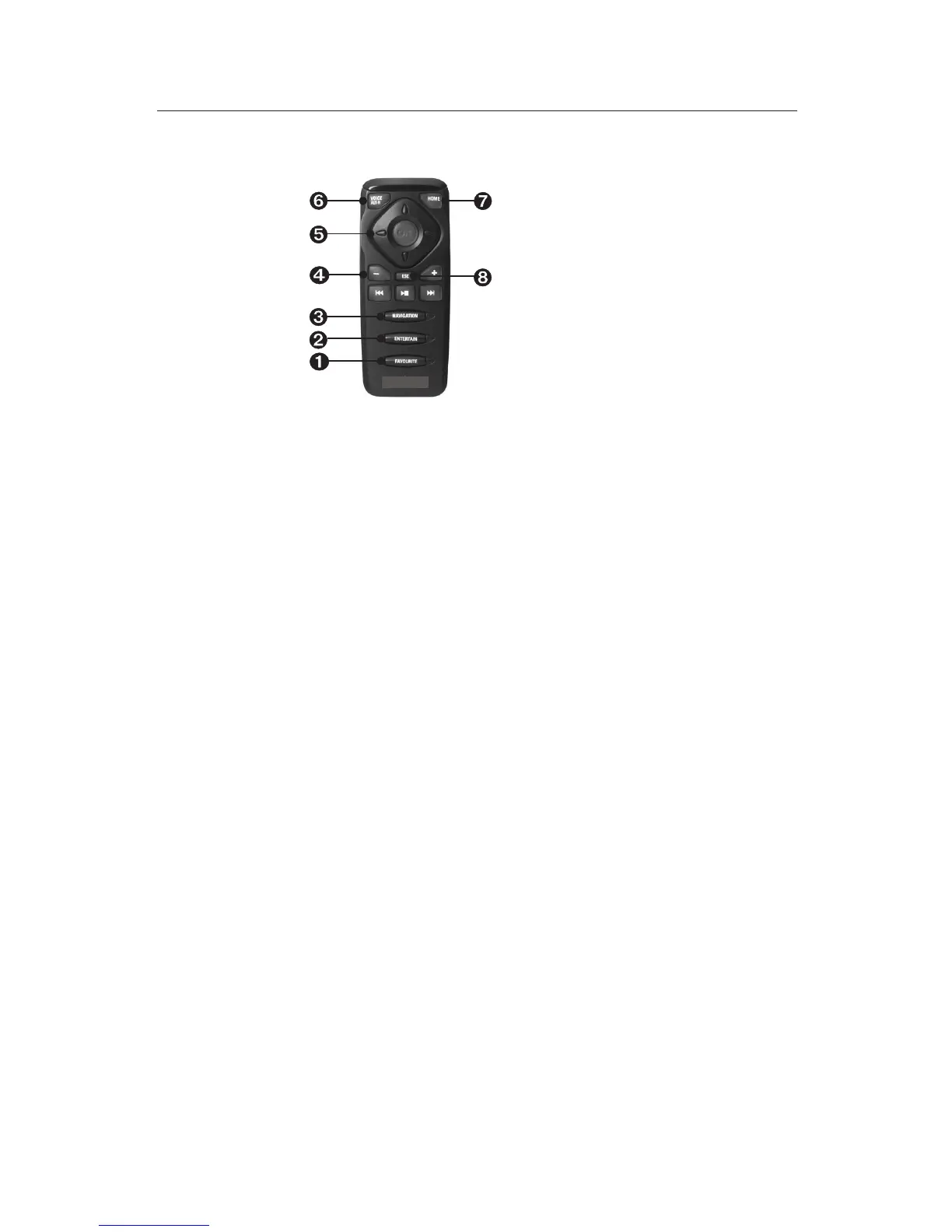
FAVOURITE - This button is freely programmable to provide direct
access to selected functions. (See also the section entitled “Settings”).
Ë
ENTERTAIN - Press the button < 1 second to access the entertainment
source last used.
Ì
NAVIGATION - Press the button < 1 second to switch between the
route guidance screens. Press the button > 1 second to directly access
the Start menu.
Í
Set the volume.
Î
Cursor keys as well as OK confirmation key.
Ï
VOICE / ALT-R - Press the button < 1 second to call up the current
audible route guidance information. Press the button > 1 second to
plan an alternative route.
Ð
HOME - If your own address is saved press the HOME button
< 1 second to call up this address. Press the button > 1 second to load
the address which is saved under “Work”.
Ñ
ESC - Press ESC < 1 second to access the previous menu. Press it
> 1 second to directly access the Main menu.
9
GENERAL INFORMATION


 To Next Page