3578 • CB500 VENDOR | 15
A. Gently remove hopper and set it on the right side.
B. Remove hopper bracket
screws (2 places). Remove
hopper bracket.
C. Remove the clamp screw
holding the temperature
sensor. Remove the
temperature sensor.
D. Remove evaporator screws.
4. Carefully move wire harness and
cables out of the way.
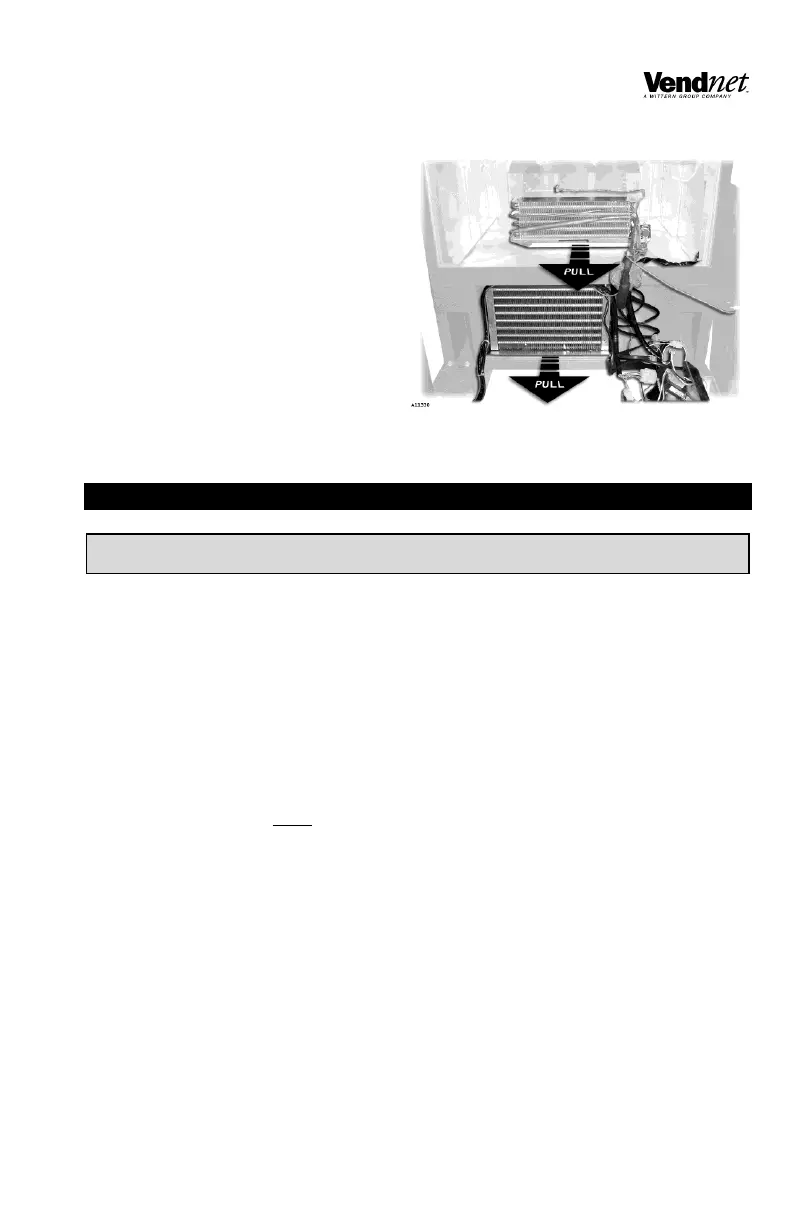
5. Grip the front lip of the condenser
base and the evaporator base
and pull out at the same time.
See Figure 15.
6. To re-install the refrigeration unit,
then reverse the steps.
CARE & CLEANING
CABINET EXTERIOR
Wash with a mild detergent and water, rinse and dry thoroughly. Wipe occasionally
with a quality car wax. Plastic exterior parts may be cleaned with a quality plastic
cleaner.
CABINET INTERIOR
Wash with a mild detergent and water. Including baking soda or ammonia in the
cleaning solution may eliminate odors. Remove and clean drain hose to eliminate
any deposits that may restrict condensate water flow.
The vend mechanisms must be kept clean. Any build-up of syrup deposits can
cause the mechanisms to malfunction. Use soap and water with great care so as
not to get water into the electrical components.
To ensure proper vending keep delivery slide area free of dirt and sticky
substances.
REFRIGERATION SYSTEM
Clean dust from condenser and screen in the front door with a soft bristle brush or
vacuum cleaner. Remove any dirt or debris from the refrigeration system
compartment. Remove and clean the condensation pan.
Do not block the evaporator or any area of the airflow with product or supplies.


 To Next Page