3578 • CB500 VENDOR | 9
To adjust the back spacer:
Lift the back spacer and reposition it in the adjustment slots. Use notch markers as
reference points to align it vertically. See Figure 4.
To adjust the latch striker and gate assembly:
Pull and lift up on the lower end of the gate
assembly (or latch striker). Use a small
screwdriver as a wedge to gently pry the
dimple away from the slot opening. See
Figure 4. Reposition them in the adjustment
slots. Use notch markers as reference points
to align it vertically.
8. If product spacing is correct, then test
vend each column using real money.
9. Load the columns to full capacity.
LIVE DISPLAY
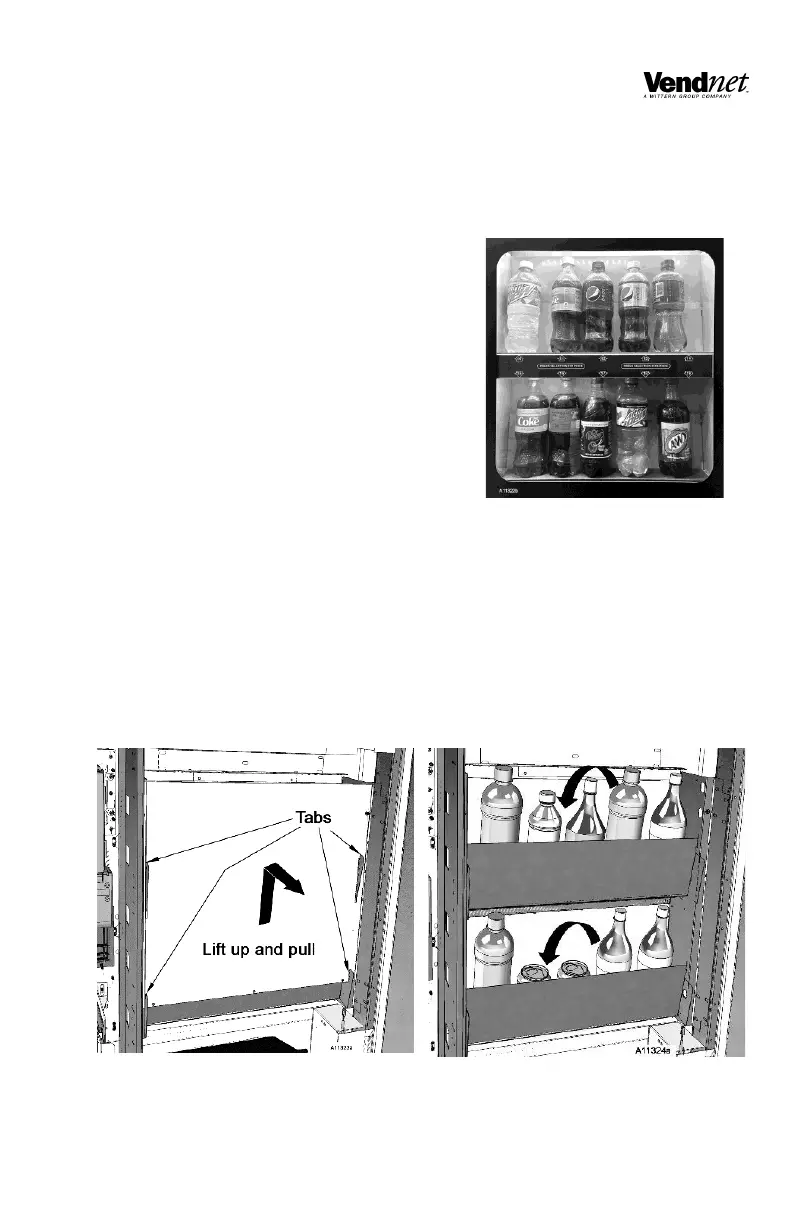
Make sure that the Live Display price and
selection labels are set and installed
correctly. Labels and product containers must face outward toward the customer
and must match the products being loaded. See Figure 5.
LOADING THE LIVE DISPLAY
1. Open the main door, and then open the Inner Door.
2. Firmly grip the top edge of the Live Display Panel. Lift it up then pull. Live
display is secured in place with four tabs. See Figure 6.
3. Load the can or bottle on two shelves. See Figure 7.
4. Close the Live Display Panel.


 To Next Page