4. INSTALLATION
5.
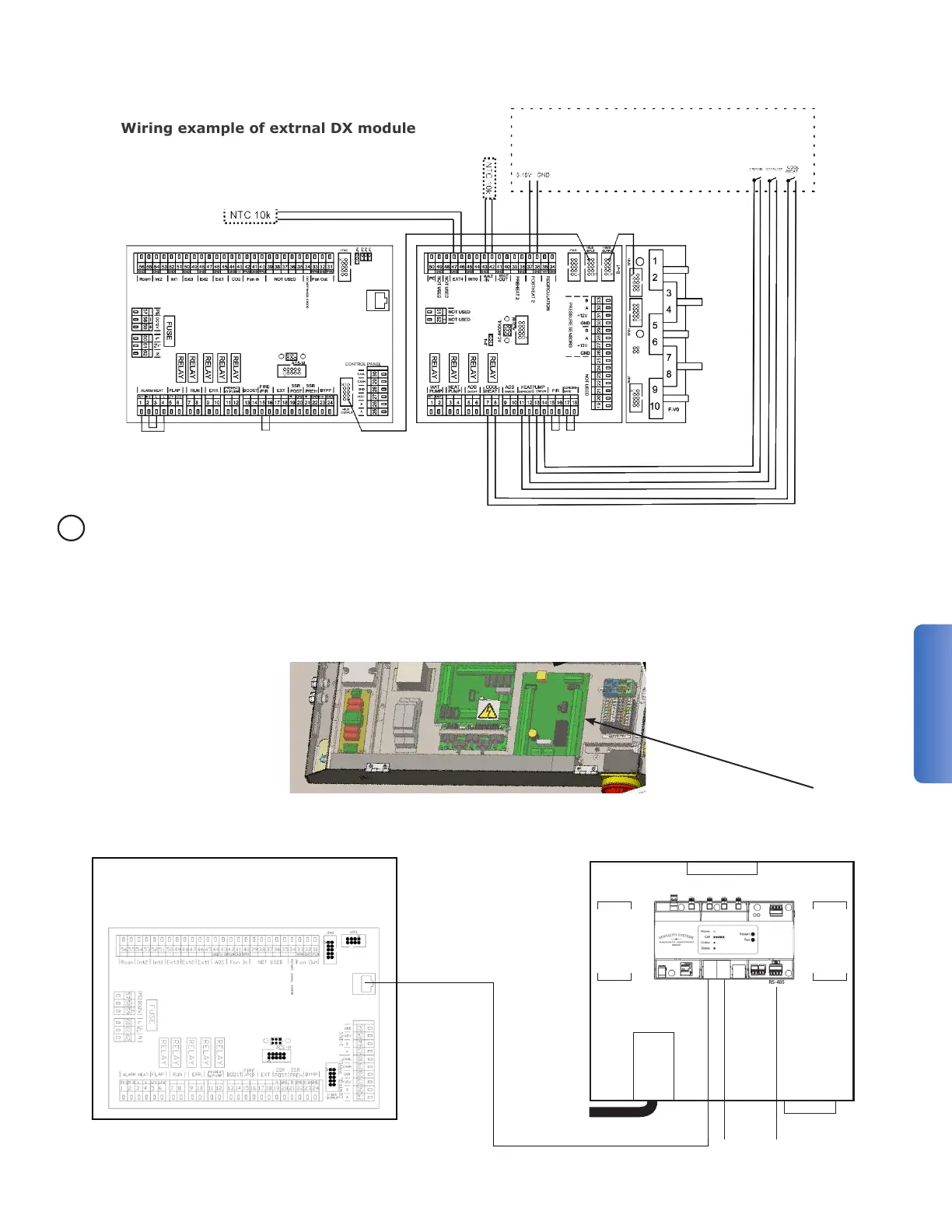
via the grommet. Terminate the cat5e/6 cable at the ethernet port on the Module A board.
1001
QUICK START INSTRUCTIONS:
For more help at each step, scan this QR code
or go to: ventacity.com/qr/1001
1. Mount the SBC100 on a wall (see Installation Guide) with either:
a. Good Verizon LTE signal (3 bars or more of LTE signal on a phone) or,
b. Within close proximity of an Ethernet connection with internet service
(if used, plug into the ETH0 port of the Gateway).
2. If you are connecting any external Modbus devices, wire the Modbus
cable to the RS-485 terminals of the Gateway. Be sure to review the
QR code help for advanced wiring considerations.
3. If there are any Ethernet devices (such as Ventacity HRV/ERVs) under the
control of the SBC100:
a. For exactly one Ethernet device, plug it directly into the ETH1 port of
the Gateway.
b. For more than one Ethernet device, plug each device into an
Optional Ethernet Switch which is connected to the ETH1 port of
the Gateway.
4. Connect the power cord, powering on the SBC100.
5. You are now ready to begin using the SBC100. Refer to the QR code
help for next steps.


 To Next Page