Ventis™ MX4 Product Manual
© 2014Industrial Scientific Corporation
12
the up arrow icon displays.
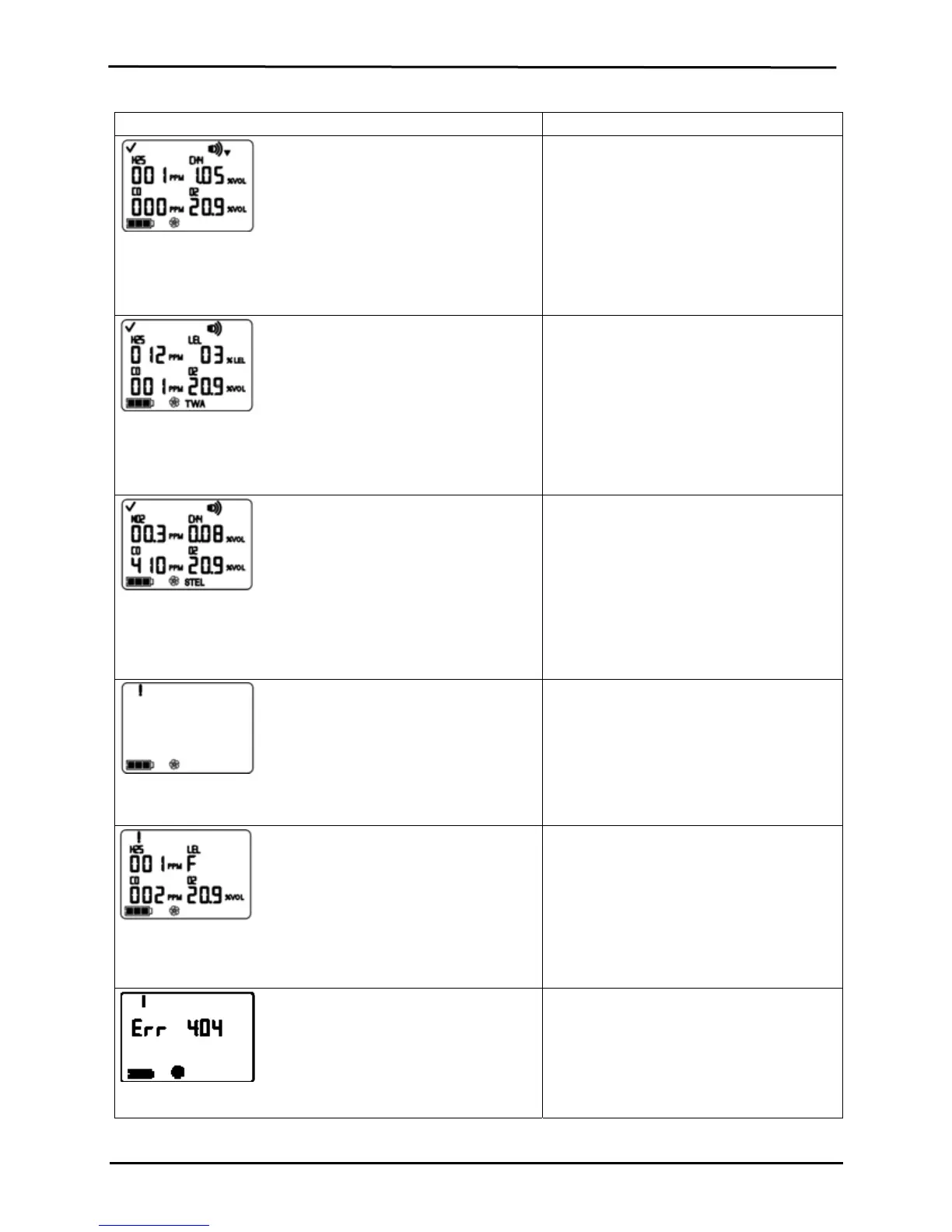
Low Alarm Screen
A flashing gas concentration value* indicates which sensor(s)
reading(s) is the cause for alarm. The low level alarms turn on and
the down arrow icon displays.
A low alarm condition occurs when the
concentration of gas sensed reaches the
monitor’s low alarm value setting for a
sensor(s).
TWA Alarm Screen
A flashing gas concentration value* indicates which sensor(s)
reading(s) is the cause for alarm. The low level alarms turn on and
the TWA icon flashes.
A TWA alarm occurs when the calculated time
weighted average reaches the monitor’s
hazardous value for the set time frame.
STEL Alarm Screen
A flashing gas concentration value* indicates which sensor(s)
reading(s) is the cause for alarm. The low level alarms turn on and
the STEL icon flashes.
The STEL alarm occurs when the short term
exposure value exceeds the acceptable limit.
No Sensor Installed Screen
The system level alarms turn on and the error icon displays.
Alarm occurs when the monitor registers no
sensors installed.
Sensor Data Fail Screen
A flashing “F” indicates which sensor is the cause for alarm. The
audio alarm turns on and the error icon displays.
Alarm occurs when any installed sensor’s
data-related operations fail and the sensor is
not operational.
Critical Error Screen
Error codes 4XX to 5XX (404 shown here)
indicate the monitor has detected a
malfunction. The unit is not operational and
and should be examined by a qualified
technician or reported to Industrial Scientific
for service or repair information.


 To Next Page