Ventis™ MX4 Product Manual
11 © 2014 Industrial Scientific Corporation
ALARMS
NOTICE
All monitor alarms and warnings should be taken seriously and responded to as stated in company safety
standards.
Once initiated, an alarm will remain on while the alarm condition is present. For gas-related alarms, once the
detected gas concentration changes, the alarm indicators will change to reflect any new condition such as
low-alarm gas, high-alarm gas, over-range gas, or no gas alarm.
When the latch alarm feature is enabled and the monitor goes into alarm, it will remain in alarm until the
alarm condition no longer exists and the monitor user presses the ENTER button for one second. This
applies only to gas-related alarms.
It is practical for the monitor user to be aware of the possible alarms prior to monitor set-up and use. The Ventis MX4
has four alarm and warning levels. A “system level” alarm generates the highest frequency tone and highest level
visual and vibration signals. It is used to indicate such events as a pump or sensor failure. The “high” or “low” level
audio alarms, in combination with visual and vibration indicators, turn on when gas concentration readings are over-
range, high, or low. The lowest level indicator is a warning with beep patterns to indicate service needs (e.g., low
battery or calibration due). The beep is also used as a confidence indicator when enabled.
Alarm types and their alarm generating conditions are described below.
Display
Description
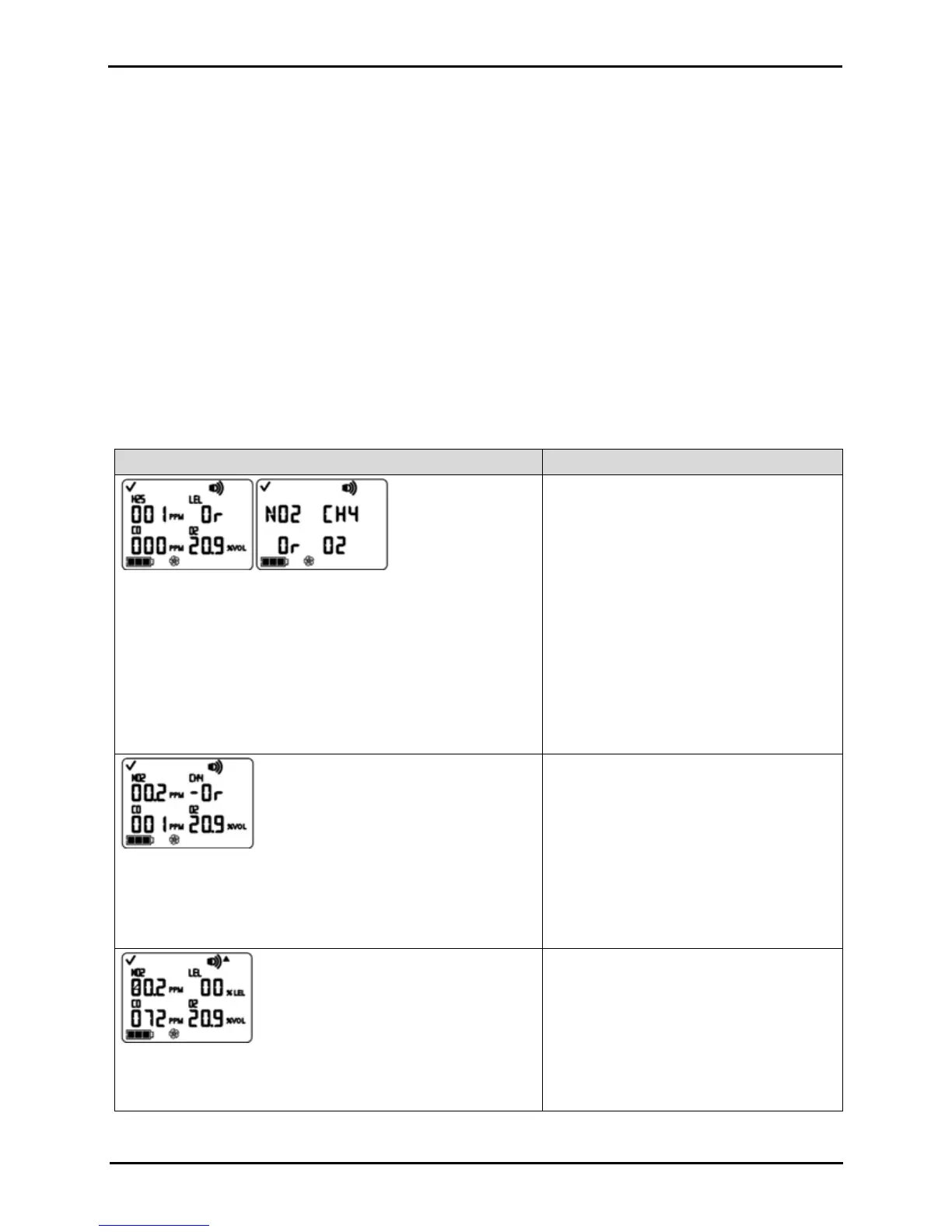
Over-range Alarm Screen
The “Or” message indicates which sensor(s) is reading an over-
range condition(s). All other sensors show their current gas
concentration readings on a numeric display (left) or gas names on
a text display (right). The high level alarms turn on and the alarm
icon displays.
An over-range condition occurs when the gas
concentration value sensed is above the
sensor’s measuring range.
After any over-range alarm, the monitor
should be calibrated.
NOTES: The O
2
and toxic sensor values normally
reset when the gas sensed reaches an acceptable
range.
If the LEL reads over-range, the alarm latches and
the LEL sensor is automatically turned off. Press
the enter button to turn on the LEL sensor. This will
turn off the alarm indicators. After a warm-up period
of approximately 30 seconds, an LEL reading will
display. If the new reading is an over-range or other
alarm condition, the alarm indicators will turn on.
Negative Over-range Alarm Screen
The “-Or” message indicates which sensor is reading a negative
over-range condition. All other sensors display their current gas
concentration readings*. The high level alarms turn on and the
alarm icon displays.
A negative over-range condition occurs when
the gas concentration value sensed is less
than the sensor’s measuring range.
After any negative over-range alarm, the
monitor should be calibrated.
High Alarm Screen
A flashing gas concentration value* indicates which sensor(s)
reading(s) is the cause for alarm. The high level alarms turn on and
A high alarm condition occurs when the
concentration of gas sensed reaches a level
greater than the monitor’s high alarm value
setting for a sensor(s).


 To Next Page