Ventis™ MX4 Product Manual
© 2014 Industrial Scientific Corporation
32
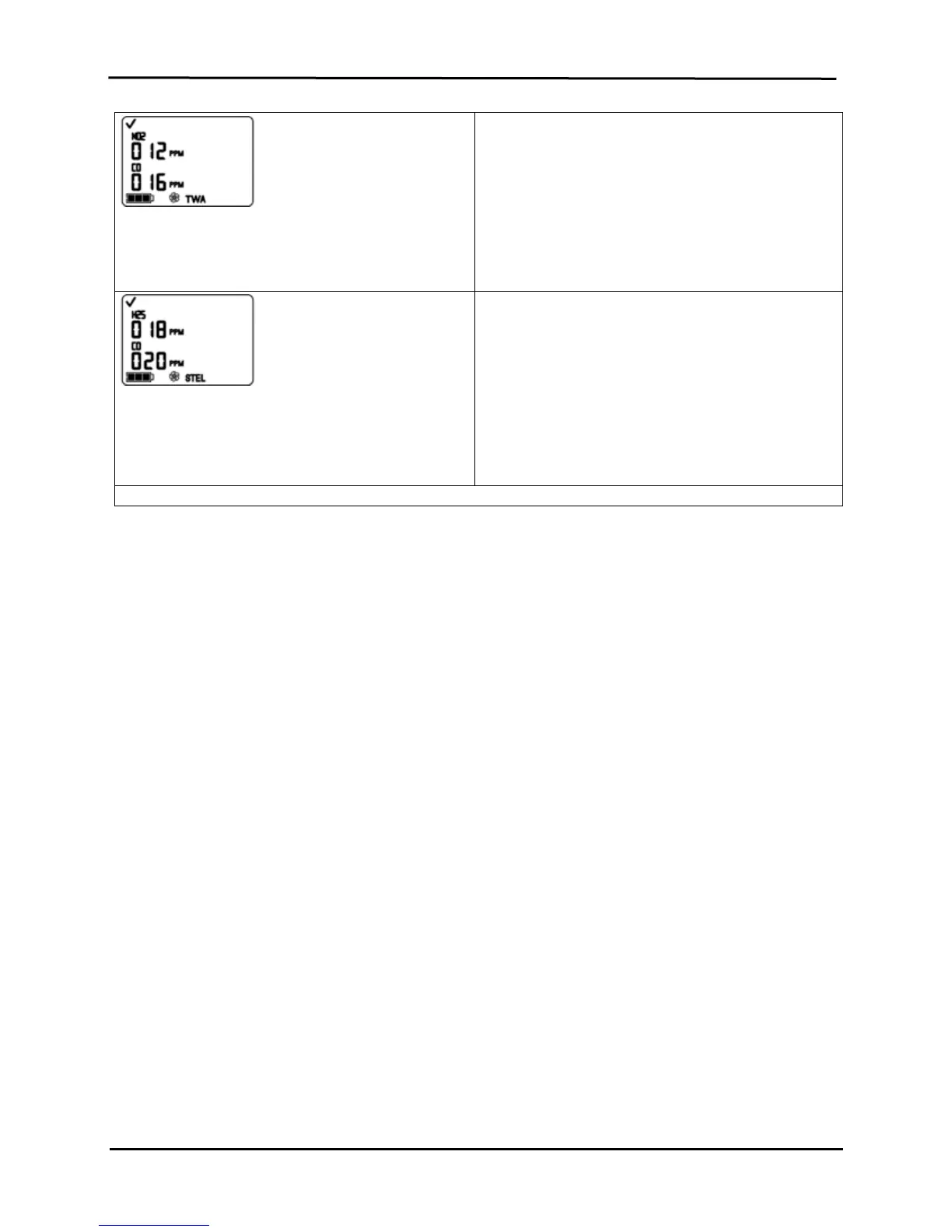
TWA Readings Screen
Displays the TWA (time weighted average) icon and
calculated readings for each toxic sensor installed; all
other sensor values are blank.
Press and release ENTER to clea
the displayed TWA
reading(s), if desired.
Press ON/OFF/MODE to advance to the STEL Readings
Screen.
STEL Readings Screen
Displays the STEL (short term exposure limit) icon and
STEL values for each toxic sensor installed; all other
sensor values are blank. The STEL value is the running
average over the last 15 minutes.
Press and release ENTER to clea
the reading(s), if
desired.
Press ON/OFF/MODE to advance to the Gas Monitoring
Screen.
* During the standard calibration process, a series of apply gas, in-progress, and results screens show for EACH sensor as it is calibrated or tested.
RECOMMENDED PRACTICES FOR IN-FIELD AIR SAMPLING
Diffusion monitor
When worn, the diffusion monitor should be fastened securely and attached to ensure the sensor portals are exposed
to the air. The monitor should be in full view. No part of the monitor should be covered by any garment or part of a
garment.
Aspirated monitor
Before using an aspirated monitor, force a pump fault to ensure the pump and air-sample accessories (sample
tubing, probe, or sample tubing and probe) are working as intended:
1 Power on the monitor.
2 Attach the air-sample accessory(ies) to the pump inlet.
3 Using a finger, cover the opening at the other end of the air-sample tubing (or probe) to block the flow of air.
This should result in a pump fault alarm.
4 After a pump fault occurs, remove the finger from the tubing (or probe). If the unit resumes normal
operation, the pump and air-sampling accessories are working as intended.
Note: If no pump fault occurs or if the unit stays in pump fault, check for debris at these locations: the pump nipple,
inside the inlet barrel, at the water barrier, and inside the pump cradle; attempt to clear any blockage. Check the air-
sample accessories, too, for debris and for possible crack or leaks.
The Ventis MX4 aspirated monitor is rated to sustain a continuous sample draw for up to 100 feet (30.48 m) with
0.125 inch (0.3175 cm) inside diameter sample tubing. In confined space, an air sample should be taken in four foot
(1.2192 m) intervals. With each sample, the minimum time required to successfully draw air and read the gas
concentrations should include two minutes plus two seconds for every 12 inches (30.48 cm) of tubing.
CLEANING
NEVER use solvents or cleaning solutions of any type.
When necessary, wipe the outside of the Ventis MX4 with a soft, clean cloth.
Make sure the sensor diffusion membrane, inside and out, is free of debris; wipe gently with a cloth or brush that
is soft, clean, and dry.
Make sure the aspirated monitor’s inlet is free of debris.


 To Next Page